Droplette
droplette.app/
Droplette is a Figma and FigJam plugin that generates color palettes: it pulls colors from a designer's selected frames or synced color styles and uses AI, backed by a user-supplied OpenAI API key, to build and iterate on palettes. The page is structured as a single simple funnel — "Try in Figma," a short numbered explanation of how it works (select frames, sync styles, adjust, redo with AI), an FAQ block, then pricing. Its pricing model stands out for a design tool: no subscription, a single one-time payment, listed at a discounted launch price of $9 down from $20. The footer credits it as "Another Figma plugin crafted by Relay," identifying it as one product in a small plugin studio's lineup rather than a standalone company.
- Category
- Design & Creative
- Style
- DarkMinimal
- Stack
- Svelte
- Fonts
- Ein
- Palette
- Meta title
- Droplette: Smart AI-Powered Color Palette Generator for Figma & FigJam
- Sections
- 2
- Updated
Droplette's landing page, section by section
Each section below is cropped straight from Droplette's live page — useful references for design & creative landing page design.
Heroes
More heroesDroplette design review: how the homepage is built
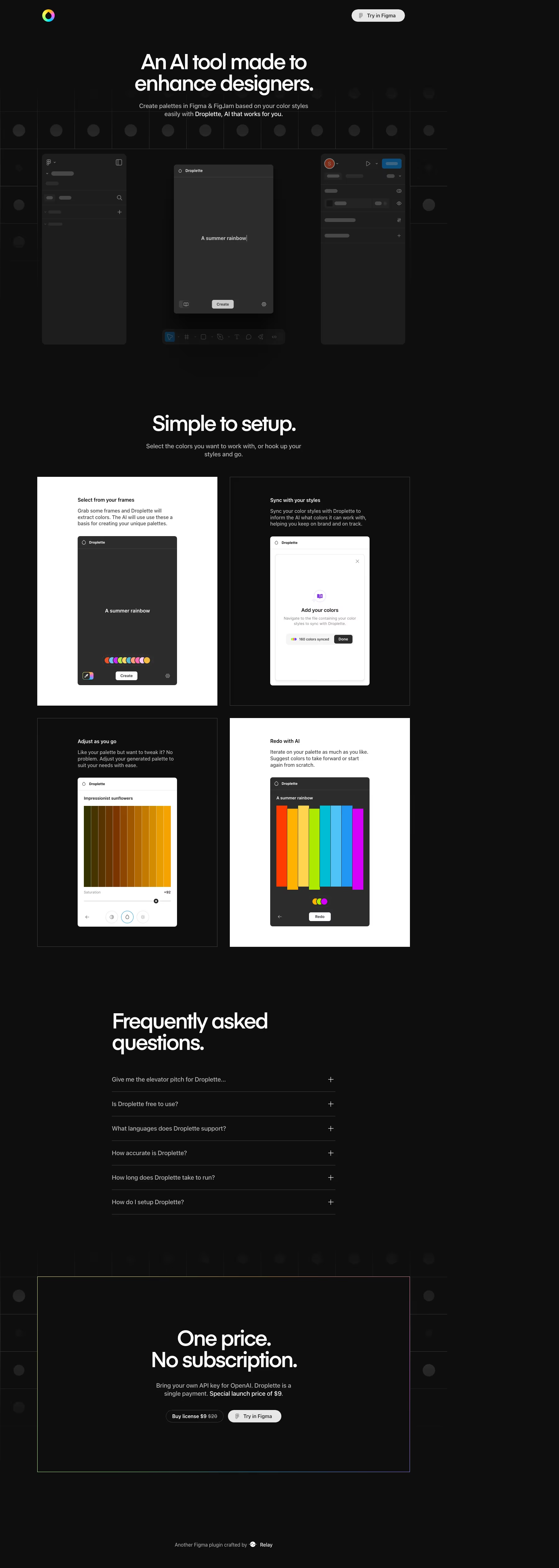
Droplette's homepage is a single dark column of 5051 pixels: a header with a logo and one button, a hero over a mock Figma workspace, a four-card setup grid, an FAQ list, a bordered pricing panel and a one-line credit. Colour is near-black, #0d0d0e, with grey text and borders in #2b2b2b and #474747, so the only saturation comes from the rainbow palettes inside the product screenshots and the gradient ring in the logo. Headings use the Ein typeface. For a design plugin, the hero sells by showing the host app's interface, with greyed placeholder bars, around the plugin window.
Above the fold
The header has a small ring logo at left and a pale pill button, "Try in Figma", at right, with no text links. The headline "An AI tool made to enhance designers." sits over a faint grid of dark circles. A two-line subhead names Figma and FigJam. Below, three panels imitate the Figma editor, with grey bars standing in for layers and a toolbar underneath, and the middle panel holds the Droplette window with its logo.
Setup steps in four cards
"Simple to setup." heads a two-by-two grid of cards, alternating white and black. "Select from your frames" shows the plugin with the prompt "A summer rainbow" and a "Create" button. "Sync with your styles" shows an "Add your colors" dialog with a counter of 160 colors synced and a Done button. "Adjust as you go" shows brown to amber swatches with a saturation slider, and "Redo with AI" shows eight rainbow bars.
FAQ, pricing panel and credit
"Frequently asked questions." opens six collapsed rows with plus signs, beginning with "Give me the elevator pitch for Droplette..." and including "Is Droplette free to use?". A wide panel with a thin multicolour outline follows: "One price. No subscription.", a line about bringing an OpenAI API key, and two buttons, a dark outlined "Buy license $9" with $20 struck through, and a white "Try in Figma". The page ends with "Another Figma plugin crafted by" and the Relay name.
What the page leaves out
The price appears once, inside the final panel, as "Special launch price of $9." in white text brighter than the grey sentence around it. No plan table, testimonials, customer logo row or footer link columns appear anywhere on the page, so the credit line is the only footer content and the header button is the only navigation element on the page.
On mobile
At 390 pixels the headline breaks into three lines and the three-panel mockup shrinks to the Droplette window alone, with the toolbar below it. The four setup cards stack in one column, keeping their white and black alternation. FAQ questions stay on one line, with the first truncated by an ellipsis. In the pricing panel, the two buttons sit on top of each other.
Worth borrowing
- Framing the plugin window inside greyed Figma chrome shows exactly where the tool lives.
- Alternating white and black cards let the same plugin UI appear in both themes.
- Putting the strikethrough $20 beside "Buy license $9" shows the discount right on the button.