Wonder
wonder.design/
Wonder is a design tool whose stated premise is that "what you design is the code you ship" — it outputs production-ready React and Tailwind (or plain CSS) directly, rather than handing a design file to developers, and connects to coding agents like Claude and Cursor via an MCP server. Pricing is published outright on the homepage: free, $16-$20/month Pro (which includes a monthly AI token allowance and 1,000+ shaders), and custom Enterprise with SSO/SAML. A small but specific privacy signal sits in its robots policy, which sets "ai-train=no." Beyond a changelog and Slack/Discord community links, the site shows no customer logos or case studies.
- Category
- Design & Creative
- Style
- DarkMinimal
- Stack
- Next.jsTailwind CSS
- Fonts
- Uncut Sans VariableInter
- Palette
- Meta title
- Wonder — What you see is what you ship
- Sections
- 7
- Updated
Wonder's landing page, section by section
Each section below is cropped straight from Wonder's live page — useful references for design & creative landing page design.
Heroes
More heroesPricing
More pricingCTAs
More ctasPricing & Plans
More pricing & plansCareers pages
More careers pagesBlog pages
More blog pagesWonder design review: how the homepage is built
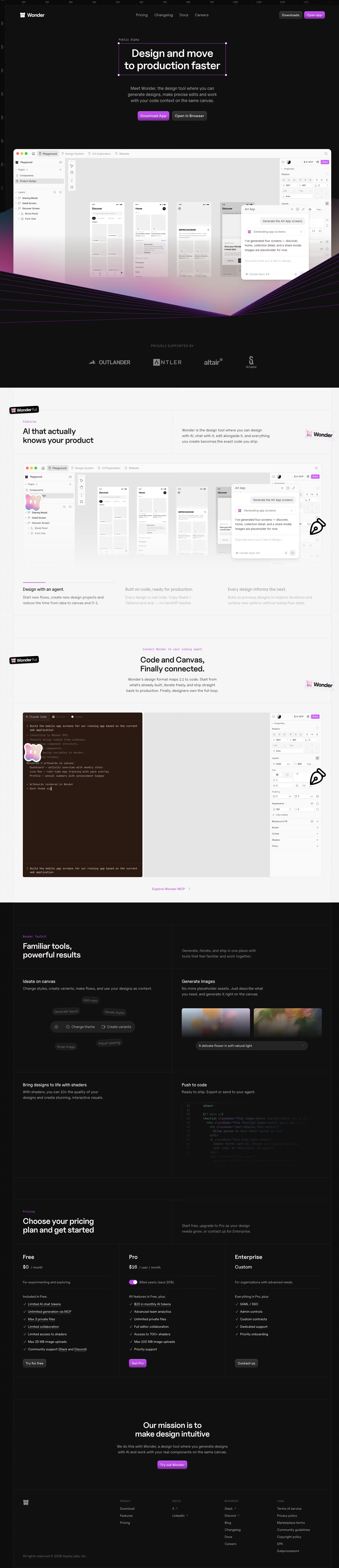
Wonder’s 6,670-pixel desktop page alternates a black, ruler-edged workspace with a pale gridded content field. A violet outline around the hero headline, gradients beneath the app capture, and purple buttons provide the recurring accent; metadata names Uncut Sans Variable and Inter. It moves from the editor and investor marks through AI and code-context claims, a dark toolkit grid, three pricing columns, and a mission/footer ending. The captures show a browser-like design interface rather than isolated marketing illustrations.
Hero workspace
A top row places the Wonder mark at left, “Pricing”, “Changelog”, “Docs”, and “Careers” in the middle, with “Downloads” and violet “Open app” controls at right. “Public Alpha” labels the outlined headline “Design and move to production faster”. The explanatory copy sits above “Download App” and “Open in Browser”. A very wide, white app window below contains pages, layers, phone artboards, properties, and a generation chat, while violet perspective lines converge beneath it.
AI and code connection
A pale section begins with “AI that actually knows your product” next to a tilted Wonder badge. Its large interface capture foregrounds a prompt panel over mobile screens. Three statements frame the offer: “Design with an agent.”, “Built on code, ready for production.”, and “Every design informs the next.” “Code and Canvas, Finally connected.” follows with a terminal-like agent panel beside an empty canvas and properties rail, ending with an “Explore Wonder MCP” link.
Toolkit grid and pricing
The page returns to black for “Familiar tools, powerful results”, arranged as a two-by-two bordered grid. “Ideate on canvas” shows small commands clustered around a control bar, while “Generate Images” pairs blurred image tiles with a prompt strip. “Bring designs to life with shaders” is mostly typographic; “Push to code” includes a dim code sample. The next grid introduces “Choose your pricing plan and get started” and puts Free, Pro, and Enterprise in equal columns, each with a separate action button.
Mission and footer
The closing black band centers “Our mission is to make design intuitive” over a short paragraph and a purple “Try out Wonder” control. The footer is compact but structured: Product links include Download, Features, and Pricing; Social contains X and LinkedIn; Resources lists Slack, Discord, Blog, Changelog, Docs, and Careers; Legal holds policies and terms. Thin grid lines continue through this area, retaining the drafting-board language even after the product screenshots have ended.
On mobile
At 390 pixels, the header reduces to the mark and “Open app”; the bordered headline breaks into four lines. Hero actions stack. The editor window is retained but cropped tightly, making its chat panel dominant before the violet-line field. Pale sections become one vertical column, and dark toolkit cells stack one by one. The pricing plans become three consecutive cards, preserving feature checklists and buttons. The footer rearranges its four link groups into two columns.
Worth borrowing
- A contrasting workspace can make a product screenshot feel integral to the page rather than supplementary.
- The same faint grid supports both light explanatory panels and dark feature panels.
- A three-tier price grid stays legible when each tier ends with its own action.