Basewell
basewell.com/
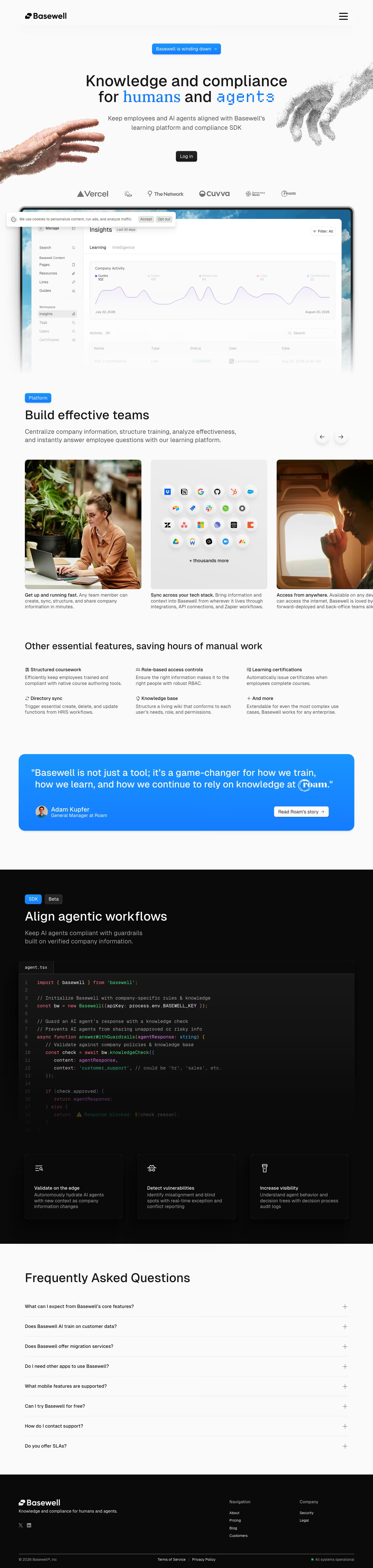
Basewell is a knowledge and compliance platform with two parts: a learning-management system for employee training and certifications, and a beta “Compliance SDK” that checks AI agent responses against a company's approved policies before they go out. The homepage shows a live-looking insights dashboard with specific counts (102 guides, 156 pages, 64 resources, 22 certifications) and includes a JavaScript code sample demonstrating how the SDK validates an agent's output. However, the page also displays a banner reading “Basewell is winding down” above this otherwise fully built-out product pitch, making the homepage itself the clearest signal about the company's current status.
- Category
- Productivity & Collaboration
- Style
- LightColorful
- Stack
- Next.jsTailwind CSS
- Fonts
- GeistSans
- Palette
- Meta title
- Basewell
- Sections
- 7
- Updated
Basewell's landing page, section by section
Each section below is cropped straight from Basewell's live page — useful references for productivity & collaboration landing page design.
Heroes
More heroesFeatures
More featuresFAQs
More faqsAbout Us
More about usPricing & Plans
More pricing & plansBlog pages
More blog pagesBasewell design review: how the homepage is built
Basewell's homepage runs 6055 pixels at desktop width, stacking a collapsed header, a centered hero with a dashboard mockup, a scrolling card row, a feature grid, a blue testimonial panel, a dark SDK block, an FAQ list and a black footer. The page is pale grey with bright blue: #157cff on the announcement button, the highlighted headline words and the quote panel, and #a9cdfa in the sky photo behind the dashboard. Headings use GeistSans. Two pixelated hands reaching toward each other flank the headline, an unusual hero illustration for a knowledge and compliance product.
Above the fold
The header holds only the Basewell wordmark at left and a hamburger icon at right, so the navigation is collapsed. Below it a blue button reads "Basewell is winding down". The headline "Knowledge and compliance for humans and agents" sets "humans" in blue serif and "agents" in blue pixel type. One black "Log in" button is the only call to action. Six grey logos follow, then a framed "Insights" dashboard with a line chart.
Platform cards and feature grid
Under a blue "Platform" tag, "Build effective teams" introduces a horizontal card row with left and right arrow buttons. Cards pair a photo or a grid of integration icons with a bold lead-in such as "Get up and running fast." and "Sync across your tech stack." Next, "Other essential features, saving hours of manual work" sets six items in two rows of three, one titled "Role-based access controls".
Testimonial and SDK block
A rounded blue panel quotes "Adam Kupfer", "General Manager at Roam", with a "Read Roam's story" button. The page then turns black for "Align agentic workflows", tagged "SDK" and "Beta". An "agent.tsx" code editor with numbered lines spans the full width, and its lower lines fade out. Below, three bordered cards, "Validate on the edge", "Detect vulnerabilities" and "Increase visibility", each have an outline icon.
Closing section and footer
No closing call to action appears. A "Frequently Asked Questions" heading leads eight collapsed rows, each with a plus sign, the sixth being "Can I try Basewell for free?". The black footer repeats the wordmark with a tagline and two social icons. A "Navigation" column lists four links, About, Pricing, Blog and Customers, and a "Company" column lists Security and Legal. A green "All systems operational" status closes the bottom bar.
On mobile
At 390 pixels the headline wraps to four lines under the announcement button, and the two hands shrink to the screen edges, one sitting behind "Log in". The six logos reflow into a grid of two columns. Platform cards stack in a single column instead of scrolling sideways, and the six features become one list. The code editor is cut off at the right edge, while the footer keeps its two link columns.
Worth borrowing
- A hamburger-only header with one "Log in" button keeps all attention on the headline.
- Mixing a serif word and a pixel-font word inside one headline separates the human and agent audiences.
- Switching to a black section with a code editor signals the developer SDK within a light marketing page.