Metomic
metomic.io/
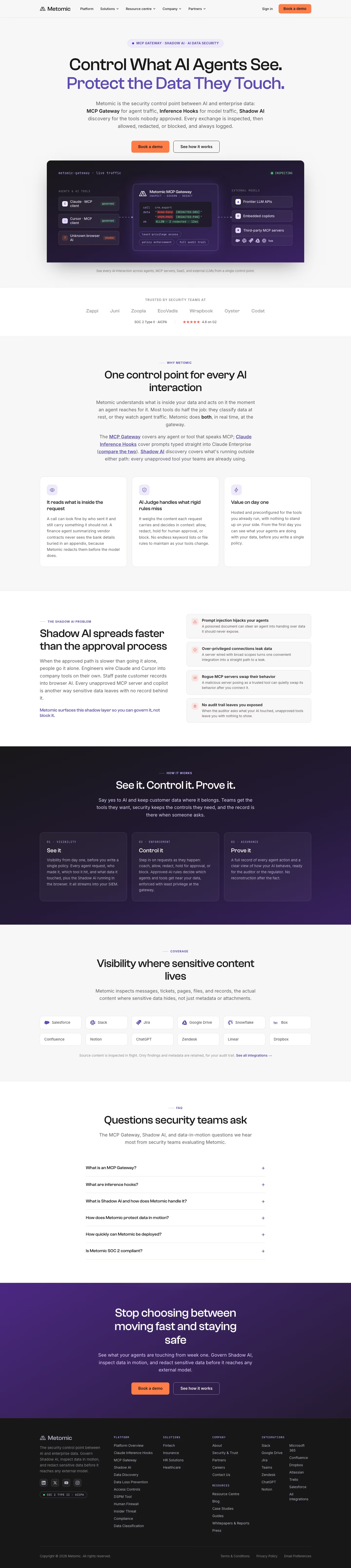
Metomic positions itself as a security checkpoint between AI systems and company data, combining an MCP Gateway that inspects requests between AI agents and tools, hooks that intercept direct LLM API calls, and shadow-AI discovery to surface tools employees are using without approval. The headline, "Control What AI Agents See. Protect the Data They Touch," is followed by a direct dig at competitors: "Most tools do half the job... Metomic does both, in real time, at the gateway." It also stresses zero setup burden, claiming visibility into agent data activity from day one "before you write a single policy," and cites a 4.8 G2 score plus SOC 2 Type II certification rather than posting pricing.
Metomic's landing page, section by section
Each section below is cropped straight from Metomic's live page — useful references for security landing page design.
Heroes
More heroesFeatures
More featuresCTAs
More ctasFAQs
More faqsAbout Us
More about usContact Us
More contact usBlog pages
More blog pagesMetomic design review: how the homepage is built
Metomic's homepage is a light grey page with a purple and orange system: #614ab3 carries headline emphasis and section labels, while #ff7e47 colours the primary buttons. Deep #241b36 and #362557 fill the product diagram and closing band. The desktop capture runs 6439 pixels tall and the mobile capture 9395 pixels. Blocks run top to bottom: a hero with a live traffic diagram, a trust strip, a value row, a Shadow AI section, a dark three-step process, an integration grid, an FAQ and a footer. Display type is Clash Grotesk, with Inter also listed. Distinctive is the diagram showing inspected, redacted and blocked traffic in one frame.
Above the fold
The hero sits on a pale grey field. A purple pill reads "MCP GATEWAY · SHADOW AI · AI DATA SECURITY". The headline "Control What AI Agents See." sits above "Protect the Data They Touch." in purple. An orange "Book a demo" button sits beside an outlined "See how it works" button. Below, a dark diagram labelled "metomic-gateway · live traffic" shows the gateway box with "ALLOW · 2 redacted · 12ms".
Trust strip, value row and Shadow AI problem
A trust strip lists seven brands beneath "TRUSTED BY SECURITY TEAMS AT", with "SOC 2 Type II · AICPA" and "4.8 on G2" beneath. The value section, headed "One control point for every AI interaction", has three cards: "It reads what is inside the request", "AI Judge handles what rigid rules miss" and "Value on day one". The section "Shadow AI spreads faster than the approval process" pairs body copy with four warning-icon cards.
Three-step process, integrations and FAQ
A dark band headed "See it. Control it. Prove it." sets three numbered cards: "See it", "Control it" and "Prove it". The coverage section, headed "Visibility where sensitive content lives", shows twelve integration tiles in two rows of six, including "Salesforce", "Slack", "Jira", "Google Drive", "Snowflake" and "Box". The FAQ, headed "Questions security teams ask", lists six collapsed questions, starting with "What is an MCP Gateway?".
Closing band and footer
The closing band, on purple, reads "Stop choosing between moving fast and staying safe" above orange "Book a demo" and outlined "See how it works" buttons. The dark footer has groups for Platform, Solutions, Company, Resources and Integrations, plus social icons and a SOC 2 badge. The copyright line reads "Copyright © 2026 Metomic. All rights reserved."
On mobile
At 390px the headline wraps to four lines and the buttons stack full width. The live traffic diagram becomes a vertical flow, with the three agent sources above the gateway box and the external model list below it. Value cards, risk cards and process cards collapse into single columns, and the integration tiles fall into two columns. FAQ questions stay as full-width rows, and footer groups stack one after another.
Worth borrowing
- Show inspected, redacted and blocked traffic in one diagram above the fold.
- Use a dark band for the process so method stands apart from proof sections.
- Tile integrations as recognisable tool names so visitors match their own stack.