Cloudflare
cloudflare.com/
Cloudflare's homepage pitches a serverless compute platform — Workers, R2 storage, D1 databases, Workers AI — deployable across "330+ data centers" with, in its words, "zero cold starts" and "infinite scalability," attributing the speed to running code in V8 isolates rather than containers. Instead of a features list, the page is organized into five labeled categories — Compute, Storage, AI, Media, Network — each linking straight to its own product page. It skips testimonials and logo walls entirely in favor of a three-step CLI-based getting-started block, treating documentation and a Discord link as its main trust signals rather than customer quotes or case studies.
- Category
- Security
- Style
- LightColorful
- Stack
- AstroTailwind CSS
- Fonts
- FT Kunst Grotesk
- Palette
- Meta title
- Cloudflare: Build for the agent era
- Sections
- 9
- Updated
Cloudflare's landing page, section by section
Each section below is cropped straight from Cloudflare's live page — useful references for security landing page design.
Heroes
More heroesFeatures
More featuresPricing
More pricingLogo clouds
More logo cloudsAbout Us
More about usContact Us
More contact usAffiliate pages
More affiliate pagesCareers pages
More careers pagesCloudflare design review: how the homepage is built
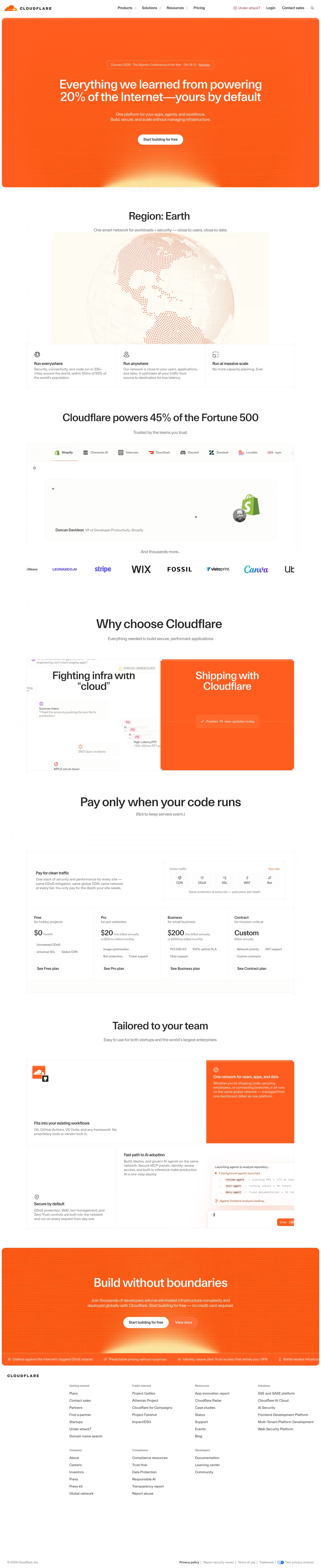
The page runs from a navigation bar to a full-width orange hero, a "Region: Earth" globe section, a customer logo and quote block, a split comparison, a plan table, a feature grid, a second orange banner and a footer link directory. The desktop capture is 7033 pixels tall. Colour is dominated by "#ff5e1f" orange on the two banners and one panel, with a "#feb597" tint in the globe, and white elsewhere. Headings use FT Kunst Grotesk. Distinctive for a security vendor, orange blocks bracket a mostly white page and pricing appears on the homepage.
Above the fold
A white bar holds the logo, centered "Products", "Solutions", "Resources" and "Pricing", plus "Login" and "Contact sales" at right. Below, a rounded orange panel carries a pill reading "Connect 2026 · The Agentic Conference of the Year · Oct 19-21 · Register", the centered headline "Everything we learned from powering 20% of the Internet—yours by default", a two-line subhead and one white pill button, "Start building for free".
Globe, scale claims and customer proof
A dotted globe sits under "Region: Earth", followed by three bordered cells, "Run everywhere", "Run anywhere" and "Run at massive scale". "Cloudflare powers 45% of the Fortune 500" introduces a tab row of nine logos beginning with "Shopify", above a quote block credited to "Duncan Davidson". "And thousands more…" leads into a row of larger logos such as Stripe and Wix.
Comparison, pricing and feature grid
Under "Why choose Cloudflare", a split panel sets "Fighting infra with \"cloud\"", a scatter of grey incident notes, against a solid orange "Shipping with Cloudflare" half. "Pay only when your code runs" opens a four-column price table: "Free" at "$0", "Pro" at "$20", "Business" at "$200" and "Contract" at "Custom", each with chips and a plan button. "Tailored to your team" adds a grid with one orange cell.
Closing section and footer
A full-width orange banner repeats the opening: "Build without boundaries", a line ending "no credit card required", a white "Start building for free" pill and a translucent "View docs" pill. A scrolling strip at its base lists short claims. The footer is a text directory in two rows of groups, from "Getting started" to "Developers", ending with "© 2026 Cloudflare, Inc." and legal links.
On mobile
At 390px the page is 9911 pixels tall. The navigation reduces to the logo, "Login", a search icon and a menu icon, and the headline wraps to four lines above a full-width button. The three feature cells stack. Plan cards stack in one column under a "Network & CDN" dropdown, and the grid cells stack. Closing buttons become full-width rows.
Worth borrowing
- Bracketing a white page with two full-width orange panels, the hero and the closing banner, gives the single accent colour a clear start and end.
- Showing a four-tier price table with "$0", "$20" and "$200" on the homepage lets visitors size up cost without leaving.
- Pairing a grey scatter of incident notes with a solid orange half dramatizes before and after in one split panel.