
Readymag
readymag.com/
Readymag is a Design & Creative product. See its readymag.com landing page design in full — desktop and mobile screenshots plus close-ups of the heroes, footers, pricing, about us, affiliate pages, and 1 more. It's built with CSS-in-JS. Its type is set in custom_157067, anchored by a #e63139 palette. Study how Readymag structures its messaging, layout and visual hierarchy, then explore more of the best Design & Creative website designs.
- Category
- Design & Creative
- Style
- DarkColorful
- Stack
- CSS-in-JS
- Fonts
- custom_157067Rm Graphik
- Palette
- Meta title
- Readymag – the design tool for outstanding websites
- Sections
- 6
- Updated
Readymag's landing page, section by section
Each section below is cropped straight from Readymag's live page — useful references for design & creative landing page design.
Heroes
More heroesPricing
More pricingAbout Us
More about usAffiliate pages
More affiliate pagesCareers pages
More careers pagesReadymag design review: how the homepage is built
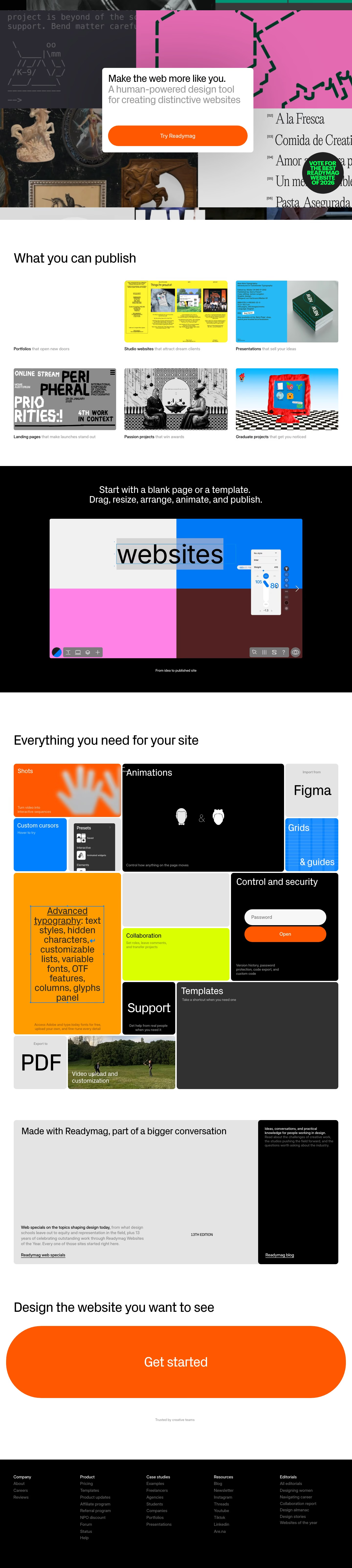
Top to bottom: a full-bleed collage of other people's websites with a white card on top, a six-thumbnail gallery, a black editor demo, a tiled grid of twelve capability blocks, an editorial promo, a giant closing button and a black footer. It measures 6420 pixels on desktop. The page is mostly white and black, with orange near #fe5701 reserved for buttons and a few tiles, while red, green and blue enter only through the showcased work. Rm Graphik sets the text. Its distinctive move is that customers' sites, not product screenshots, form the hero.
Above the fold
No header bar appears in the capture. A collage of site tiles fills the screen: a green panel, a black armchair photo, a red poster headed "//How to make wheat pa", a blue sky with a clay house, and a black colour picker. A round black badge reads "VOTE FOR THE BEST READYMAG WEBSITE OF 2026". Centred over it, a white card gives "Make the web more like you." in black, the grey subhead, and one wide orange "Try Readymag" pill.
Gallery and editor demo
"What you can publish" lays out six thumbnails in two rows of three, each captioned in bold plus grey, from "Studio websites" to "Graduate projects". A black band follows with "Start with a blank page or a template. Drag, resize, arrange, animate, and publish." above a split-colour editor frame, white, blue, pink and maroon, with the word "websites" selected and a toolbar below. A small caption says "From idea to published site".
Capability tile grid and editorial promo
"Everything you need for your site" opens a mosaic of twelve differently sized tiles, such as orange "Shots", a wide black "Animations", a lime "Collaboration" and a tall orange "Advanced typography". The black "Control and security" tile holds a password field and an orange "Open" button, while "Video upload and customization" uses a photo. A grey panel then says "Made with Readymag, part of a bigger conversation", with a black blog card beside it.
Closing button and footer
"Design the website you want to see" sits above an orange "Get started" pill stretched almost edge to edge, the largest control on the page, above "Trusted by creative teams". The black footer arranges five columns of grey links under white headings: "Company", "Product", "Case studies", "Resources" and "Editorials". The "Product" column is longest, running from "Pricing" to "Affiliate program" and "Help".
On mobile
At 390px the page is 6527 pixels. The collage shrinks to a short band with the white card pushed beneath it. The six gallery thumbnails sit two across, and the mosaic tiles run as full-width or two-across rows. The closing button narrows to a rounded pill, and a row of customer logos appears under "Trusted by creative teams". The footer has two columns.
Worth borrowing
- Using real customer sites as an edge-to-edge hero backdrop proves the range of output before any copy is read.
- Varying tile heights and colours, from "Shots" to "Support", turns a feature list into a mosaic.
- Stretching the "Get started" pill across the page turns the closing call to action into the main visual.





