
Runway
runway.com/
Runway builds AI models it calls "Real-World Intelligence," split across three products: Creative tools for video, image, and audio generation, a developer API, and a Robotics arm doing policy inference through simulation. The homepage claims usage by "60m+ creatives" and highlights a real-time world-simulation model running at "720p at 24 fps." Rather than a splashy generated-video hero, the top of the page is occupied by a banner for the company's own AI Summit event, and the tone throughout favors technical specificity — model names like Gen-4.5, references to partners like DeepMind and Physical Intelligence — over the marketing-hype framing common to consumer AI video tools.
- Category
- Design & Creative
- Style
- LightColorful
- Stack
- Next.jsTailwind CSS
- Fonts
- abcNormal
- Palette
- Meta title
- Runway | Building Real-World Intelligence
- Sections
- 9
- Updated
Runway's landing page, section by section
Each section below is cropped straight from Runway's live page — useful references for design & creative landing page design.
Heroes
More heroesFeatures
More featuresAbout Us
More about usContact Us
More contact usPricing & Plans
More pricing & plansAffiliate pages
More affiliate pagesCareers pages
More careers pagesBlog pages
More blog pagesRunway design review: how the homepage is built
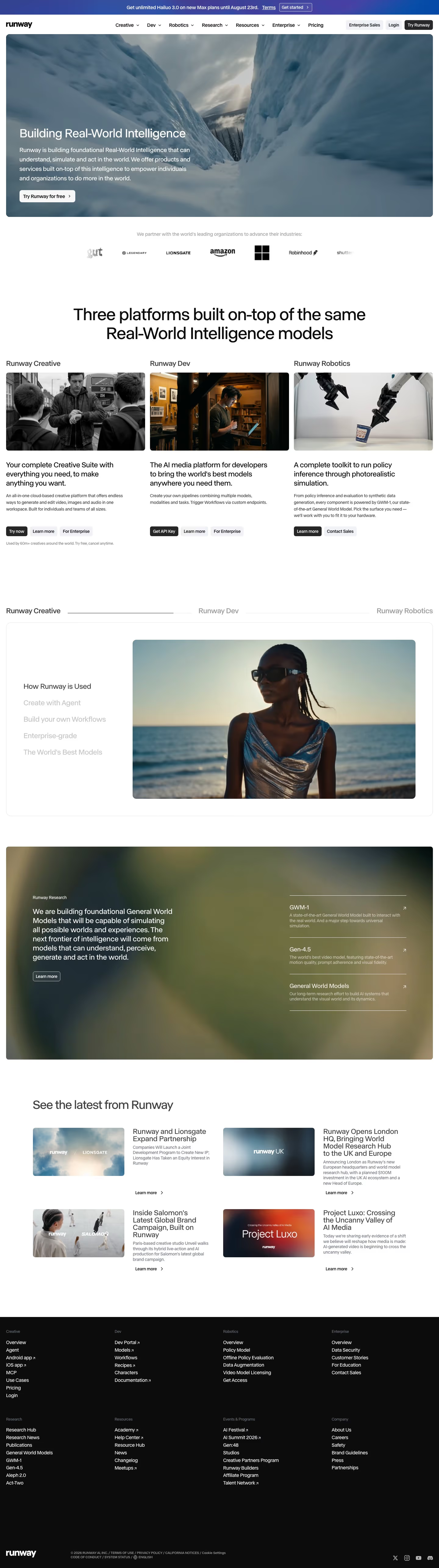
Runway's homepage runs top to bottom as a gradient announcement bar, navigation, a full-width video hero, a partner logo strip, a three-column platform split, a tabbed feature panel, a dark research block, four news cards and a black footer. The page measures 5147 pixels at 1440px wide. White and near-black carry the layout, the detected blues #364599 and #074aa7 show in the banner gradient, and photography supplies the rest. Headings use the abcNormal display face. Distinctive for an AI creative company is the absence of any product interface on the first screens.
Above the fold
A purple-to-blue banner reads "Get unlimited Hailuo 3.0 on new Max plans until August 23rd." Beneath it, navigation lists seven items, from "Creative" to "Pricing", plus "Enterprise Sales", "Login" and a dark "Try Runway" button. The hero is a rounded video panel of a robotic arm tossing fried rice in a wok. Over it, left-aligned, sit "Building Real-World Intelligence", a four-line paragraph and one white "Try Runway for free" button.
Logo strip and three platforms
A grey line, "We partner with the world's leading organizations to advance their industries:", introduces seven logos, including Lionsgate, Amazon and Robinhood, with the ends cropped like a marquee. A centred heading, "Three platforms built on-top of the same Real-World Intelligence models", leads into three equal columns: "Runway Creative", "Runway Dev" and "Runway Robotics". Each has a photo, a bold sentence, a short description and two or three buttons, the first filled dark.
Tabbed use cases, research and news
A tab strip repeats the three platform names. Inside a bordered card, a vertical list from "How Runway is Used" to "The World's Best Models" fades from dark to grey beside a large portrait photo. A blurred olive panel follows, with a paragraph and three ruled links: "GWM-1", "Gen-4.5" and "General World Models". Then "See the latest from Runway" shows four image-and-text news cards in two rows.
Closing section and footer
No closing call-to-action band appears. After the news cards, a black footer holds eight link columns in two rows, from "Creative" and "Dev" to "Events & Programs" and "Company". Small grey headings sit over white links, several marked with diagonal arrows for external destinations. The bottom strip has a white wordmark, a legal line starting "© 2026 RUNWAY AI, INC.", a language selector and four social icons.
On mobile
At 390px the navigation collapses to a hamburger beside "Try Runway", and the banner wraps to two lines. The hero text fills most of the panel. The three platform columns stack in the same order, and the tab strip wraps onto two lines. News cards become full-width single stacks, and the footer lists every link in one long column with larger type.
Worth borrowing
- Opening with a headline over looping footage and one white button sets the tone before any product detail appears.
- Giving three offers identical photo, sentence and button structure in equal columns makes them easy to compare.
- Repeating the three platform names as a tab strip lower down reinforces the structure without new vocabulary.





