Tailscale
tailscale.com/
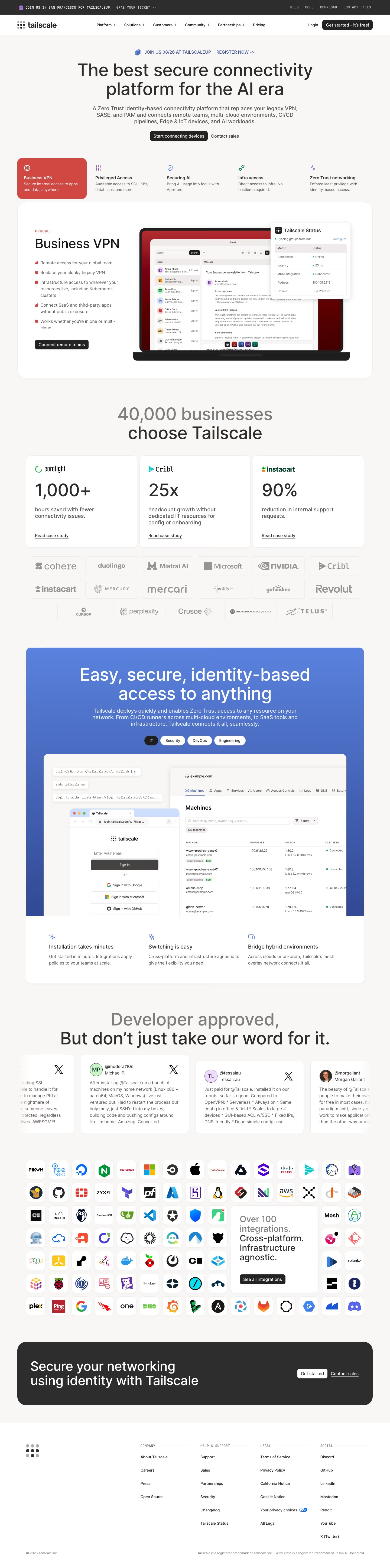
Tailscale is a zero-trust, identity-based networking product that replaces traditional VPN, SASE and privileged-access setups for connecting remote teams, multi-cloud infrastructure, CI/CD pipelines and IoT devices. Rather than generic testimonials, the homepage runs named case-study metrics: Instacart cites a 90% drop in internal support requests, Cribl says it scaled headcount 25x without dedicated IT, and Corelight reports 1,000+ hours saved on connectivity issues. It claims 40,000 businesses as customers and displays logos including Microsoft, NVIDIA and Duolingo. The current hero framing, "the best secure connectivity platform for the AI era," plus a stated emphasis on minutes-long install time, positions ease of setup as the differentiator over enterprise VPN competitors.
- Category
- Engineering & Infrastructure
- Style
- LightColorful
- Stack
- Next.jsTailwind CSS
- Fonts
- intermdio
- Palette
- Meta title
- Tailscale | Secure Connectivity for AI, IoT & Multi-Cloud
- Sections
- 9
- Updated
Tailscale's landing page, section by section
Each section below is cropped straight from Tailscale's live page — useful references for engineering & infrastructure landing page design.
Heroes
More heroesFeatures
More featuresPricing
More pricingAbout Us
More about usContact Us
More contact usAffiliate pages
More affiliate pagesCareers pages
More careers pagesBlog pages
More blog pagesTailscale design review: what the page does, section by section
The home page runs 5,789 px on desktop. Order: dark announcement bar, nav, centred hero with five product tabs, a "Business VPN" panel, a "40,000 businesses choose Tailscale" block with three stat cards and a logo grid, a blue gradient band, tweets, an integrations icon grid, a dark closing banner and the footer. Colour is a warm off-white page with detected red #d04841 on the active tab, deeper reds like #570101 in the laptop mockup, and near-black buttons. The display face is Inter. Distinctive for infrastructure: screenshots show a real install command and machine table.
HeroesView crop
The hero centres "The best secure connectivity platform for the AI era" over two actions, "Start connecting devices" and "Contact sales". A five-tab row follows, where "Business VPN" is filled red and "Privileged Access", "Securing AI", "Infra access" and "Zero Trust networking" carry coloured icons.
FeaturesView crop
A blue gradient card opens with "Easy, secure, identity-based access to anything" and four pill tabs, "IT" selected in black. Beneath, one screenshot combines shell commands, a sign-in window with Google, Microsoft and GitHub buttons, and a "Machines" table of 136 machines.
FootersView crop
The footer places a nine-dot logo at left and four columns with monospaced labels: "COMPANY" with four links, "HELP & SUPPORT" with six, "LEGAL" with six including a "Your privacy choices" toggle icon, and "SOCIAL" with seven. A hairline rule runs beside the copyright line.
PricingView crop
The crop shows one plan card, "Personal", with a half-light, half-dark green circle mark. It lists "$0", a small monospaced "FREE FOREVER" label and a black "Get started" button. A second crop, "PLAN HIGHLIGHTS" in green monospace, lists seven bullets such as "Up to 6 users".
About UsView crop
The about page opens with "We're building the new internet" at left and three paragraphs at right. A navy band, "Our guiding principles", holds three cards, including "Small is beautiful". A narrow "Our commitments" column and a teal "Our team" photo collage follow.
Contact UsView crop
A pale panel splits in two. At left, "Contact our sales team" sits over link groups "Looking for technical support?" and "Partner with us?". At right, a seven-field form runs from "Name" to "Message" and ends in a black "Submit".
Affiliate pagesView crop
The partnerships page starts with the headline "Unlock new opportunities with Tailscale Partnerships" and two buttons, "Become a Tailscale Partner" and "Register a deal", above a scattered grid of app icons around a black Tailscale tile. "Partner benefits" follows as four cards.
Careers pagesView crop
The careers page leads with "Careers at Tailscale", a "See open positions" button and team photos in grey circles. Six perk cards follow. The long "Open positions" list is grouped by department pills, with counts such as Engineering 22 and "Full-time" on every row.
Blog pagesView crop
The blog page shows a featured grid of one large card and four small ones. Filter chips read "All Posts", "Insights", "Company", "Product" and "Community", beside a search box and "395 results". Posts form a two-column card grid with tinted tags, dates and authors.
On mobile
At 390px the page runs 7,424 px in one column. The product tabs wrap into stacked pills, the laptop image sits above the bullets, stat cards stack, and the logo grid drops to three columns. Footer columns list vertically. Text stays readable, but dashboard screenshots shrink to illegible detail.
Worth borrowing
- Place icon tabs above the product panel, with the active tab filled solid red as "Business VPN" is.
- Show real artefacts, such as the install command beside the "Machines" table, so the image proves setup is short.
- Pair big-number cards ("1,000+", "25x", "90%") with "Read case study" links before the logo grid.