Basecamp
basecamp.com/
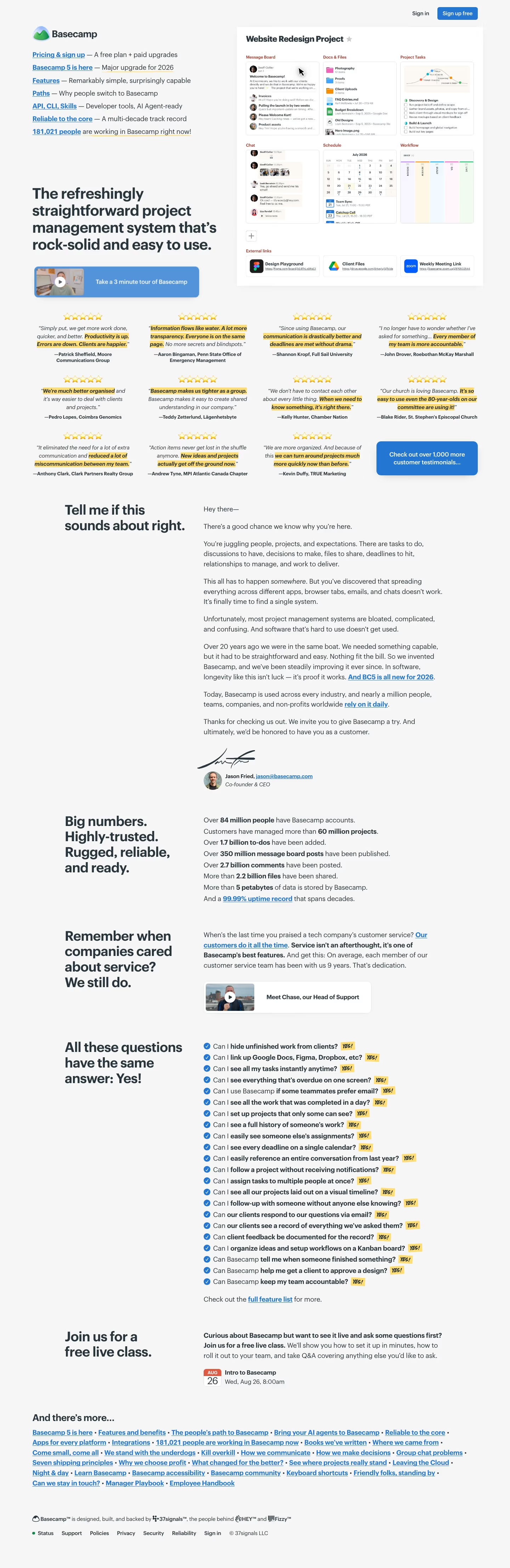
Basecamp bundles team messaging, to-dos, file sharing, docs, and scheduling into one workspace, pitched on its homepage headline as “project management without all the nonsense.” Rather than a stat-tile wall up top, the page includes a personal letter from co-founder Jason Fried addressing common frustrations with other tools before presenting the product itself. It backs its 20-year track record with specific scale numbers — 84 million accounts, 2.7 billion comments, 5 petabytes of data, 99.99% uptime, adoption across 233 countries and 52,000 cities — and testimonials drawn from unusual customer types for a project-management tool, including churches and universities. It also emphasizes owning its own infrastructure and offering 24/7 human support rather than automated support.
- Category
- Productivity & Collaboration
- Style
- LightMinimal
- Fonts
- Graphik
- Palette
- Meta title
- Basecamp
- Sections
- 5
- Updated
Basecamp's landing page, section by section
Each section below is cropped straight from Basecamp's live page — useful references for productivity & collaboration landing page design.
Basecamp design review: what the page does, section by section
The Basecamp home page runs 4427px at 1440px wide and stacks a text-only link menu, a product mockup, a wall of twelve highlighted-quote testimonials, a founder letter, a statistics block, a support pitch, a "Yes!" checklist, a class sign-up and a link directory. Colour is restrained: an off-white page, blue links and buttons, yellow highlighter marks, and detected tints "#d7e4f3", "#88b4e4" and "#f6e9ca". The display face is Graphik. Distinctive for a project tool: no feature grid or pricing cards on the home page, only prose, link lists and a signed letter.
HeroesView crop
The opening screen splits in two. On the left, the logo sits above seven underlined blue links such as "Pricing & sign up" and "Features", each with a grey descriptor, then a large headline beginning "The refreshingly straightforward project management system". On the right, a white card titled "Website Redesign Project" shows six miniature panels, from "Message Board" to "Workflow", and three "External links".
FeaturesView crop
Features arrive as stacked text blocks, each with a bold headline in a narrow left column and copy on the right. "Big numbers." lists eight statistics in plain lines, and "All these questions have the same answer: Yes!" runs 21 checked questions, each ending in a yellow "YES!" sticker. A video card and a dated class tile close the run.
FootersView crop
The footer opens with "And there's more...", a paragraph of about 30 underlined blue links separated by bullets, wrapping across six lines, from "Basecamp 5 is here" to "Employee Handbook". Below, a small line credits 37signals, then seven plain links from "Status" to "Sign in" sit beside a green status dot and a copyright notice.
Pricing & PlansView crop
The pricing page centres the headline "No per-user fees, everyone's included." One card pairs a radio list of five packages, from "Free" to "Unlimited Edition", with a detail pane; "Studio, $59/mo" is selected, with a "Start a 30-day free trial" button and ticked and crossed lines. Below come a quote, two checklists and an eight-question accordion.
About UsView crop
The about page is one narrow column on a pale blue ground. A centred headline, "Where we came from.", leads into a first-person letter from the co-founder in short grey paragraphs. No images interrupt the text. It ends with a signature graphic, a small avatar with name and title, then the same link directory and footer.
On mobile
At 390px the capture runs 5708px. The link menu is gone, leaving the logo, "Sign in" and "Sign up free" above the headline. The tour button spans the width, the mockup shrinks, and twelve testimonials stack in one column, ending with "Check out over 1,000 more customer testimonials...". Headlines sit above their copy, and the "YES!" list stays legible.
Worth borrowing
- List described links in place of a nav bar, as "Pricing & sign up" and "Features" do, so each entry explains itself.
- Let a signed founder letter, with handwritten signature and avatar, persuade instead of feature cards.
- Turn objections into a checklist of questions, each answered with a yellow "YES!" sticker, to make dozens of capabilities scannable.