Cline
cline.bot/
Cline is an open-source AI coding agent that runs inside VS Code, a terminal, a desktop app, or an embedded SDK, executing multi-file edits and shell commands rather than just suggesting code. The hero line, "Ship securely w/ Claude in VS Code," is followed immediately by a corporate trust wall — Samsung, Oracle, Amazon, Microsoft, Visa, IBM, eBay — unusual for an open-source tool. It states "11M+ developers" and "69.0k stars" as its two headline numbers, and structures its capability pitch around a stated workflow, "Plan, then Act," with a tabbed demo cycling through "Understand," "Refactor," "Automate." Model choice is treated as a selling point: eight provider logos appear under "Every model, your choice," emphasizing no vendor lock-in.
- Category
- Engineering & Infrastructure
- Style
- LightMinimal
- Stack
- Next.jsTailwind CSS
- Fonts
- DM SansInter
- Palette
- Meta title
- Cline - AI Coding, Open Source and Uncompromised
- Sections
- 8
- Updated
Cline's landing page, section by section
Each section below is cropped straight from Cline's live page — useful references for engineering & infrastructure landing page design.
Heroes
More heroesFeatures
More featuresCTAs
More ctasLogo clouds
More logo cloudsPricing & Plans
More pricing & plansCareers pages
More careers pagesBlog pages
More blog pagesCline design review: how the homepage is built
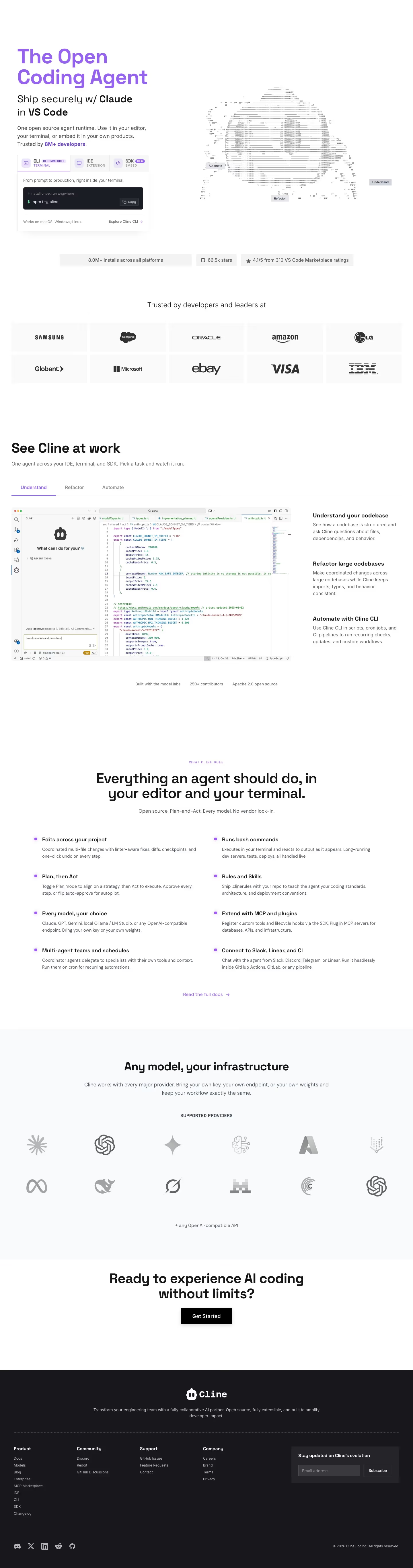
The homepage runs from a white hero with an ASCII-art figure through a stats strip, a logo wall, a feature walkthrough, an eight-item feature list, a provider grid and a closing call to action, across 5,470 pixels of desktop height. The colour approach is light and minimal: #fefefe sections, purple #9663f1 for the headline and accents, and #191c23 for the dark footer. The detected display typefaces are DM Sans and Inter, and no body face was detected. The page brands itself as Cline, matching meta.name, and its hero offers three tabs, CLI, IDE and SDK,.
Above the fold
The hero headline "The Open Coding Agent" sits in purple above "Ship securely w/ GPT in the CLI", Three tabs, "CLI" marked "RECOMMENDED", "IDE" and "SDK" marked "NEW", sit in a card showing "npm i -g cline" with a "Copy" button and the link "Explore Cline CLI". On the right, an ASCII-art head carries the labels "Automate", "Refactor" and "Understand".
Stats strip and logo wall
A strip reads "8.0M+ installs across all platforms", "66.5k stars" and "4.1/5 from 310 VS Code Marketplace ratings". Beneath it, "Trusted by developers and leaders at" heads a ten-logo wall in two rows of five, with "SAMSUNG", "salesforce", "ORACLE", "amazon", "LG", "Globant", "Microsoft", "ebay", "VISA" and "IBM".
Walkthrough and feature list
The "See Cline at work" section offers tabs "Understand", "Refactor" and "Automate", beside a window reading "What can I do for you?".Its three captions read "Understand your codebase", "Refactor large codebases" and "Automate with Cline CLI". "WHAT CLINE DOES" then heads "Everything an agent should do, in your editor and your terminal.", with eight features in two columns, such as "Runs bash commands".
Provider grid and closing call to action
"Any model, your infrastructure" introduces "SUPPORTED PROVIDERS" as a grid of twelve grey marks in two rows of six, followed by "+ any OpenAI-compatible API". The band below, "Ready to experience AI coding without limits?", sets a black "Get Started" button.
Closing section and footer
The footer opens with the Cline wordmark and the tagline "Transform your engineering team with a fully collaborative AI partner.", then four link columns, "Product", "Community", "Support" and "Company". Product links run from "Docs" to "Changelog", and a newsletter box reads "Stay updated on Cline's evolution" with an "Email address" field and a "Subscribe" button. The base line reads "© 2026 Cline Bot Inc. All rights reserved." beside social icons.
On mobile
At 390px the headline wraps onto three lines, and the install card sits below the paragraph with no separate hero button. The logo wall shrinks to two columns of six marks, and the three captions in "See Cline at work" stack vertically. The provider grid collapses to two columns, and the footer link groups pair into two columns.
Worth borrowing
- The hero pairs a purple headline with a three-tab install card, so the install command sits above the fold.
- Feature items use a small purple square bullet, a bold title and a two-line description in a two-column grid.
- The provider grid shows unlabelled grey marks, leaving the line of text beneath it to carry the open-ended claim.