
Stagereview
stagereview.app/
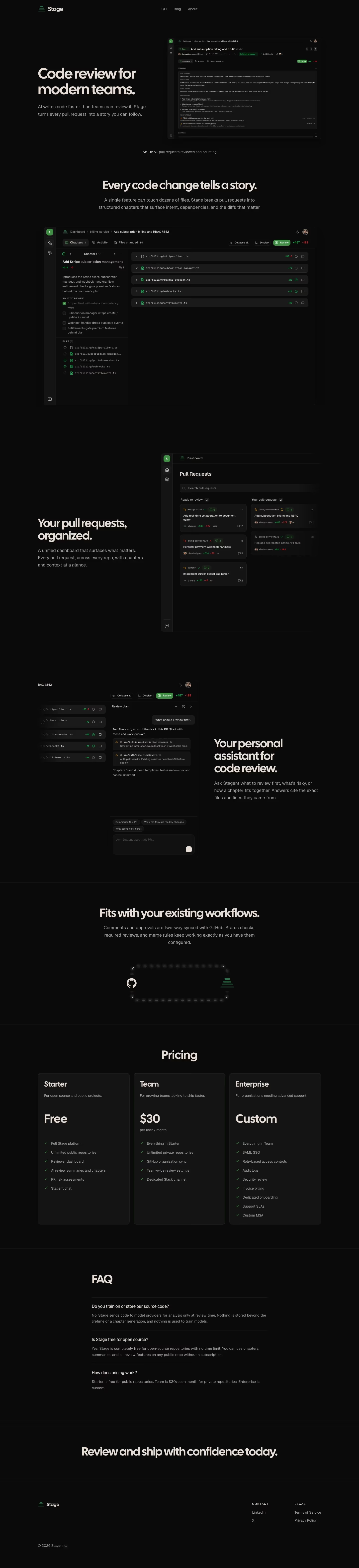
Stage is a code review platform that breaks pull requests into structured "chapters" surfacing intent and dependencies, paired with an AI assistant called Stagent that answers reviewer questions by citing exact file locations. Its headline states plainly, "AI writes code faster than teams can review it. Stage turns every pull request into a story you can follow," and the page backs this with a running counter of 56,966 pull requests reviewed to date and a worked example PR showing +487/-129 changes across 14 files split into 4 chapters. Pricing is listed directly on the homepage in three tiers, including a free plan covering unlimited public repositories, rather than gated behind a separate page.
- Category
- Engineering & Infrastructure
- Style
- DarkMinimal
- Stack
- Tailwind CSS
- Fonts
- Cal SansGeist
- Palette
- Meta title
- Stage | A better code review platform
- Sections
- 6
- Updated
Stagereview's landing page, section by section
Each section below is cropped straight from Stagereview's live page — useful references for engineering & infrastructure landing page design.
Heroes
More heroesFeatures
More featuresFAQs
More faqsAbout Us
More about usBlog pages
More blog pagesStagereview design review: how the homepage is built
The homepage is a near-black page about 6,286 pixels tall at 1440px wide, with no photography anywhere. The background is #0a0a0a, with muted grey text near #b3aca7 under large display headings. Display type is Cal Sans and Geist. The only green is in the logo mark, the checkmarks and the status pills of the product screenshots. The brand on screen is Stage, while meta.name is Stagereview, so the logo and footer name differ from the listing. The hero shows a pull request screenshot instead of a diagram. Below the hero, the layout is a single column of centred sections.
Above the fold
The hero is a two-column block on black. The left column carries the headline "Code review for modern teams." in large grey-white display type, with the subhead "AI writes code faster than teams can review it. Stage turns every pull request into a story you can follow." beneath. The right column holds a pull request screenshot. Navigation reads "CLI", "Blog" and "About", and a line below reads "56,966+ pull requests reviewed and counting".
Chapter explainer and dashboard section
The section headed "Every code change tells a story." sits centred above a wide screenshot. It shows a chapter sidebar headed "WHAT TO REVIEW" with checkboxes, a "FILES (5)" list, and five file rows with paths such as src/billing/stripe-client.ts. Next, "Your pull requests, organized." sits left of a dashboard with "Ready to review" and "Your pull requests" columns, each holding cards with repository names and counts.
Assistant panel, integrations and pricing tiers
The section headed "Your personal assistant for code review." pairs a chat panel with the question "What should I review first?" and a reply naming two risky files. Quick prompts read "Summarize this PR", "Walk me through the key changes" and "What looks risky here?". The section "Fits with your existing workflows." shows a dashed loop between GitHub and the Stage logo. Then "Pricing" shows three text columns: "Starter" at "Free", "Team" at "$30" per user / month, and "Enterprise" at "Custom".
FAQ, closing line and footer
The FAQ, headed "FAQ", has three questions: "Do you train on or store our source code?", "Is Stage free for open source?" and "How does pricing work?" The closing line "Review and ship with confidence today." sits centred on black. The footer shows the Stage logo, columns headed "CONTACT" and "LEGAL" with two links each, and a copyright line for 2026.
On mobile
At 390px the headline sits on two lines above the subhead and the product screenshot. The screenshot is cropped at the right edge, so the prologue text runs off-screen. Each feature section becomes a single column, and the chat screenshot is cut off at its left edge. The pricing cards stack vertically, which makes the Enterprise list the longest block on the page. The footer collapses to two columns.
Worth borrowing
- The hero pairs a one-line claim with a full-size pull request screenshot rather than an abstract illustration.
- Each feature section repeats a centred heading, grey copy and a framed product view.
- Pricing uses three plain text columns with check marks and no highlighted plan.





