
Bolt
bolt.new/
Bolt lets people build websites, apps, and prototypes by chatting with an AI rather than writing code, generating a workable app alongside built-in backend, auth, and hosting. The hero leans on two specific figures — 98% fewer errors from automatic testing and refactoring, and the ability to handle projects "1,000 times larger than before" — rather than generic speed claims. It splits its pitch by persona (product managers, entrepreneurs, agencies, students), and its logo row leans further into enterprise territory than most no-code tools, naming Google, Microsoft, Salesforce, and AWS as users.
- Category
- Engineering & Infrastructure
- Style
- DarkColorful
- Stack
- Tailwind CSS
- Fonts
- Inter DisplayInterSilkscreen
- Palette
- Meta title
- Bolt AI builder: Websites, apps & prototypes
- Sections
- 6
- Updated
Bolt's landing page, section by section
Each section below is cropped straight from Bolt's live page — useful references for engineering & infrastructure landing page design.
Heroes
More heroesFeatures
More featuresPricing & Plans
More pricing & plansCareers pages
More careers pagesBlog pages
More blog pagesBolt design review: how the homepage is built
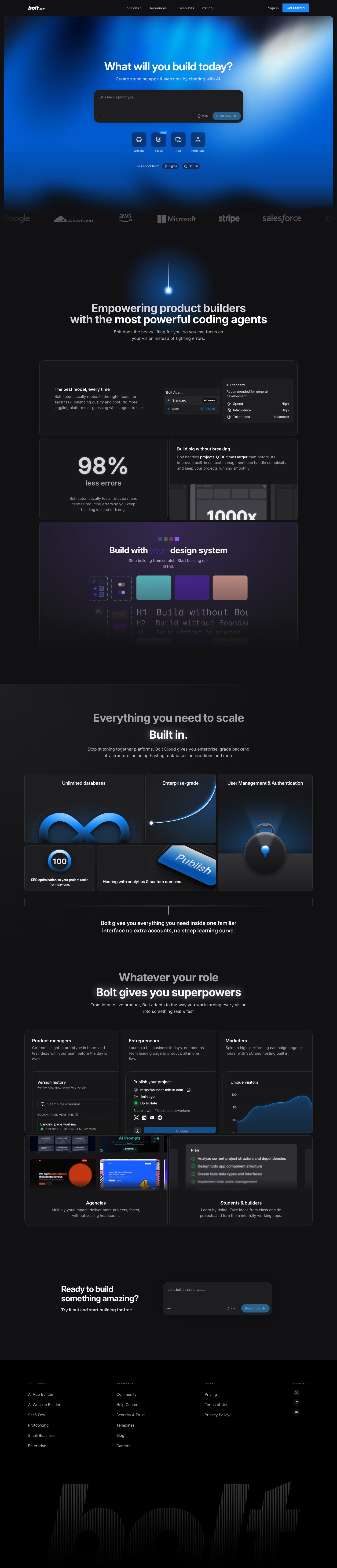
The homepage is about 6,708 pixels tall on desktop and runs from a blue gradient hero with a prompt box through a logo strip, bento-style feature cards, a role-based card grid and a closing prompt to a black footer. A near-black page carries the detected blues #2ba6ff, #0259c8 and #054499, with a violet card as the one exception to the blue. Typefaces are Inter Display and Inter, with Silkscreen listed for body text. Distinctive for the category, the hero offers four project-type buttons and Figma and GitHub imports under the prompt field.
Above the fold
A dark navigation bar holds the "bolt.new" logo, "Solutions", "Resources", "Templates", "Pricing", "Sign in" and a blue "Get Started" button. Inside a rounded blue gradient frame, "What will you build today?" sits above a dark input reading "Let's build a prototype..." with "Plan" and "Build now" controls. Four icon tiles ("Website", "Slides" with a "New" tag, "App", "Prototype") and "or import from" chips for "Figma" and "GitHub" follow.
Logos and feature cards
A strip of grey logos (Google, Cloudflare, aws, Microsoft, stripe, salesforce) is cropped at both edges. "Empowering product builders with the most powerful coding agents" is split into grey and white halves. Bordered cards follow: a full-width "The best model, every time" card with a model picker, then "98%" "less errors", "Build big without breaking" with a "1000x" graphic, and a purple "Build with your design system" card.
Built-in infrastructure and roles
"Everything you need to scale Built in." repeats the grey-then-white headline split above five tiles of different widths: "Unlimited databases" with an infinity loop, "Enterprise-grade", "User Management & Authentication" with a padlock, a "100" SEO dial and a "Publish" button. "Whatever your role Bolt gives you superpowers" then opens five cards, "Product managers", "Entrepreneurs", "Marketers", "Agencies" and "Students & builders", each with an interface fragment.
Closing section and footer
"Ready to build something amazing?" and "Try it out and start building for free" sit left of a repeat of the hero prompt box. A black footer follows with four columns: "SOLUTIONS" with six links, "RESOURCES" with six, "MORE" with three, and "CONNECT" with three social icons. Beneath them, a large wordmark "bolt" is drawn in vertical stripes that fade toward the bottom edge.
On mobile
At 390px the headline wraps to two lines and the four project tiles stay in one row, while the "GitHub" import chip disappears and only "Figma" remains. The logo strip shows just two names. Feature, infrastructure and role cards all stack in one column. The closing prompt moves below its heading over a blue gradient, and the footer folds to two columns.
Worth borrowing
- Placing project-type tiles and import chips directly beneath the hero prompt turns the first screen into a choice of starting points.
- Splitting a headline into a grey first line and a white second line directs attention to the claim without extra size or colour.
- Giving infrastructure features tiles of different widths, each with one large object, makes a list of five items read as a varied grid.





