Cosmos
cosmos.so/
Cosmos is a visual search and curation tool for creative professionals, letting users search saved images by color (down to a specific hex code), by visual similarity, or by keyword, under the line 'Your space for inspiration.' Its more distinctive claim is that it actively researches each image to surface the original artist, source, and story — crediting specific photographers and designers by name rather than leaving images anonymous — and it includes a built-in AI-content toggle to show, blur, or hide AI-generated images in search results. The homepage carries a scrolling wall of 20+ creative-team logos but no user counts, revenue figures, or pricing.
- Category
- Design & Creative
- Style
- LightMinimal
- Stack
- Next.jsTailwind CSS
- Fonts
- cosmosOracle
- Palette
- Meta title
- Cosmos
- Sections
- 5
- Updated
Cosmos's landing page, section by section
Each section below is cropped straight from Cosmos's live page — useful references for design & creative landing page design.
Cosmos design review: how the homepage is built
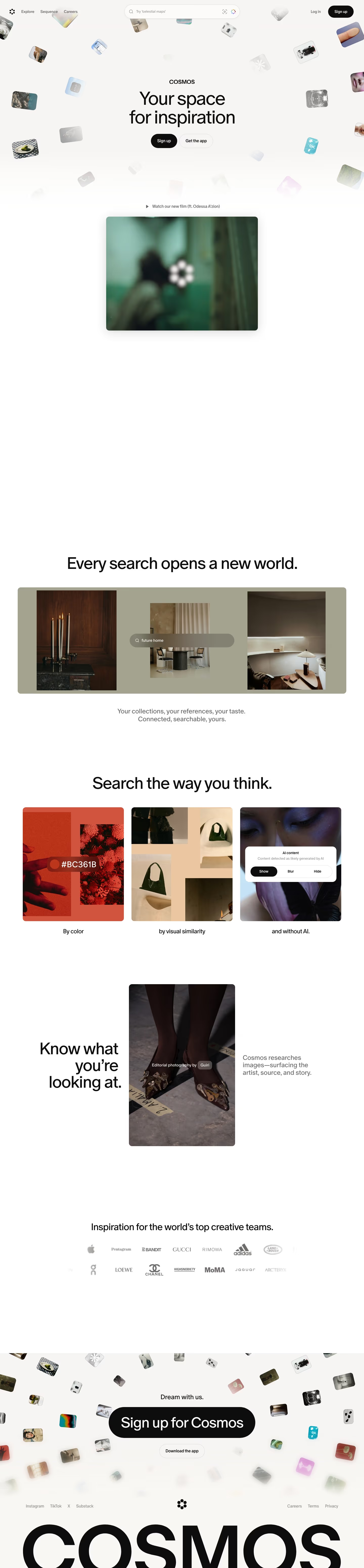
The Cosmos homepage is 6,196 pixels tall on desktop and runs through a hero of floating tilted image tiles, a sage-grey search demonstration, three search-mode cards, an editorial photograph, a logo wall and a closing call to action above an oversized wordmark. The colour approach is almost entirely neutral, with an off-white ground close to #f8f8f6 and grey captions near #787877. Only a display face, cosmosOracle, is detected, so every heading is large and set in one sans. The category-distinctive move is a search bar laid over tilted images, which presents the product as a visual archive rather than a feature list.
Above the fold
An off-white hero with the wordmark "COSMOS" above the headline "Your space for inspiration" in large black sans. Rounded image tiles drift around the text in an arc, Beneath it sit a black "Sign up" pill and an outline "Get the app" button. The nav reads "Explore", "Sequence" and "Careers", with a centred search field reading "Try 'archival animations'". A play line, "Watch our new film (ft. Odessa A'zion)", leads to a video frame showing a blurred green scene.
Search demonstration and search modes
A centred headline, "Every search opens a new world.", sits above a sage-grey panel with three interior photographs and a rounded search pill reading "future home". The caption beneath reads "Your collections, your references, your taste. Connected, searchable, yours." "Search the way you think." heads three equal cards labelled "By color", "by visual similarity" and "and without AI.", the last showing a dialog titled "AI content" with three options.
Editorial photo and logo wall
"Know what you’re looking at." is set right-aligned beside a tall photograph credited "Editorial photography by" with a "Guiri" chip, and a short paragraph, "Cosmos researches images—surfacing the artist, source, and story." Below, "Inspiration for the world’s top creative teams." sits over two rows of grey brand wordmarks, faded at the edges of the row.
Closing section and footer
"Dream with us." sits above a large black pill, "Sign up for Cosmos", with a smaller outline "Download the app" button, all surrounded by tilted tiles. The footer carries Instagram, TikTok, X and Substack on the left and Careers, Terms and Privacy on the right, with a centred flower-like mark and an oversized black "COSMOS" wordmark cropped at the page bottom.
On mobile
At 390px the hero keeps the wordmark and headline with a single "Get the app" button, and the film frame drops below the play line at full width. The search panel shrinks to one tile with the "future home" pill. The three search cards stack vertically with their labels beneath, and the logo wall shows three columns of wordmarks. The closing block becomes a full-width "Download the app" button above a stacked footer with Connect and More link lists.
Worth borrowing
- Tilted, fading image tiles around the headline turn an empty hero into a sample of the product.
- A search pill placed over a photograph shows the search feature in use rather than describing it.
- Short lowercase captions under image cards make the three cards read as one sequence.