Eigenpal
eigenpal.com/
EigenPal automates document-heavy workflows — extraction, Q&A, processing — while keeping a human checkpoint at each step, and its homepage is organized around six named sub-tools (EigenPal, EigenSearch, EigenEval, ParseCache, OpenParser, and an open-source DOCX editor) rather than one flagship product. Its headline, "One agentic suite, at the forefront of AI," is followed by a mortgage-processing case study citing a 93% automation rate. The distinguishing pitch is full reversibility rather than raw automation: it markets "every step logged, every action reversible," and grounds credibility in named affiliations — Elastic, McKinsey, MIT, and Y Combinator — plus the tagline "Built in San Francisco. Deployed globally."
- Category
- Productivity & Collaboration
- Style
- LightMinimal
- Stack
- Next.jsTailwind CSS
- Fonts
- Roboto Mono
- Palette
- Meta title
- EigenPal - AI Document Automation Platform
- Sections
- 5
- Updated
Eigenpal's landing page, section by section
Each section below is cropped straight from Eigenpal's live page — useful references for productivity & collaboration landing page design.
Eigenpal design review: how the homepage is built
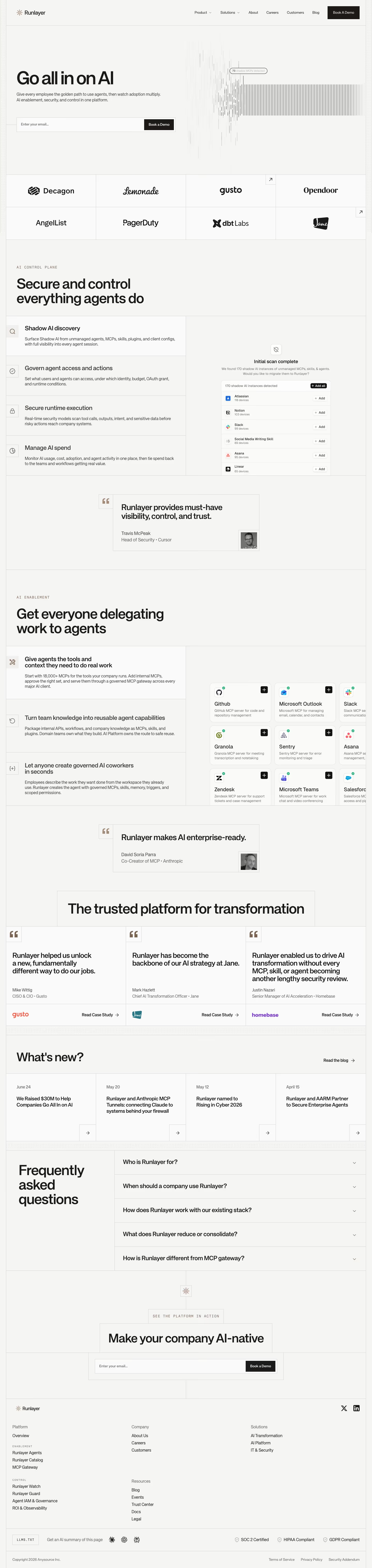
EigenPal's homepage runs 9,684 pixels tall on an off-white base recorded in meta.json as #fcfbfb, with #ccbaf6 as the lavender of its primary buttons. Green accents mark icons and underlined words. Monospace labels are set in Roboto Mono, and no display face was detected. The brand on the page matches meta.name. The layout is a gridded hero, a three-column row, a video and process pair, a case study, a comparison, a copilot panel and industry cards, closing on a dark green call to action and a footer. Its distinctive trait is the slash-prefixed eyebrow label above every section.
Above the fold
The hero sits on a faint grid pattern under a white header. A small line reads "Backed by Y Combinator" above the centred headline "AI automation that learns your workflow." Two buttons follow: a lavender "Start for free" and an outlined "Book a demo". Below, three columns headed "Learns from examples", "Test before you trust" and "Deploy anywhere" each sit under a green pixel icon. A line reading "/ TRUSTED BY AND BUILT BY THE TEAMS BEHIND:" introduces a logo row.
Demo video, learning section and case study
A product video titled "Workflow Creation Agent" sits beside a three-step list headed "Watch our AI Agent learn your process", with "Upload examples", "AI learns patterns" and "Workflow ready" as steps. Below, "Learning from examples, just like you." sits over a split case study panel. The left column is headed "US retail bank achieves 89% automation" with the figures 80%, 93% and 2 months. The right column is labelled "CHALLENGE", "SOLUTION" and "RESULT" in monospace.
Accuracy testing, deployment and copilot comparison
The "See exactly what works before going live" section pairs a panel, "Accuracy testing on your historical data", with figures 87% and 13%, against a second video. Next, "Your cloud, your rules." presents four tiles headed "AWS", "Azure", "GCP" and "On-Premise", above "Enterprise security & compliance" and "Simple Deployment". The "Workflow maintenance 10x faster" comparison sets "Traditional Workflow Tools" against "EigenPal AI Copilot", ending with bars reading "2-4 WEEKS TO IMPLEMENT" and "5 MINUTES TO IMPLEMENT".
Closing section and footer
The "Unlock document automation across industries." block lists "Finance", "Insurance", "Manufacturing" and "Healthcare" as stacked cards with green icons. A dark green panel headed "Stop drowning in paperwork." offers "Start for free" and "Book a demo" buttons. The footer carries a short description, copyright text and link columns headed "SOLUTIONS" and "PRIVACY POLICY", ending with "Designed by GRAFIT" beside "Built in San Francisco, CA".
On mobile
At 390px the hero headline wraps onto three lines and the grid background fills the header. The three feature columns stack vertically, and the video sits above its process list. The case study keeps its stats in a row, with "2 months" wrapping onto two lines. The four cloud tiles become a two-by-two grid, and the industry cards stack in a single column.
Worth borrowing
- Use one lavender accent for every primary button.
- Open each section with a slash-prefixed monospace eyebrow.
- Set before-and-after panels side by side with matching figures.