
Juno
juno.build/
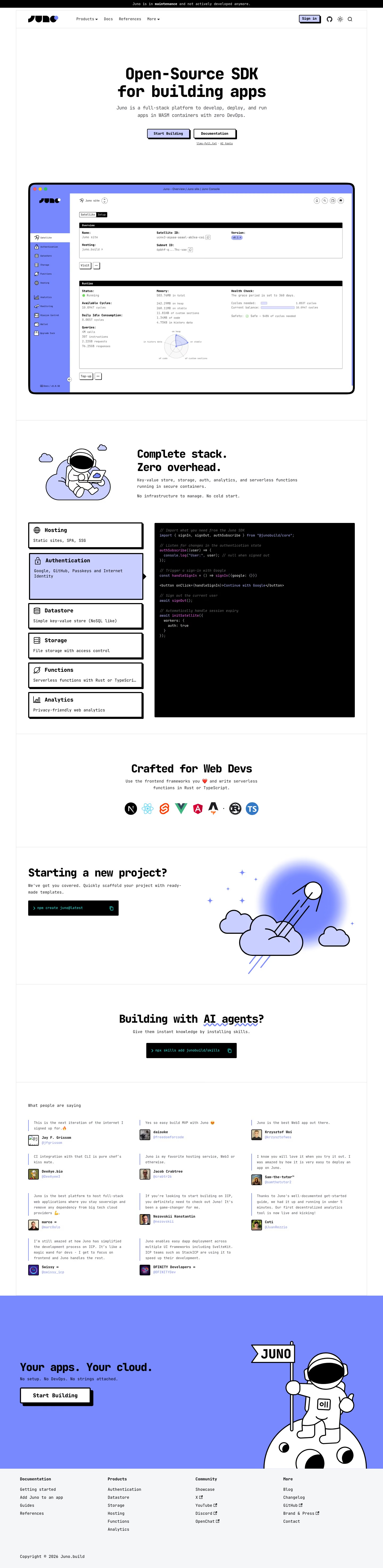
Juno is an open-source SDK and backend-as-a-service platform for deploying web apps in WebAssembly containers, covering hosting, authentication, a datastore, file storage, serverless functions, and analytics without requiring separate DevOps setup. The homepage's most notable feature is a prominent notice stating "Juno is in maintenance and not actively developed anymore," placed above the fold rather than buried in a changelog. Its positioning emphasizes decentralization, explicitly framing the goal as removing "any dependency from big tech cloud providers," and it is built on the Internet Computer Protocol ecosystem with support cited from DFINITY. Ten testimonials are pulled directly from Twitter/X with profile photos rather than curated quotes.
- Category
- Engineering & Infrastructure
- Style
- LightColorful
- Fonts
- JetBrains Mono
- Palette
- Meta title
- Juno | Open-Source SDK for building apps
- Sections
- 6
- Updated
Juno's landing page, section by section
Each section below is cropped straight from Juno's live page — useful references for engineering & infrastructure landing page design.
Heroes
More heroesFeatures
More featuresLogo clouds
More logo cloudsContact Us
More contact usBlog pages
More blog pagesJuno design review: how the homepage is built
The Juno homepage runs about 5,889 pixels at desktop width, under a black maintenance strip. The order is a centered headline, a console mockup, an illustrated feature block beside a code panel, framework icons, two terminal-command boxes, a testimonial grid, a full-bleed periwinkle closing band and a four-column footer. The palette is white with black type and hard offset shadows, plus one periwinkle (#7788fd) and a pale tint (#c9cfff) on buttons, a selected card and illustrations. Everything is set in JetBrains Mono, so even the headlines read like code.
Above the fold
A black strip reads "Juno is in maintenance and not actively developed anymore." The bordered header holds the logo, "Products", "Docs", "References" and "More" and a "Sign in" button. The centered headline sits over a monospace subhead, a periwinkle "Start Building" button and a white "Documentation" button. A framed console mockup follows, with a sidebar listing "Satellite", "Authentication" and "Datastore", and "Overview" and "Runtime" panels.
Feature cards, code panel and project starter
"Complete stack." and "Zero overhead." sit beside an astronaut-on-a-cloud illustration. Under it, six outlined cards with hard shadows name "Hosting", "Authentication", "Datastore", "Storage", "Functions" and "Analytics". The "Authentication" card is tinted periwinkle, with an arrow pointing to a black panel of SDK code. "Crafted for Web Devs" follows with eight round technology icons. "Starting a new project?" pairs a rocket illustration with a black command box holding "npm create juno@latest".
AI agents block and testimonial wall
"Building with AI agents?" is a centered heading with a wavy underline beneath "AI agents", above a second black command box, "npx skills add junobuild/skills". "What people are saying" opens a three-column wall of eleven short quotes. Each has a small avatar, a bold name such as "Jay F. Grissom" or "DFINITY Developers", and a periwinkle handle. Quotes run one to four lines in small monospace.
Closing section and footer
A full-bleed periwinkle band carries "Your apps. Your cloud." and "No setup. No DevOps. No strings attached." above a white "Start Building" button with an offset shadow. An astronaut holding a "JUNO" flag stands on a moon at right. The grey footer has four columns, "Documentation", "Products", "Community" and "More",, and one line reading "Copyright © 2026 Juno.build".
On mobile
At 7,141 pixels tall, the mobile page keeps the hero text and stacks the two buttons vertically. The console mockup is dropped, and the astronaut illustration moves up to follow the hero. The six feature cards form one column with a "Learn more" link added to each, and the code panel disappears. Framework icons wrap into two rows, the testimonials collapse into a single column, and the footer columns stack vertically.
Worth borrowing
- Offset black shadows on buttons and cards make a flat monospace layout feel tactile, from "Sign in" to "Start Building".
- Pairing a feature list with a black code panel, with the "Authentication" card tinted to match, ties each product claim to a code sample.
- Copyable terminal commands such as "npm create juno@latest" turn whole sections into direct calls to action.





