Noon
noon.design/
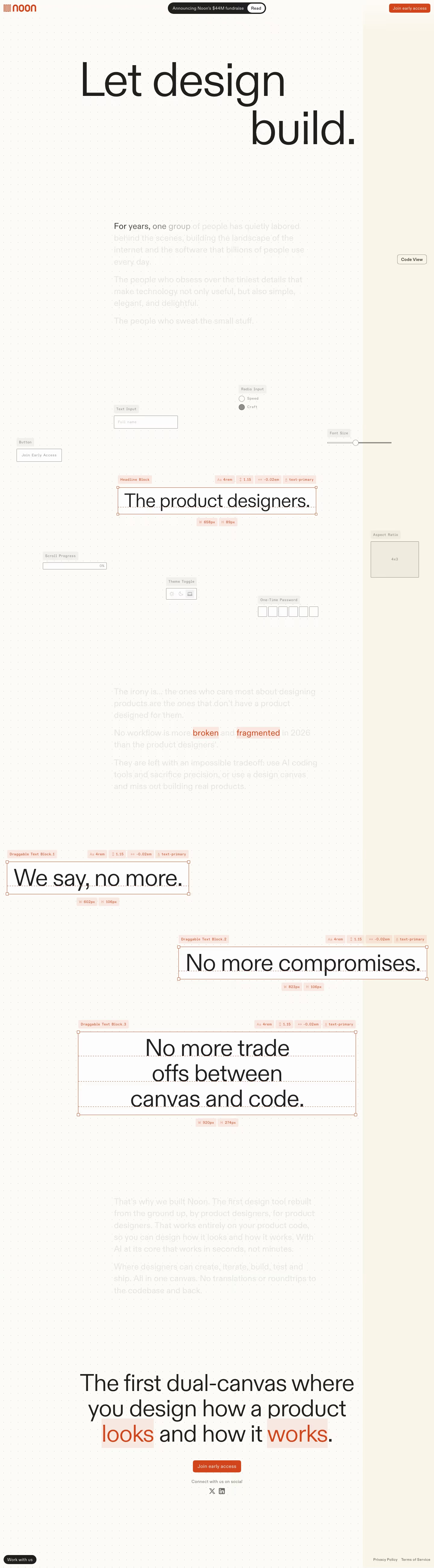
Noon's homepage opens with a design-system-styled hero, "Let design build," and layers actual UI component specimens (a headline block, button, text input, radio input, slider) with their exact type specs shown alongside — 1.375rem, -.05em tracking, "text-primary" — directly in the marketing page itself, so the components on display are the same primitives the product presumably outputs. Copy underneath reads as a tribute to product designers: "For years, one group of people has quietly labored behind the scenes, building the landscape of the internet... The people who sweat the small stuff." A banner announces a $44M fundraise, and the CTA throughout is "Join early access," indicating the product isn't yet broadly available.
- Category
- Design & Creative
- Style
- LightMinimal
- Stack
- Next.jsCSS-in-JS
- Fonts
- NoonSans
- Palette
- Meta title
- Noon: The new home for product design
- Sections
- 2
- Updated
Noon's landing page, section by section
Each section below is cropped straight from Noon's live page — useful references for design & creative landing page design.
Heroes
More heroesNoon design review: how the homepage is built
Noon's 5,199-pixel page is an off-white, dotted drafting field. There are no conventional feature cards or dense navigation blocks: a massive NoonSans statement unfolds across the canvas, while faint interface fragments float around it. The rust-orange “Join early access” action is the persistent color against black type and pale grey component labels. The site treats its page as an editable product surface, using bounding boxes, measurement annotations, radio controls, an OTP field, and draggable headline blocks to embody the dual-canvas claim.
Announcement and opening canvas
The Noon mark occupies the upper left. A black pill says “Announcing Noon's $44M fundraise” with a white “Read” capsule; “Join early access” sits at upper right. “Let design build.” is set extremely large over the dot grid and broken across two lines. A pale block of manifesto copy fades in beneath it. “Code View” is placed against the empty right margin, beginning a page that deliberately leaves much of the viewport open.
Interface fragments as argument
Further down, the page scatters “Text Input”, “Radio Input”, “Font Size”, “Aspect Ratio”, “Theme Toggle”, “One-Time Password”, and “Scroll Progress” across the canvas. A selected “Headline Block” encloses “The product designers.” with dashed baselines, corner handles, and a measurement tag. The controls read as a prototype. Their low contrast keeps the hero sentence dominant, while the labels supply a visual vocabulary around it.
Three movable declarations
The long explanatory copy grows more visible before three separately framed statements appear at different positions: “We say, no more.”, “No more compromises.”, and “No more trade offs between canvas and code.” Each carries a small “Draggable Text Block” tag, dimensions, and baseline guides. The asymmetry matters: desktop positions the declarations across a broad field instead of forcing a predictable vertical rhythm. Orange words in the following statement connect visual treatment to the contrast between how a product “looks” and how it “works”.
Dual-canvas close
The final claim reads “The first dual-canvas where you design how a product looks and how it works.” with “looks” and “works” highlighted in rust-orange blocks. A second “Join early access” button sits below with “Connect with us on social” and X and LinkedIn marks. The footer is intentionally residual: “Work with us” floats at bottom left, while “Privacy Policy” and “Terms of Service” sit on the right. The dot field continues uninterrupted behind every element.
On mobile
At 390 pixels, the primary sentence becomes a tall three-line composition, and manifesto copy fills a narrower column. Floating interface fragments reshuffle around the selected headline block, so the page feels like a canvas viewed through a smaller aperture. The three draggable declarations stack in reading order with annotations intact. The final dual-canvas statement centers above the orange action. Footer links and the “Work with us” pill move into one lower area without a conventional navigation menu.
Worth borrowing
- Interface annotations can become the visual subject when they directly support the product proposition.
- Expansive blank canvas makes a few carefully placed controls feel consequential.
- Repeating one accent color on actions and highlighted words maintains direction in an otherwise muted page.