
Origami
origami.chat/
Origami is an outbound customer-acquisition tool where a user enters their own website URL and the system recommends specific marketing "plays" — lead lists, buyer research, email sequences, LinkedIn content, website-visitor tracking — that the user approves with a click before Origami runs the campaign itself. The hero reads "Origami gets customers for you" with the tagline "Enter your website. Origami finds the best ways to get you customers." It backs this with granular sourcing detail rather than vague claims: 50+ real-time data sources, 100M+ company profiles, 350M+ people profiles, email verification through 5+ providers, and phone validation across 9 providers, plus named customers including Mercury, Cognition, and Bloomberg.
- Category
- Sales & Support
- Style
- LightMinimal
- Stack
- Next.jsTailwind CSS
- Fonts
- GeistSansRoboto Flex
- Palette
- Meta title
- Origami | Find your perfect customers in one prompt
- Sections
- 11
- Updated
Origami's landing page, section by section
Each section below is cropped straight from Origami's live page — useful references for sales & support landing page design.
Heroes
More heroesFeatures
More featuresPricing
More pricingFAQs
More faqsLogo clouds
More logo cloudsAbout Us
More about usContact Us
More contact usPricing & Plans
More pricing & plansAffiliate pages
More affiliate pagesCareers pages
More careers pagesOrigami design review: how the homepage is built
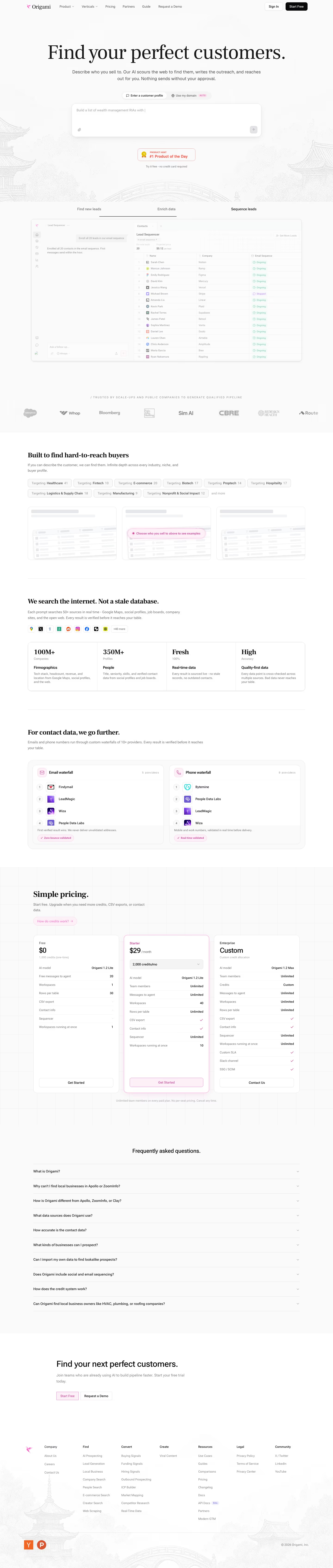
Origami's homepage runs 6,771 pixels on desktop: a hero with a prompt box, a feature-tab panel, a logo strip, a targeting section, a stats block, two waterfall panels, a pricing grid, an FAQ, a closing band and a footer. The page sits on a near-white #f9f9f9 ground with light #d8d8d8 rules and #595959 secondary text. The faint ink-line drawing of pagodas and an arched bridge behind the hero and footer gives it its distinct character. The metadata lists GeistSans and Roboto Flex as its typefaces. The page is quiet overall: most colour comes from the product screenshots and a pink accent on the Starter plan.
Above the fold
The hero is a serif headline, "Find your perfect customers.", over a subhead that opens "Describe who you sell to." and closes "Nothing sends without your approval." A prompt box follows, showing the placeholder "Find e-commerce brands in activewear that are running paid ads on Meta". Beneath it, a "#1 Product of the Day" badge. The top bar lists six links, "Product" to "Request a Demo", plus "Sign In" and "Start Free".
Feature tabs, logo strip and targeting chips
Three tabs, "Find new leads", "Enrich data" and "Sequence leads", sit above a spreadsheet view titled "Lead Sequencer" with sixteen contact rows, most marked "Ongoing" and one "Stopped". A logo strip follows under "Trusted by scale-ups and public companies to generate qualified pipeline". The section "Built to find hard-to-reach buyers" then lists industry chips such as "Targeting Healthcare 41" above three table previews.
Stats, waterfalls and pricing
"We search the internet. Not a stale database." introduces four tiles, "100M+", "350M+", "Fresh" and "High", each with a label such as "Firmographics" and "Real-time data". "For contact data, we go further." then pairs an "Email waterfall" with a "Phone waterfall" of the same shape. "Simple pricing." closes the stretch with three cards, "Free", "Starter" and "Enterprise", the middle one outlined in pink.
Closing section and footer
"Frequently asked questions." stacks ten full-width questions, from "What is Origami?" to "Can Origami find local business owners like HVAC, plumbing, or roofing companies?". A closing band, "Find your next perfect customers.", offers "Start Free" and "Request a Demo". The footer has seven link columns, from "Company" to "Community", and ends with "© 2026 Origami, Inc."
On mobile
At 390px the hero headline wraps onto two lines and the desktop top links are not shown, leaving the prompt box stacked above the tabs. The tabs become equal labels over a mini contact table that runs off the right edge. The stats become a stacked list of four rows, the waterfall panels stack, and the pricing cards stack with Starter second. The footer turns into single-column link lists.
Worth borrowing
- One prompt box paired with a spreadsheet-style preview lets the hero show the product without a second screen.
- Presenting verification as ranked provider lists, like the email waterfall, makes the accuracy claim concrete.
- Three pricing cards with checkmark rows and one outlined middle card make the plans easy to compare.





