Perplexity
perplexity.ai/
Perplexity is a Productivity & Collaboration product. See its perplexity.ai landing page design in full — desktop and mobile screenshots plus close-ups of the heroes and footers. It's built with Tailwind CSS. Its type is set in pplxSans, anchored by a #fafafa palette. Study how Perplexity structures its messaging, layout and visual hierarchy, then explore more of the best Productivity & Collaboration website designs.
- Category
- Productivity & Collaboration
- Style
- LightMinimal
- Stack
- Tailwind CSS
- Fonts
- pplxSans
- Palette
- Meta title
- Perplexity
- Sections
- 2
- Updated
Perplexity's landing page, section by section
Each section below is cropped straight from Perplexity's live page — useful references for productivity & collaboration landing page design.
Heroes
More heroesPerplexity design review: how the homepage is built
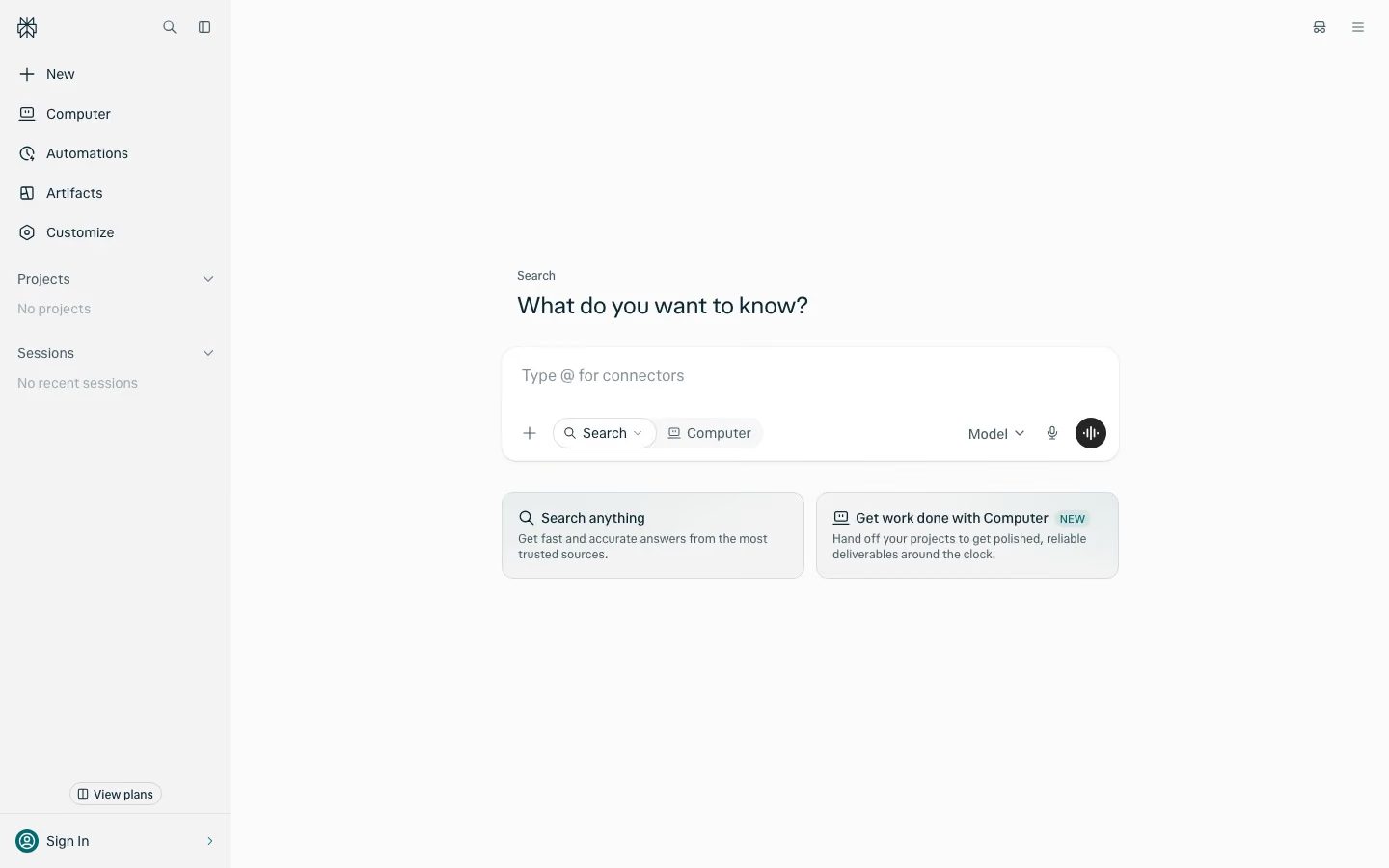
The page is a single 900-pixel screen with no scrolling, built as an application shell instead of a marketing page. A pale grey left sidebar takes about a sixth of the width, and an off-white canvas to its right centres one search composer. Colour is restrained: near-white surfaces, dark blue-black text, one black round button and a small teal tag. Type is a single geometric sans at modest sizes. The distinctive trait for an answer-engine product is that the first view is the working tool itself, ready for typing.
Sidebar navigation
The left rail is a full-height panel with the logo mark at top left beside a magnifier and a panel-toggle icon. Five stacked rows with line icons follow: "New", "Computer", "Automations", "Artifacts" and "Customize". Two collapsible groups come next, "Projects" and "Recents", each with a chevron and a grey empty-state line, "No projects" and "No recent sessions". One thin vertical line and a darker grey fill separate the rail from the canvas.
Question heading and composer
Centred in the canvas, a small grey label "Search" sits above the heading "What do you want to know?", in regular weight. The composer is a white rounded card and the placeholder "Ask anything…". Its bottom row holds a plus button, pills for "Search" and "Computer", then at the right a "Model" dropdown, a microphone icon and a black round button with an audio-wave glyph.
Two mode cards
Under the composer, two equal cards sit side by side with pale grey fills. The first is titled "Search anything" with a magnifier icon and the line "Get fast and accurate answers from the most trusted sources." The second is titled "Get work done with Computer" beside a small teal "NEW" tag and a monitor icon. Pointing at the Computer pill raises a dark tooltip, "Use Computer", over "For work and more complex tasks".
Account corner and empty space
At the bottom of the rail a small outlined pill with a book icon reads "View plans", above a divider and a profile row with a teal round avatar, the label "Sign In" and a right chevron. At the top right of the canvas two unlabeled icons float: a glasses-style icon and a three-line menu icon. The rest of the canvas is empty.
On mobile
At 390 pixels the rail disappears behind a hamburger icon at top left, the wordmark "perplexity", and a black pill "Open in App" with an Apple glyph at top right. The heading becomes one centred line at the vertical middle of the screen, and the small label and both cards are dropped. The composer moves to the bottom edge, with the placeholder "Type / for search modes".
Worth borrowing
- Opening on a working input under the heading "What do you want to know?" lets a search product prove itself before any marketing copy.
- Pairing the "Search" and "Computer" pills inside the composer with matching cards beneath it teaches both modes in one glance.
- Empty-state lines such as "No projects" and "No recent sessions" give a signed-out rail structure and show what will fill it.