Stacker
stacker.ai/
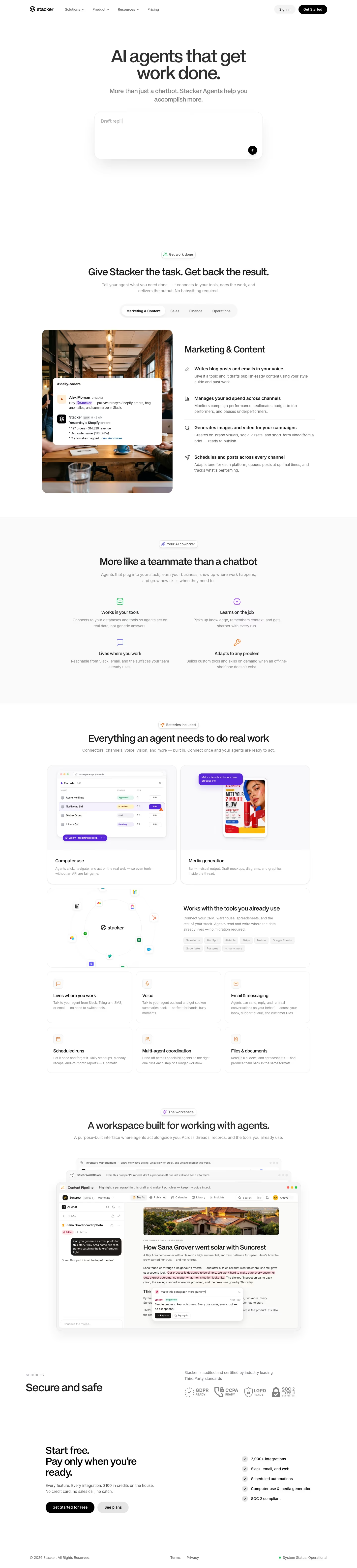
Stacker builds AI agents that connect to a company's existing tools (Slack, Salesforce, HubSpot, Gmail, Snowflake, and others) and complete assigned tasks directly rather than answering questions, with the headline "AI agents that get work done. More than just a chatbot." The homepage demonstrates this literally through mocked-up product interfaces rather than screenshots of a single dashboard: a Shopify order-anomaly Slack alert, a CRM record showing an agent drafting and sending a sales proposal from call notes, and an inventory tool showing an agent placing a reorder purchase order autonomously. Each scenario names its own fictional company (Suncrest, Loam, Halen), a device used to make the abstract idea of an "AI coworker" concrete across several different business functions on one page.
- Category
- Engineering & Infrastructure
- Style
- LightMinimal
- Stack
- Next.jsTailwind CSS
- Fonts
- PP Mori RegularInter
- Palette
- Meta title
- Stacker
- Sections
- 5
- Updated
Stacker's landing page, section by section
Each section below is cropped straight from Stacker's live page — useful references for engineering & infrastructure landing page design.
Stacker design review: how the homepage is built
The page is a white, minimal layout 6317 pixels tall at desktop width, with black type and black pill buttons as the main contrast. The greys run from #eaeaea to #696969 on a #ffffff ground, and the one photograph sits in the feature section. Headings are set in PP Mori Regular with Inter for text, per the detected fonts. The hero is one centered prompt box showing "Draft replies" as placeholder text. For an engineering catalog entry, the distinctive choice is that the solution tabs cover marketing, sales, finance and operations rather than code.
Above the fold
Above the fold, the headline "AI agents that get work done." sits over the subhead "More than just a chatbot. Stacker Agents help you accomplish more." The header lists "Solutions", "Product" and "Resources" with dropdown arrows, then "Pricing", "Sign in" and "Get Started". The prompt box below is white with a soft shadow and a round black send button in its lower right corner.
Task tabs and the coworker grid
The second section, headed "Give Stacker the task. Get back the result.", sits under a small pill labeled "Get work done". Four tabs, "Marketing & Content", "Sales", "Finance" and "Operations", switch the panel. The open Marketing tab pairs a cafe photograph with a chat card titled "daily-orders" and four feature rows, starting with "Writes blog posts and emails in your voice".
Capability grid and connector cards
Four icon-led points, "Works in your tools", "Learns on the job", "Lives where you work" and "Adapts to any problem", sit in a two-by-two block. Under "Batteries included", the heading "Everything an agent needs to do real work" introduces two large cards, "Computer use" and "Media generation", above a connector diagram captioned "Works with the tools you already use". Six smaller cards follow, from "Voice" to "Files & documents".
Closing section and footer
The workspace block, headed "A workspace built for working with agents.", stacks threads named "Inventory Management", "Sales Workflows" and "Content Pipeline" above a document editor titled "How Sana Grover went solar with Suncrest". "Secure and safe" lists GDPR, CCPA, LGPD and SOC 2 badges. The closing band reads "Start free." above the buttons "Get Started for Free" and "See plans". The footer shows "© 2026 Stacker. All Rights Reserved." beside "System Status: Operational".
On mobile
At 390 pixels the hero stacks a centered headline over a full-width prompt box, which reads "Summarize my unread Slack and flag what needs me" as placeholder text. The solution tabs scroll sideways, with "Finance" cut at the edge. Feature cards collapse to one column, with the cafe photograph above its list. The compliance badges wrap, with three on the first row and SOC 2 below. The closing buttons stack at full width.
Worth borrowing
- Let the first prompt box stand as the whole hero, so the product is used before it is explained.
- Organize feature examples by business function, with one tab per department and one card open at a time.
- Place the compliance badges directly above the closing buttons, so security sits beside the sign-up call.