Caret
caret.so/
Caret is a macOS meeting assistant that surfaces real-time answers during calls by pulling from a user's own documents and past meeting history, plus drafts follow-ups and action items afterward. The hero claims it returns answers "in under a second," and the product is built around a consistent mascot character, Casper, used across the marketing pages rather than generic screenshots. Its privacy section names four specific guarantees — hidden during screen share, no bot joins the call, end-to-end encryption, and no use of data for AI training — addressing the exact objection meeting-recording tools usually draw, and it displays a Y Combinator badge alongside CRM integrations like Salesforce and HubSpot.
- Category
- Productivity & Collaboration
- Style
- DarkColorful
- Stack
- Next.jsTailwind CSS
- Fonts
- Google Sans FlexFigtreeInter
- Palette
- Meta title
- Caret - AI meeting assistant that makes you smarter | Caret
- Sections
- 4
- Updated
Caret's landing page, section by section
Each section below is cropped straight from Caret's live page — useful references for productivity & collaboration landing page design.
Caret design review: how the homepage is built
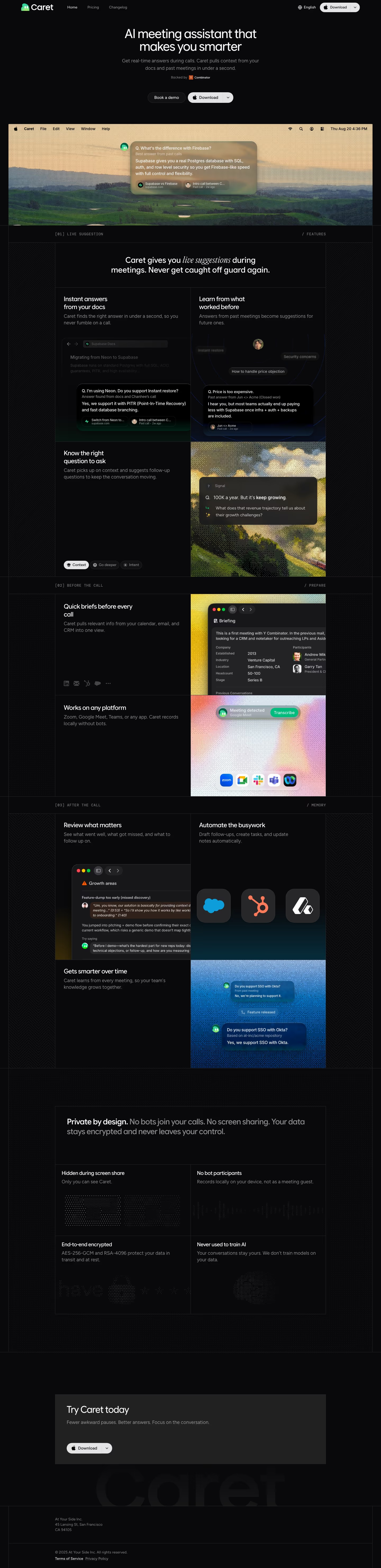
Caret's homepage is a near-black page on #09090b, with one warm photograph of rolling hills under a gold sky carrying the colour. Blocks run top to bottom: a centred hero, a numbered feature grid, pre-call and memory sections, a privacy grid, a closing download panel, then a footer. The desktop capture is 5,931 pixels tall. The sky tone #e3c599 appears in the hero screenshot and photographic panels. Typefaces are Google Sans Flex for display, with Figtree and Inter for body text. The page is distinctive for its monospace section labels, such as "[01] LIVE SUGGESTION", which act as chapter dividers.
Above the fold
The hero is centred: a two-line headline "AI meeting assistant that makes you smarter", a grey subhead and a "Backed by" line with a small Y Combinator badge. Two pill buttons follow: outlined "Book a demo" and a light "Download". Below sits a full-width screenshot of a macOS menu bar over the landscape, with a translucent card titled "Best answer from past calls". The header holds the logo, "Home", "Pricing" and "Changelog".
Live suggestion feature grid
The feature section opens with "[01] LIVE SUGGESTION" above a centred heading, "Caret gives you live suggestions during meetings. Never get caught off guard again." A grid of cards follows: "Instant answers from your docs" beside "Learn from what worked before", each with a dark app mock-up. A third row holds "Know the right question to ask" beside a photographic panel labelled "Signal".
Pre-call, after-call and memory cards
The lower grid carries "[02] BEFORE THE CALL", with "Quick briefs before every call" beside a briefing window, then "Works on any platform" beneath it. The "[03] AFTER THE CALL" band pairs "Review what matters" with "Automate the busywork", where three app tiles float over a dark gradient. "Gets smarter over time" closes the band with a blue chat exchange about Okta support.
Privacy grid and closing footer
The privacy grid opens with "Private by design." and four cells: "Hidden during screen share", "No bot participants", "End-to-end encrypted" and "Never used to train AI". A grey panel headed "Try Caret today" holds a single Download button, above a faded wordmark. The footer gives the company name, a San Francisco address, "Terms of Service" and "Privacy Policy", with the copyright line reading 2025.
On mobile
At 390px the hero text narrows, and the "Book a demo" and "Download" buttons stack vertically. The hero screenshot gains a play icon, and the feature cards move to a single column, so the photographic panels shrink. The privacy grid becomes four stacked rows with dimmed graphics. The footer keeps the same order, with its address above the legal links.
Worth borrowing
- Caret puts a numbered monospace label above each block, such as "[01] LIVE SUGGESTION", sorting the grid into chapters.
- The hero screenshot sits full width beneath the buttons, so the product is visible before the first scroll.
- The privacy claims form a four-cell grid with one small graphic per cell, turning security into scannable proof.