
Cartesia
cartesia.ai/
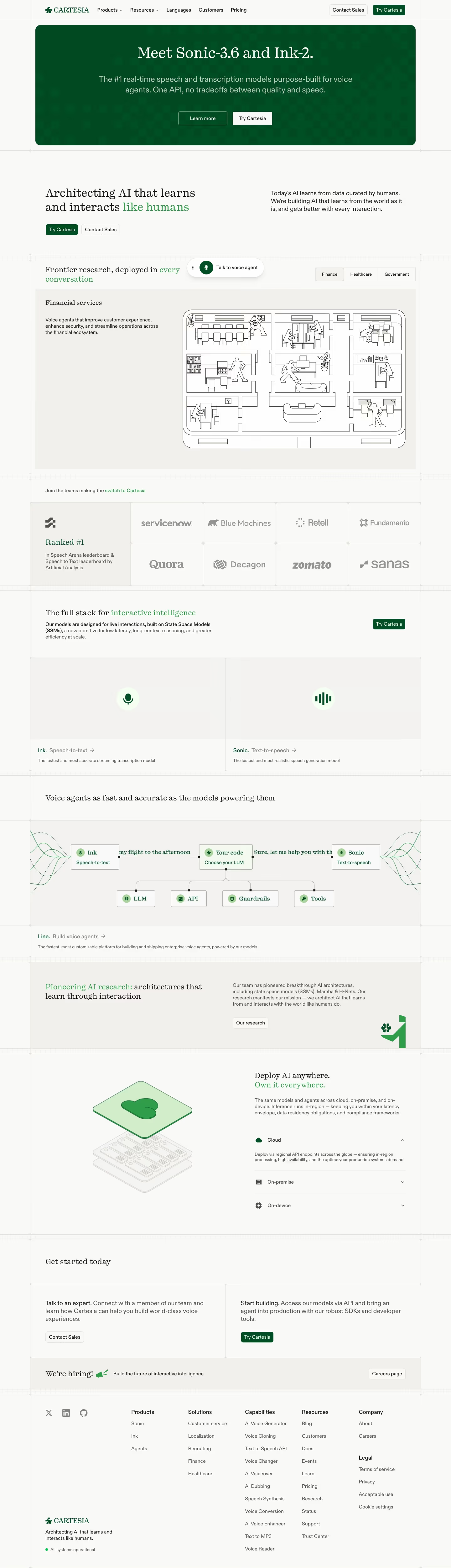
Cartesia builds real-time voice AI models — Sonic for text-to-speech, Ink for speech-to-text, and a Managed Agents platform for voice agents — built on state-space-model research (citing its own work on Mamba and H-Nets) rather than standard transformer architectures. The hero claims the #1 ranking on both the Artificial Analysis Speech Arena and Speech-to-Text leaderboards, and lets a visitor talk directly to a live demo voice agent named Skylar embedded in the page. Deployment is pitched across cloud, on-premise, and on-device with the line "Deploy AI anywhere. Own it everywhere," and customer logos include ServiceNow, Retell, and Quora.
- Category
- Engineering & Infrastructure
- Style
- LightColorful
- Stack
- AstroTailwind CSS
- Fonts
- PP Kyoto-b14c6ebb315b725bABC Diatype-017f0f97e8794fab
- Palette
- Meta title
- Cartesia | AI that learns and interacts like humans
- Sections
- 10
- Updated
Cartesia's landing page, section by section
Each section below is cropped straight from Cartesia's live page — useful references for engineering & infrastructure landing page design.
Heroes
More heroesFeatures
More featuresPricing
More pricingCTAs
More ctasLogo clouds
More logo cloudsAbout Us
More about usContact Us
More contact usCareers pages
More careers pagesBlog pages
More blog pagesCartesia design review: how the homepage is built
The Cartesia homepage is a compact 5,005 pixels on desktop, ordered as a green announcement banner, a mission statement, an industry tab panel, a logo grid, two product cards, a pipeline diagram, a research band, a deployment accordion, twin calls to action and a link-heavy footer. Colour is an off-white page with deep green (#014b22) and brighter green (#309d4b) accents, and green is also used to highlight phrases within headlines. Headlines use a serif face, PP Kyoto, against ABC Diatype for interface text. Faint grid lines and crosshair marks frame every section like a drafting sheet.
Above the fold
The navigation lists "Products", "Resources", "Languages", "Customers" and "Pricing" and, at right, "Contact Sales" and "Try Cartesia" buttons. A rounded dark green banner with a faint checker pattern follows, centred on "Meet Sonic-3.6 and Ink-2.", a subhead and two buttons, "Learn more" and "Try Cartesia". Below, "Architecting AI that learns and interacts like humans" sits left with "like humans" in green, a paragraph right and another button pair.
Industry tabs and customer logos
"Frontier research, deployed in every conversation" pairs with a floating "Talk to voice agent" pill and three tabs: "Finance", "Healthcare" and "Government". The open "Financial services" panel has short copy beside a black line drawing of an office floor plan. A "Join the teams making the switch to Cartesia" strip follows: one grey tile reading "Ranked #1" beside eight logo cells in two rows.
Product cards and pipeline diagram
"The full stack for interactive intelligence" has a "Try Cartesia" button right and two half-width cards, "Ink. Speech-to-text" and "Sonic. Text-to-speech", each a grey field with one green icon. A section headed "Voice agents as fast and accurate as the models powering them" shows a flow diagram: "Ink" to "Your code" to "Sonic", branching down to "LLM", "API", "Guardrails" and "Tools",.
Research, deployment and footer
A grey band, "Pioneering AI research: architectures that learn through interaction", carries an "Our research" button. "Deploy AI anywhere. Own it everywhere." pairs an isometric cloud-over-servers drawing with an accordion of "Cloud", "On-premise" and "On-device". "Get started today" splits into "Talk to an expert" and "Start building" cells, then a "We're hiring!" strip. The footer has five link columns, social icons and a status dot.
On mobile
At 390px the banner headline wraps to three lines and its buttons stack full width. The industry panel becomes a swipeable slide with dot pagination and an added "Fraud detection" line. Logos move to a two-column grid, the pipeline diagram rearranges vertically with side labels rotated, and the call-to-action cells stack. The footer collapses into two columns beneath the logo and status line.
Worth borrowing
- Highlight one phrase per headline in the accent green, as in "like humans", so a single colour ties the serif headings together.
- Pair a "Ranked #1" tile with the customer logo grid so credibility and social proof share one block.
- Use a node diagram with real sample speech to explain a product pipeline in one glance.





