Conductor
conductor.build/
Conductor lets developers "run parallel Claude Code, Codex, and Cursor agents in isolated workspaces" on a Mac, giving each agent its own workspace and a review-and-merge step to bring the outputs back together. The homepage is notably spare for the category: no testimonials, no customer logos, and no numerical claims about users or speed — it states a version number directly ("See what's new in 0.87.1") instead of marketing copy, and the nav is limited to Download, Documentation, Changelog, Blog, Pricing, and Enterprise. The pitch rests entirely on the mechanical description of the workflow — isolation, visibility, review — rather than proof points.
- Category
- Engineering & Infrastructure
- Style
- LightColorful
- Stack
- Next.jsTailwind CSS
- Fonts
- unknown
- Palette
- Meta title
- Conductor - Run a team of coding agents in the cloud
- Sections
- 7
- Updated
Conductor's landing page, section by section
Each section below is cropped straight from Conductor's live page — useful references for engineering & infrastructure landing page design.
Heroes
More heroesTestimonials
More testimonialsPricing
More pricingLogo clouds
More logo cloudsCareers pages
More careers pagesBlog pages
More blog pagesConductor design review: how the homepage is built
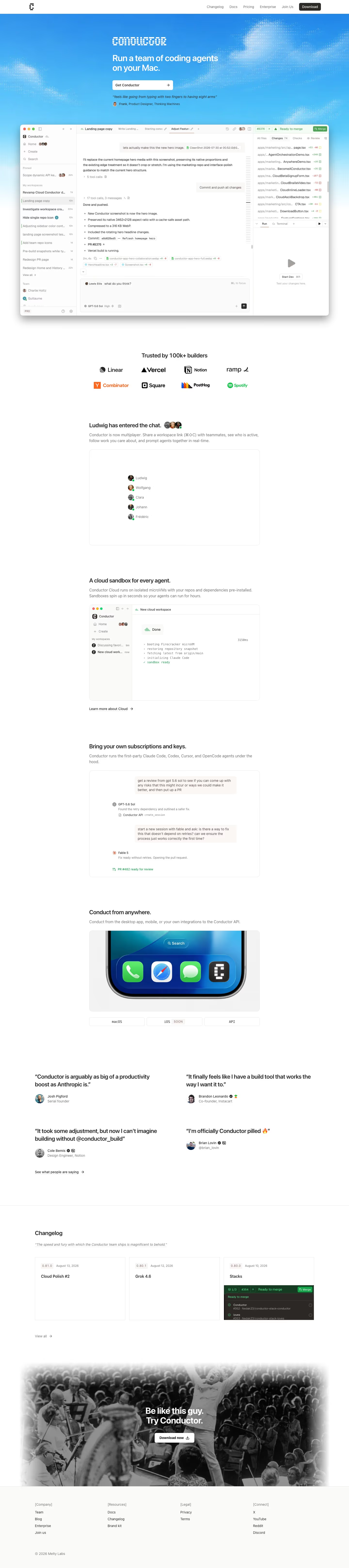
Conductor’s 6,466-pixel page pairs a white document-like body with a sky-blue, pixelated-cloud hero. The repeated black geometric mark and blocky CONDUCTOR wordmark establish an engineering-tool identity, while #48b7f6 dominates only the opening field. The page runs from a large collaborative coding interface through logos, teammate presence, isolated cloud workspaces, subscriptions, device access, quotes, changelog cards, and a photographic download close. Most evidence comes as restrained product windows with thin grey borders, letting the hero’s expansive blue sky perform the major visual change.
Cloud hero and app view
The top navigation lists “Changelog”, “Docs”, “Pricing”, “Enterprise”, and “Join Us”, ending in a black “Download” button. The blue hero places “Run a team of coding agents on your Mac.” beneath CONDUCTOR, followed by a wide “Get Conductor” control and a Frank quotation. A large interface window below shows workspace navigation, a running task, tool calls, changed files, merge status, and a code-agent prompt. The pixel-cloud texture surrounds the centered content.
Teams and sandbox
Eight logos sit under “Trusted by 100k+ builders”, including Linear, Vercel, Notion, ramp, Y Combinator, Square, PostHog, and Spotify. “Ludwig has entered the chat.” follows with a small roster panel and the multiplayer subhead. “A cloud sandbox for every agent.” then introduces another product window with a new workspace, bootstrap log, and Done status. A single “Learn more about Cloud →” text action leaves abundant space before the next capability.
Keys, devices, and proof
“Bring your own subscriptions and keys.” uses a chat-thread card to show GPT-5.6 Sol and Fable 5 handing work between turns. “Conduct from anywhere.” follows with a close crop of a phone dock and three tabs: “macOS”, “iOS”, and “API”, with iOS marked “SOON”. Four separate testimonials occupy the next area rather than a card grid. The copy is followed by “See what people are saying →”, preserving a lightweight editorial rhythm.
Changelog and download close
The “Changelog” section uses three bordered cards: “Cloud Polish #2”, “Grok 4.6”, and “Stacks”, with dates and version labels above. A “View all →” link precedes the final image, a black-and-white orchestra scene fading to white at its edges. Over it, “Be like this guy. Try Conductor.” sits above a white “Download now” button. The footer organizes links under “[Company]”, “[Resources]”, “[Legal]”, and “[Connect]”.
On mobile
At 402 pixels, the blue hero remains a tall field, but the desktop app capture contracts to a full-width miniature. The trusted-logo row wraps into two lines. The roster, cloud window, chat card, phone image, testimonials, changelog cards, and orchestra close become a single vertical route. “macOS”, “iOS”, and “API” retain their three equal tabs. The final image keeps its centered action, while the footer reshapes the four desktop groups into a two-column grid.
Worth borrowing
- A single vivid hero field can give a mostly white product page its visual anchor.
- Small application windows can explain different workflows without turning into a dense dashboard.
- A photographic final panel can reset the tone after technical screenshots.