PlayerZero
playerzero.ai/
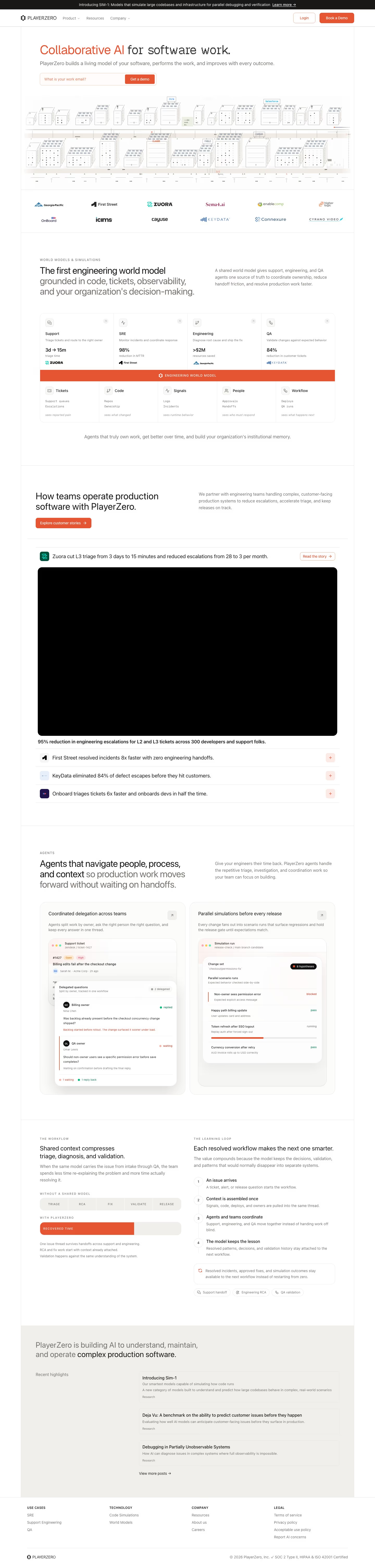
PlayerZero builds what it calls an "engineering world model" — an AI system grounded in a company's code, tickets, and observability data — that deploys agents to handle production software work across support, SRE, engineering, and QA. Its homepage headline, "Collaborative AI for software work," is followed by unusually granular before/after metrics per function: support triage time cut from 3 days to 15 minutes, a 98% reduction in mean time to resolution for SRE, and an 84% drop in customer-facing defects for QA. It names a research focus it calls "SIM-1," built around simulating large codebases and infrastructure, and backs its claims with SOC 2 Type II, HIPAA, and ISO 42001 certifications alongside named enterprise customers like Zuora and Georgia Pacific.
- Category
- Engineering & Infrastructure
- Style
- LightMinimal
- Stack
- Next.jsTailwind CSS
- Fonts
- Geist
- Palette
- Meta title
- PlayerZero | AI Production Engineering Platform
- Sections
- 5
- Updated
PlayerZero's landing page, section by section
Each section below is cropped straight from PlayerZero's live page — useful references for engineering & infrastructure landing page design.
PlayerZero design review: how the homepage is built
The PlayerZero homepage runs about 6,020 pixels at desktop width, a light page of white and off-white panels with one orange accent, #e65532, on the hero headline, buttons and a logo band. Near-black text uses #181715, with #f4b8a9 as a soft tint and #fdfdfd for backgrounds. The metadata lists Geist as the display typeface. Blocks run from a hero through a logo strip and product panels to a grey highlights band and footer. The distinctive device is the hero illustration, an isometric skyline of boxes labelled with tools such as Jira and Salesforce.
Above the fold
The hero headline reads 'Collaborative AI for software work.', with 'Collaborative AI' in orange. A grey subhead sits above an email field labelled 'What is your work email?' and an orange 'Get a demo' button. Below, a wide isometric skyline spans the page, above a logo strip that includes 'ZUORA' and 'Sema4.ai'. The subhead says PlayerZero builds a living model of your software.
World model cards and capability columns
A section headed 'The first engineering world model' sits beside a short paragraph about a shared world model for support, engineering and QA agents. Four white cards follow, headed 'Support', 'SRE', 'Engineering' and 'QA', each with one figure, such as 3d to 15m triage time and a 98% reduction in MTTR. An orange bar sits beneath them, then five columns of short sub-items headed Tickets, Code, Signals, People and Workflow.
Customer proof and agent cards
'How teams operate production software with PlayerZero.' introduces a bordered video card headed 'Zuora cut L3 triage from 3 days to 15 minutes and reduced escalations from 28 to 3 per month.' Three result rows follow, including 'KeyData eliminated 84% of defect escapes before they hit customers.' Below, two agent cards, 'Coordinated delegation across teams' and 'Parallel simulations before every release', show mock ticket and run interfaces.
Workflow, learning loop and footer
The workflow section, 'Shared context compresses triage, diagnosis, and validation.', sets a segmented five-step bar against a filled orange bar for recovered time. A four-step learning loop follows, ending in 'Each resolved workflow makes the next one smarter.' Then 'Recent highlights' lists three research posts, including 'Introducing Sim-1'. The footer lists 'Terms of service', 'Privacy policy' and 'Report AI concerns' beside 'Careers' and 'Resources'.
On mobile
At 390px the hero headline breaks onto four lines, the email field narrows, and the skyline shrinks to a strip. The logo band becomes a three-column grid. Cards stack into single columns, and the Zuora headline wraps across many short lines. The four-step learning loop becomes a vertical list. The footer collapses into a two-column grid of links.
Worth borrowing
- Put one figure in each product card so the numbers can be scanned before the copy is read.
- Label a single bordered illustration with real tool names, which shows what the product connects to.
- Use a numbered list for the learning loop so the sequence reads in order without a diagram.