Pollyreach
pollyreach.ai/
PollyReach gives AI agents a dedicated phone number so they can place real phone calls to businesses — booking restaurant reservations, cancelling subscriptions, or handling customer support — on a person's behalf. Its homepage is structured around installation as a software "Skill" (via a SKILL.md file agents read directly) rather than a typical account signup, and it phrases its features as "Five No-Need Promises": no sign-up, no pre-payment, no API key, no complex config, no security worries. It's explicitly "B2B Only — Safe by Design," stating the agent will never cold-call individuals, and it demonstrates the product with a scrolling log of example calls (a restaurant, a dentist, a subscription cancellation) shown with live status text like "Done."
- Category
- Sales & Support
- Style
- LightMinimal
- Stack
- Tailwind CSS
- Fonts
- Space GroteskDM Sans
- Palette
- Meta title
- PollyReach — AI Voice Agents for Phone Calls & Support
- Sections
- 5
- Updated
Pollyreach's landing page, section by section
Each section below is cropped straight from Pollyreach's live page — useful references for sales & support landing page design.
Pollyreach design review: how the homepage is built
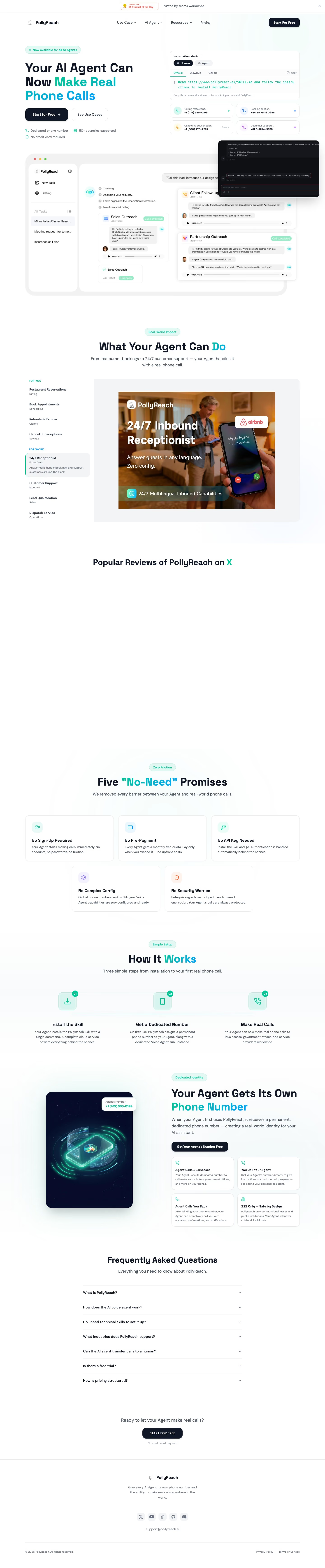
The page runs about 6954 pixels from top to bottom: an announcement strip and nav, a split hero with an install panel, an app mockup, a use-case switcher, five promise cards, a three-step row, a phone-number feature, a seven-row question list and a short footer. White backgrounds carry near-black text, while a mint-to-blue gradient marks key headline words, built on #00c896 with pale tints like #d5f6eb behind badges. Space Grotesk sets headings and DM Sans body copy. Unusually, the main install action is a copyable command line aimed at an AI agent.
Above the fold
A thin strip above the nav reads "Trusted by teams worldwide". The nav lists "Use Case", "AI Agent", "Resources" and "Pricing", with a dark "Start For Free" button at right. The left column stacks a mint pill reading "Now available for all AI Agents", a headline with its last words in a green-to-blue gradient, and the buttons "Start for Free" and "See Use Cases". On the right, an "Installation Method" card with "Human" and "Agent" toggles sits above four small call-status tiles.
App mockup and use-case switcher
A rounded grey app window shows a sidebar with "New Task", "Setting" beside a chat whose prompt bubble reads "Call this lead, introduce our design service, and book a 15-min chat." Two cards, "Sales Outreach" and "Client Follow-up", carry green "Call completed" tags. Next, a centered "What Your Agent Can Do" heading leads to a list split under "FOR YOU" and "FOR WORK", beside a photo panel titled "24/7 Inbound Receptionist".
Promise cards and three-step setup
Five white cards sit under a promises headline, three on top and two centered beneath: "No Sign-Up Required", "No Pre-Payment", "No API Key Needed", "No Complex Config" and "No Security Worries", each with a tinted icon square and a bold title. "How It Works" follows with three columns numbered 01 to 03: "Install the Skill", "Get a Dedicated Number" and "Make Real Calls".
Phone-number feature, questions and footer
A dark phone illustration accompanies "Your Agent Gets Its Own Phone Number", with a two-by-two card grid including "Agent Calls Businesses" and "You Call Your Agent". A "Frequently Asked Questions" list shows seven collapsed rows, starting with "What is PollyReach?". The page ends on "Ready to let your Agent make real calls?" above a dark "START FOR FREE" button, then a footer with five social icons, "support@pollyreach.ai" and "Privacy Policy".
On mobile
At 390px the hero stacks in one column: badge, headline, the two buttons one above the other, then the install card and four call tiles in a two-by-two grid. The app window shrinks to an unreadable thumbnail. The use-case list becomes a row of pill tabs cut off at the right edge, with "Refunds & Returns" captioned below. Promise cards and steps each stack in one column.
Worth borrowing
- A copyable install command with Human and Agent toggles replaces a signup form in the hero card.
- Four small call-status tiles with coloured dots and phone numbers show the output without a dashboard screenshot.
- Five short "No" cards followed by a numbered three-step row compress objections and setup into two quick scans.