Chronicle
chroniclehq.com/
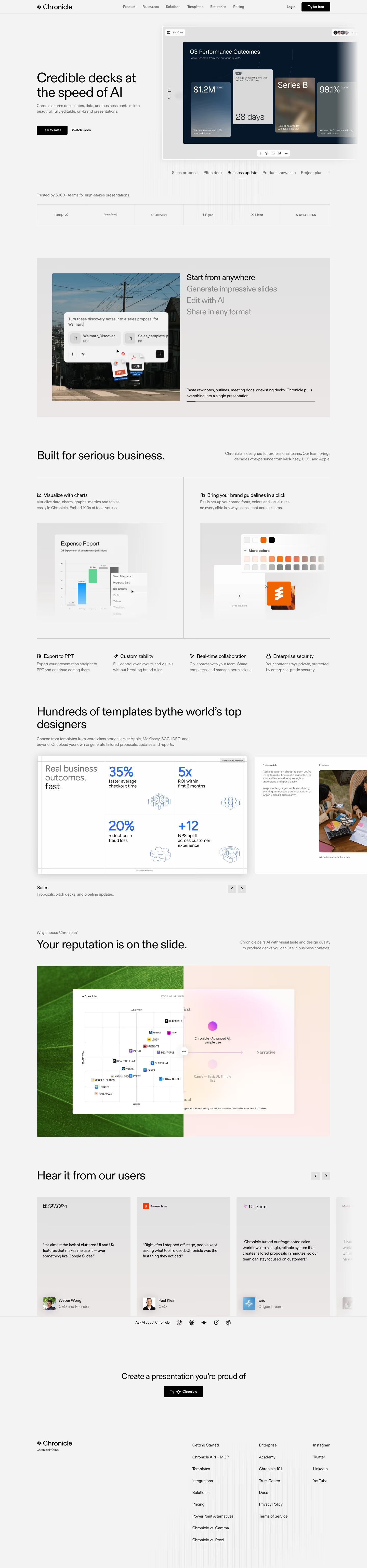
Chronicle turns documents, notes, and meeting materials into editable, brand-consistent slide decks, positioning itself against Gamma, Beautiful.ai, PowerPoint, and Google Slides in a direct on-page comparison. The line "Credible decks at the speed of AI" frames its pitch around design quality rather than generation speed, reinforced by a stated team background from McKinsey, BCG, and Apple. It claims 5,000+ teams as customers and shows a logo row including OpenAI, Apple, Notion, and Figma, and one testimonial specifically praises "the lack of cluttered UI and UX features" as the differentiator from competing AI deck tools.
- Category
- Productivity & Collaboration
- Style
- LightMinimal
- Stack
- Next.jsWordPress
- Fonts
- Diatype
- Palette
- Meta title
- Chronicle: AI Presentation Maker for Professional Slides & AI PPT
- Sections
- 6
- Updated
Chronicle's landing page, section by section
Each section below is cropped straight from Chronicle's live page — useful references for productivity & collaboration landing page design.
Heroes
More heroesFeatures
More featuresTestimonials
More testimonialsPricing
More pricingBlog pages
More blog pagesChronicle design review: how the homepage is built
Chronicle's homepage is a light grey page with black type. The brand matches meta.name. The palette leads with #f4fe54, a lime yellow, against #f3f3f3 for the background. Blocks run top to bottom: a split hero with the headline "Credible decks at the speed of AI" beside a product window, a row of use-case labels, a logo grid, a feature panel, a feature row, a quadrant comparison, customer quotes, a closing call to action and a footer. meta.json lists Diatype for display type and no body face. The distinctive habit is that lime appears only inside the product screenshots, while the site chrome stays black and grey.
Above the fold
The hero is a light grey field with the headline on the left, above the subhead "Chronicle turns docs, notes, data, and business context into beautiful, fully editable, on-brand presentations." Two buttons follow: a black "Talk to sales" and a text link, "Watch video". On the right, a window labelled "Portfolio" shows a dark slide of bar charts. The navigation bar holds six labels, with "Login" and a black "Try for free" button at the right.
Use cases, logos and creation features
A row of format labels, "Sales proposal", "Pitch deck", "Business update", "Product showcase" and "Project plan", sits above "Trusted by 5000+ teams for high-stakes presentations" and a bordered logo grid. The panel "Start from anywhere" lists "Generate impressive slides", "Edit with AI" and "Share in any format" beside a street photograph. "Built for serious business." then sets two columns, "Visualize with charts" and "Bring your brand guidelines in a click".
Feature row, comparison and quotes
A four-column row, "Export to PPT", "Customizability", "Real-time collaboration" and "Enterprise security", closes that section. "Your reputation is on the slide." introduces a split quadrant chart with Chronicle in the top-right quadrant beside Gamma, Tome and Canva. "Hear it from our users" follows with quote cards from "Weber Wong" and "Paul Klein", and an "Ask AI about Chronicle:" row of assistant icons closes the middle of the page.
Closing section and footer
The closing band reads "Create a presentation" above a single black "Try Chronicle" button on a plain light grey background. The light footer has a wordmark and "ChronicleHQ Inc." on the left and three link columns on the right, headed by "Getting Started", "Enterprise" and "Instagram". Footer links include "PowerPoint Alternatives", "Chronicle vs. Gamma" and "Chronicle vs. Prezi". The closing band and footer share one field.
On mobile
At 390px the hero stacks into one column, with the headline on two lines and the product window below both buttons. The format labels become a horizontal scroll row. Feature panels become one-column blocks, and the four-column feature row becomes a two-by-two grid. The quote carousel shows one card at a time, and the footer links form a single list.
Worth borrowing
- Format labels such as "Sales proposal" and "Pitch deck" show use cases before any feature copy.
- Customer quotes sit in a carousel beside an "Ask AI about Chronicle:" row, pairing testimonials with assistant entry points.
- Lime appears only inside product screenshots, so the brand colour reads as product output rather than navigation.