Solidroad
solidroad.com/
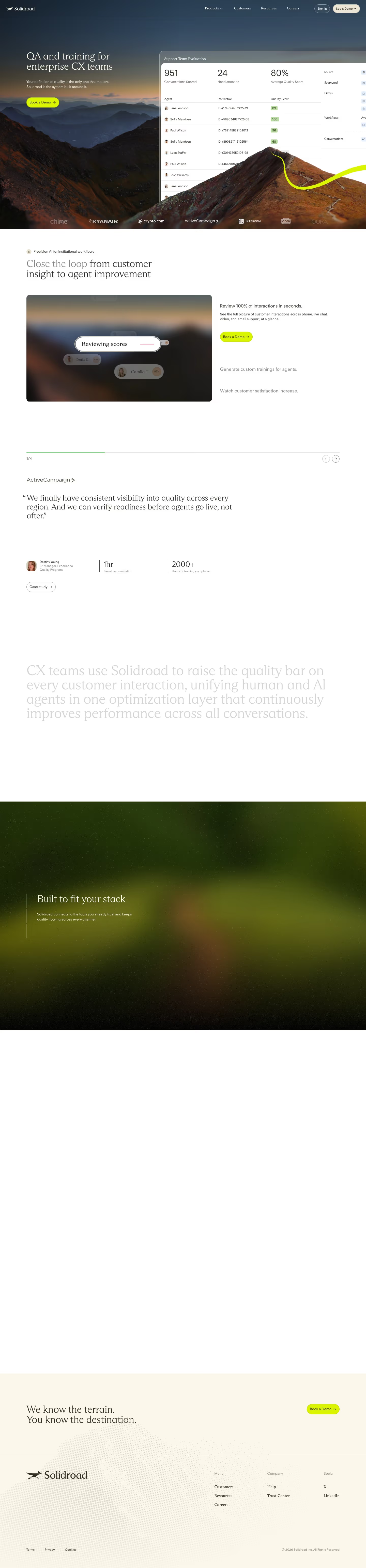
Solidroad builds AI-driven training simulations for customer support teams, letting managers run reps through realistic customer scenarios and score them against custom rubrics before they handle live conversations. Its homepage leads with two hard numbers rather than a generic before/after promise: an 18% reduction in average handling time and a 3% increase in CSAT. The most concrete piece of the page is a dashboard mockup listing six named individual agents with their own performance percentages side by side, making the scorecard concept visible rather than described. A testimonial is attributed to a specific named role, Head of Learning and Development, tying the product directly to L&D buyers rather than support ops generally.
- Category
- Sales & Support
- Style
- DarkColorful
- Stack
- Framer
- Fonts
- ABC Arizona Mix LightFT Regola Neue Regular
- Palette
- Meta title
- Solidroad — Precision AI QA & Coaching for CX Teams
- Sections
- 2
- Updated
Solidroad's landing page, section by section
Each section below is cropped straight from Solidroad's live page — useful references for sales & support landing page design.
Heroes
More heroesSolidroad design review: how the homepage is built
Solidroad's homepage is a long scroll of about 6,168 pixels on desktop. It opens on a full-bleed photograph of a rust-coloured mountain ridge under a navy sky, with a lime curve sweeping across the rock. Colour runs from navy #293648 and #384c62 at the top to brown #774727 and #452c25 in the photo, and the page turns cream and white below the hero. Detected display faces are ABC Arizona Mix Light and FT Regola Neue Regular. The distinctive device is a support scorecard mockup laid over the mountain edge in the hero.
Above the fold
The hero headline "QA and training for enterprise CX teams" sits left in a light serif, with the subhead "Your definition of quality is the only one that matters. Solidroad is the system built around it." and one lime "Book a Demo" button. A panel titled "Support Team Evaluation" sits right, showing 951, 24 and 80% over agent rows. Seven partner logos run along the bottom edge, including ActiveCampaign and INTERCOM.
Close the loop feature walkthrough
A section headed "Close the loop" has a grey first line, with the rest of the heading in dark type. Beneath it a dark image card reads "Reviewing scores" over two name chips. A right column carries "Review 100% of interactions in seconds." with a "Book a Demo" button, followed by "Generate custom trainings for agents." and "Watch customer satisfaction increase." in grey.
ActiveCampaign testimonial and proof points
A testimonial attributed to ActiveCampaign is set in large serif: "We finally have consistent visibility into quality across every region." It adds that readiness can be checked before agents go live. The attribution names "Destiny Young" beside a small portrait. Two stats follow, "1hr" labelled "Saved per simulation" and "2000+" labelled "Hours of training completed". Below, faded serif text leads into a full-width blurred green photo carrying "Built to fit your stack".
Closing section and footer
A cream panel reads "We know the terrain." and "You know the destination." with a "Book a Demo" button. A hairline divides the footer, which lists "Customers", "Resources" and "Careers" under Menu, "Help" and "Trust Center" under Company, and X and LinkedIn under Social. The legal row carries Terms, Privacy and Cookies. A halftone dot texture fills the lower left of the footer. A halftone dot texture fills the lower left of the footer.
On mobile
At 390px the hero stacks, with headline, subhead and button above the scorecard, which is cropped at its right edge. The partner logos drop to a single row running past the fold. The testimonial stacks its two stats one above the other, and the "Built to fit your stack" block becomes a short full-width panel. The footer collapses into one column, with Social links dropping below the menu and company columns.
Worth borrowing
- Pair the headline with a real product panel so the proof sits in the first screen, as the scorecard does here.
- Repeat one lime button for every call to action, in the hero, the feature block and the closing panel.
- Set a short quote in large serif with a named attribution and two stat figures.