
8 Real SaaS Pricing Pages, and the Patterns Actually Worth Copying
A close look at how Notion, Sentry, Semrush, Superhuman, Gusto, Tailscale, Ramp and ElevenLabs actually structure their pricing pages — not generic pricing-page advice, but what's really on each page and why it works.
By Derek Paul
Every screenshot and claim below is pulled straight from BestSaaSWebDesigns' catalog of 400+ captured SaaS sites — the live pricing pages of eight products already indexed here, not summarized from memory and not generic pricing-page advice. If a pattern below is one you want more of, the pricing page examples hub has the rest of the catalog's captures in the same screenshot-first format.
Notion: two panels, not one row
Most tiered pricing pages put every plan in a single horizontal row. Notion splits its four tiers into two separate panels instead — "Essentials for staying organized" (Free and Plus) on the left, "The AI workspace for work that matters" (Business and Enterprise) on the right, with Business marked "Recommended."
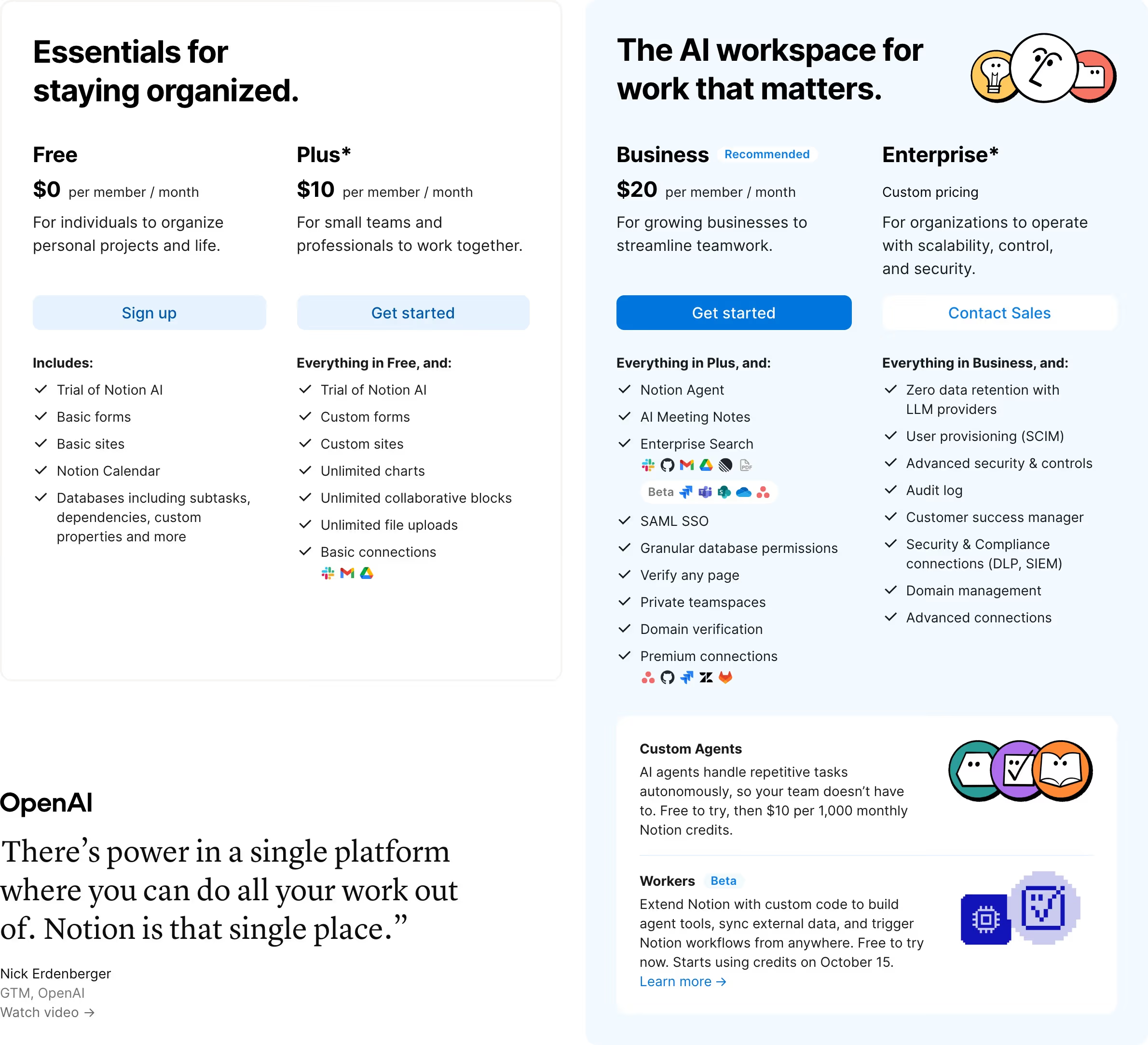
That's a framing choice, not just a layout one: it lets Notion sell two different products, essentially, on the same page — Notion-as-personal-tool and Notion-as-AI-workspace — without a visitor having to mentally filter four cards to find the two that apply to them. It also embeds a customer quote (from OpenAI) directly inside the pricing page itself, and lists specific integration icons per tier rather than a plain "integrations included" bullet.
Sentry and Superhuman: upgrading as pure addition
Sentry (Developer → Team → Business → Enterprise) and Superhuman (Free → Pro → Business → Enterprise) both use the same copy pattern for everything past the first tier: "Team features +", "Everything included in Pro, plus:". Neither ever says what a lower tier lacks — only what the next one adds.
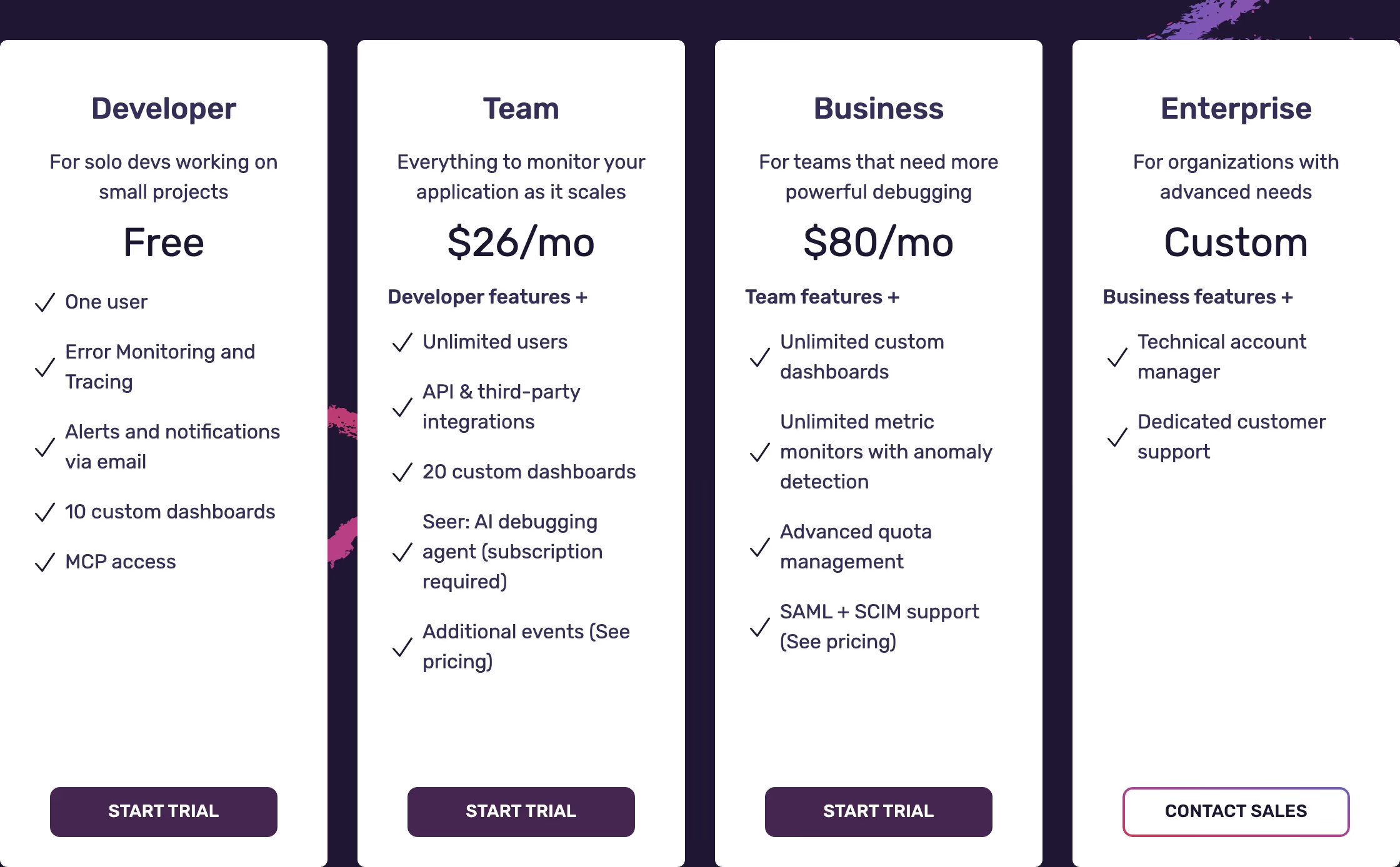
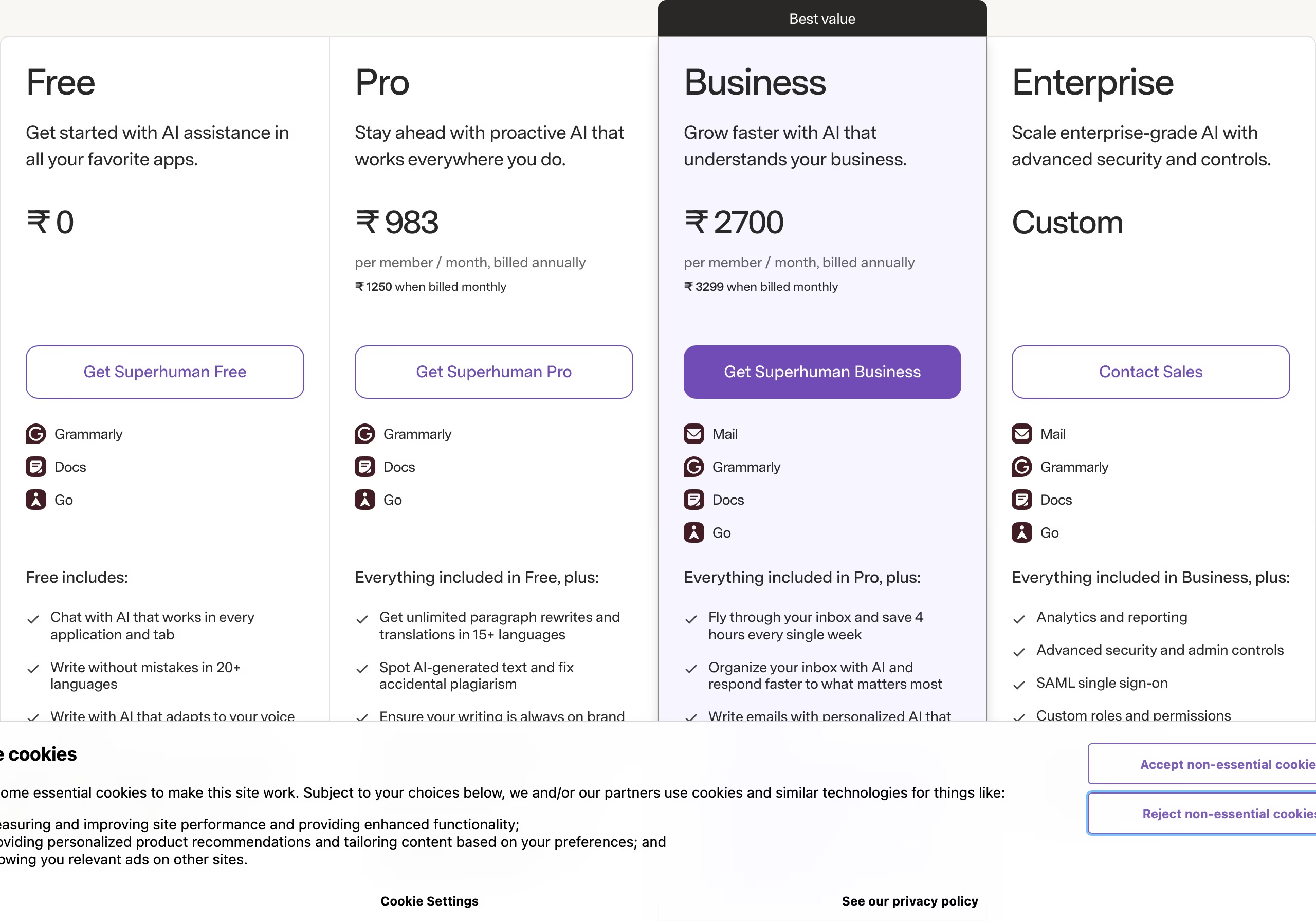
This matters more than it looks like it should: framing an upgrade as "everything you already have, plus more" removes the implicit loss-aversion of a comparison table where higher rows have checkmarks and lower rows have blanks. Superhuman adds a second technique on top — a plain "Best value" banner spanning the recommended tier, plus the same per-tier integration icons Notion uses (Grammarly, Coda, Slack, Mail) as visual proof of breadth instead of another bullet point.
Semrush: the discount is on every tier, not just one
Semrush's four tiers (SEO, Starter, Pro+, Advanced) each show a struck-through monthly-equivalent price next to the real one — $117.33 crossed out against $139, $165.17 against $199, and so on, on every single card.
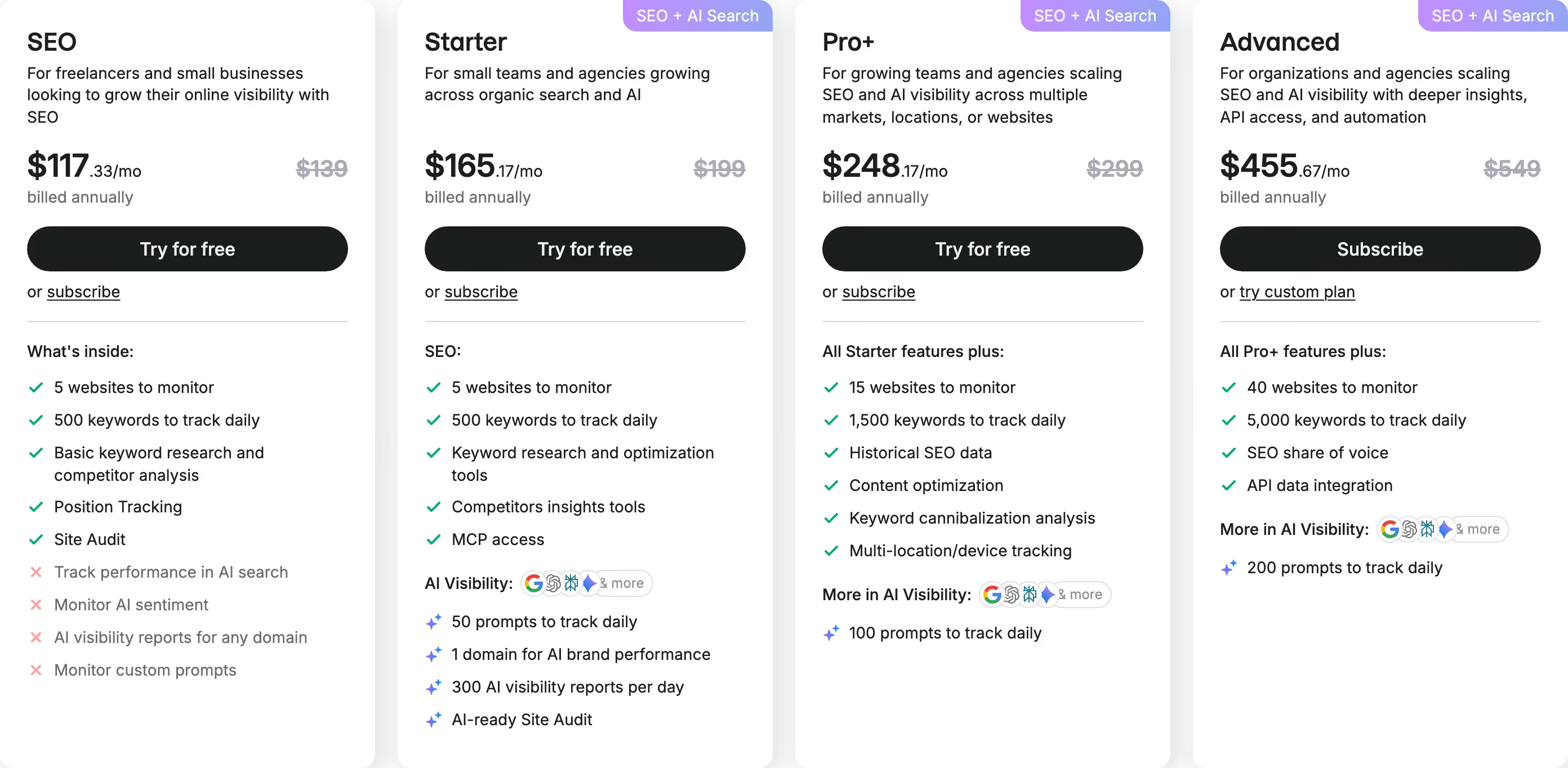
Most pricing pages that use a strikethrough discount reserve it for the one tier they want you to pick. Semrush applies it uniformly, which reframes the entire page as "everything here is on sale" rather than steering toward a single plan — a subtly different psychological move, and one that only works because the "before" price is a real, verifiable annual-vs-monthly difference rather than an arbitrary anchor.
Ramp: tier names that describe the actual upgrade reason
Ramp's four tiers aren't called Starter/Pro/Enterprise — they're labeled by AI capability directly: "AI-assisted" (Free), "AI-powered" (Plus, $15/mo/user), and "AI-tailored" (Enterprise, custom). Each card lists what it adds under the same "All the features of [previous], and:" additive pattern Sentry and Superhuman use, grouped into named sub-sections (Travel & Expense, Accounts Payable, Procurement, Accounting Automation, Global Coverage) rather than one flat bullet list.
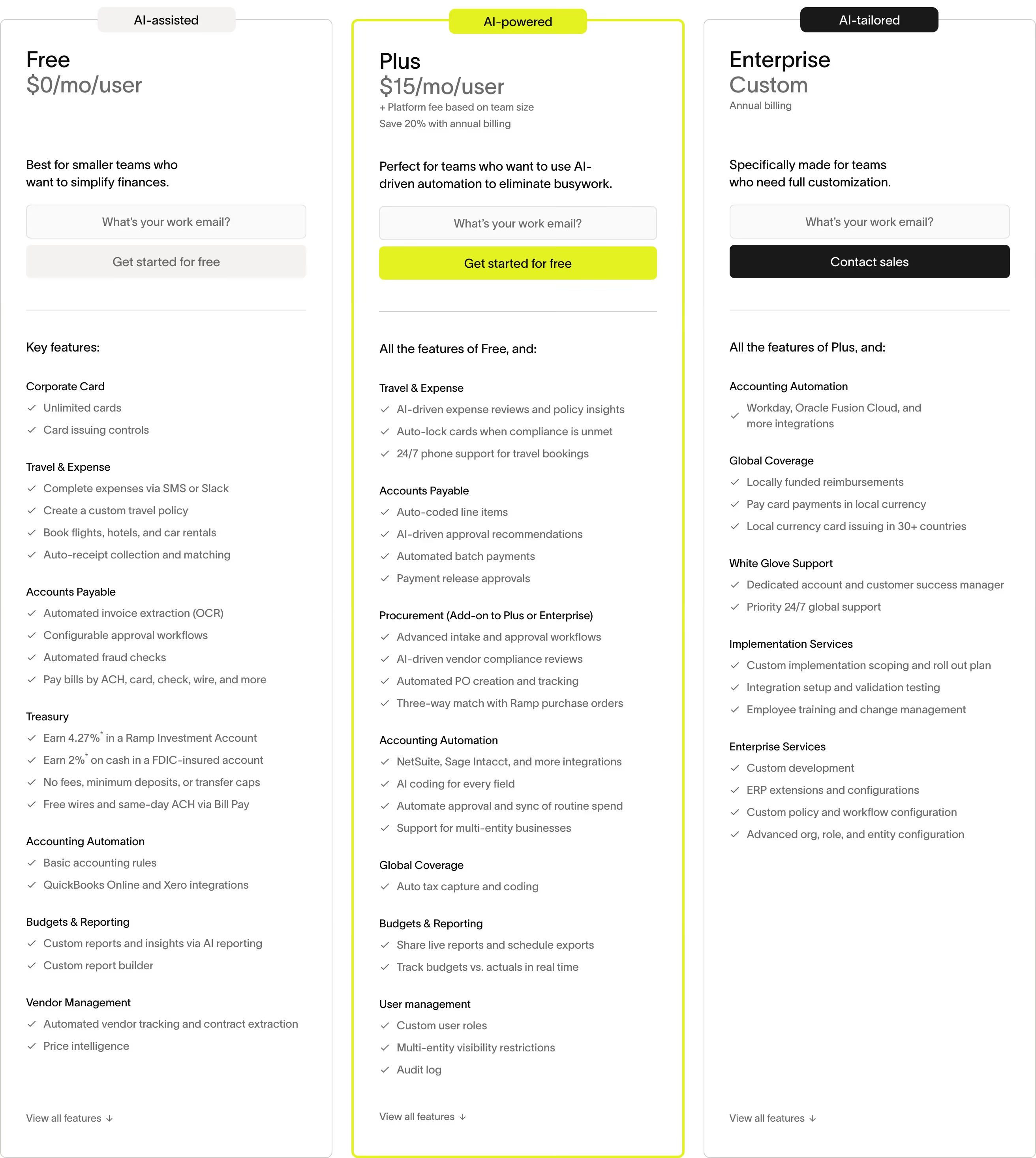
The AI-capability labels aren't just a rebrand of the usual ladder — they match what actually changes between tiers. Free gets AI-driven policy checks; Plus adds AI-driven approval recommendations and automated batch payments; Enterprise adds AI coding for every accounting field and custom workflow automation. When the real differentiator between tiers is depth of automation rather than seat count or storage limits, naming the tiers after that differentiator directly is more honest — and more useful for a buyer trying to figure out which tier they actually need — than a generic tier ladder would be.
Gusto: unbundling instead of tiering
Gusto's pricing page doesn't stop at its base plans — beneath them sits a dedicated add-ons section, each with its own name and unit price: global contractor payments, state tax registration, R&D tax credit scanning (15% of identified credits), next-day pay ($15/mo + $3/mo per person), instant pay ($100 per payroll), same-day pay ($90 per payroll).
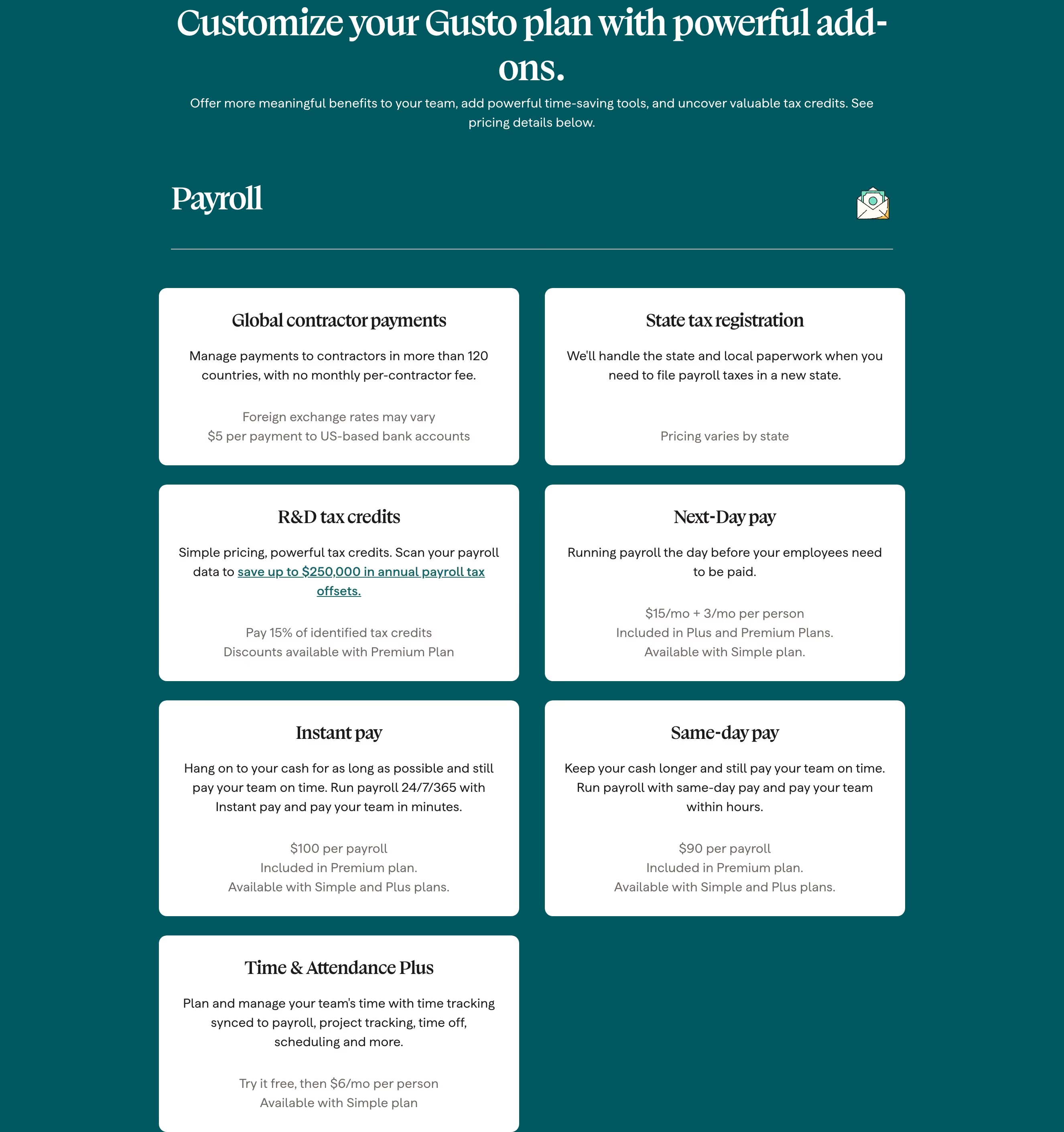
This is a genuinely different structure from a typical three-or-four-tier ladder, and it makes sense for what Gusto sells: usage of "same-day pay" or "R&D tax credits" varies enormously between a five-person startup and a 200-person company, so pricing them as flat-rate add-ons avoids either overcharging light users or undercharging heavy ones inside a single bundled tier.
ElevenLabs: pricing in credits, with the discount only on the tier that matters
ElevenLabs' four tiers (Free, Starter $6/mo, Creator, Pro $99/mo) share an identical feature list top to bottom — Text to Speech, Speech to Text, Sound Effects, Voice Design, Music, Productions, Image & Video are available starting at Free. What actually changes tier to tier is a monthly credit allowance (10k → 30k → 121k → 600k) and which higher-cost capabilities that budget can reach, like professional voice cloning or 44.1kHz PCM API audio output on Pro.
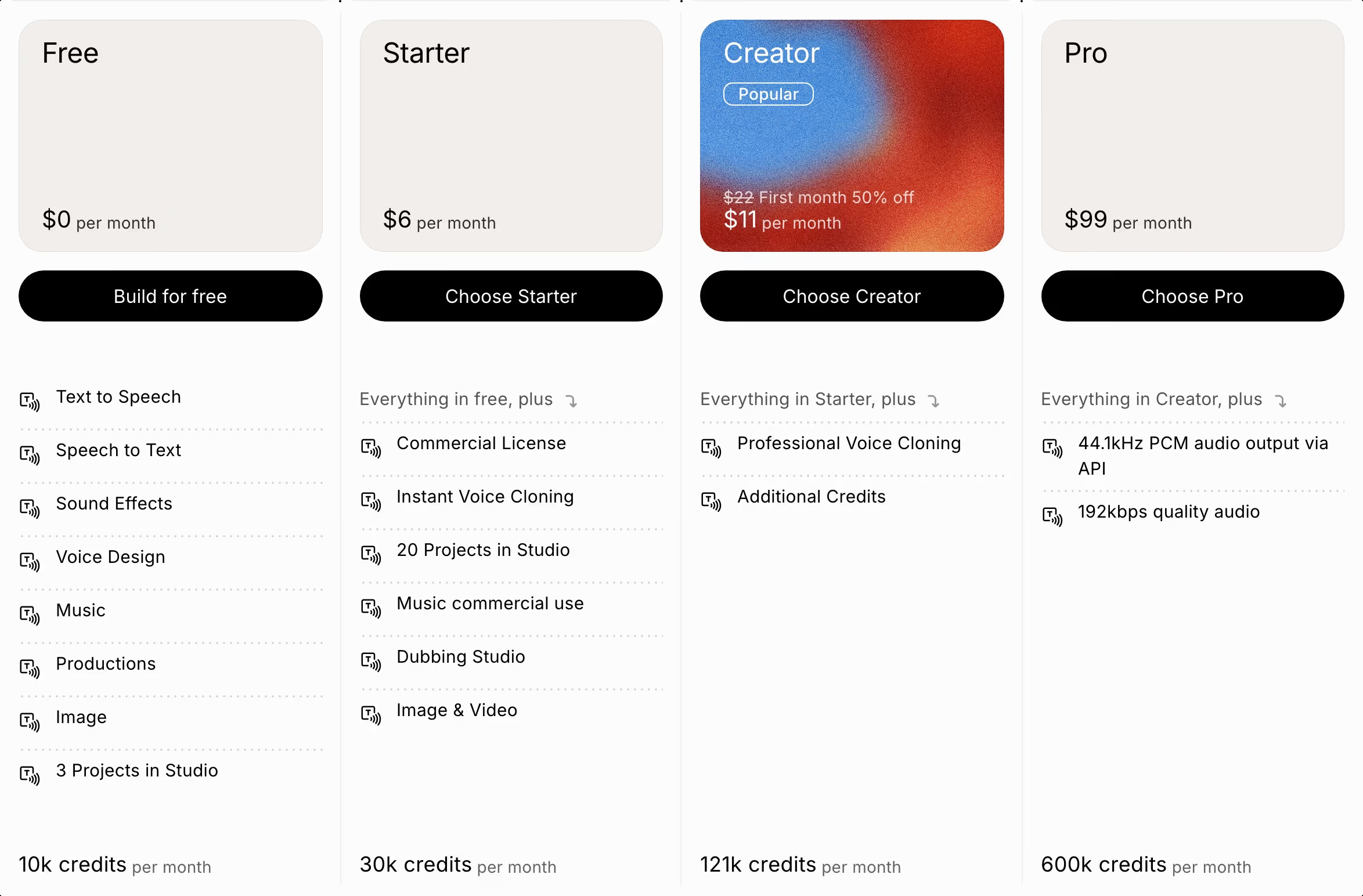
The Creator tier is the only one carrying a visible discount — "$22 First month 50% off, $11 per month" — set inside its own blue-to-red gradient card and marked "Popular," while Free, Starter and Pro sit in plain neutral cards. That's the inverse of Semrush's approach: instead of anchoring the whole page as a discount, ElevenLabs concentrates the entire visual and pricing incentive on the one tier it wants a visitor to pick, and leaves the others deliberately plain by comparison. Pricing by credits rather than by feature-gating also fits a product whose real cost driver is compute per generation — the tiers aren't selling more capability so much as more usage.
Tailscale: a specific, generously-limited free tier
Tailscale's free "Personal" tier doesn't say "Free" — it says "$0, FREE FOREVER," and backs that up with specific numbers rather than vague restrictions: unlimited user devices, up to 6 users, up to 3 ACL groups, up to 50 tagged resources.
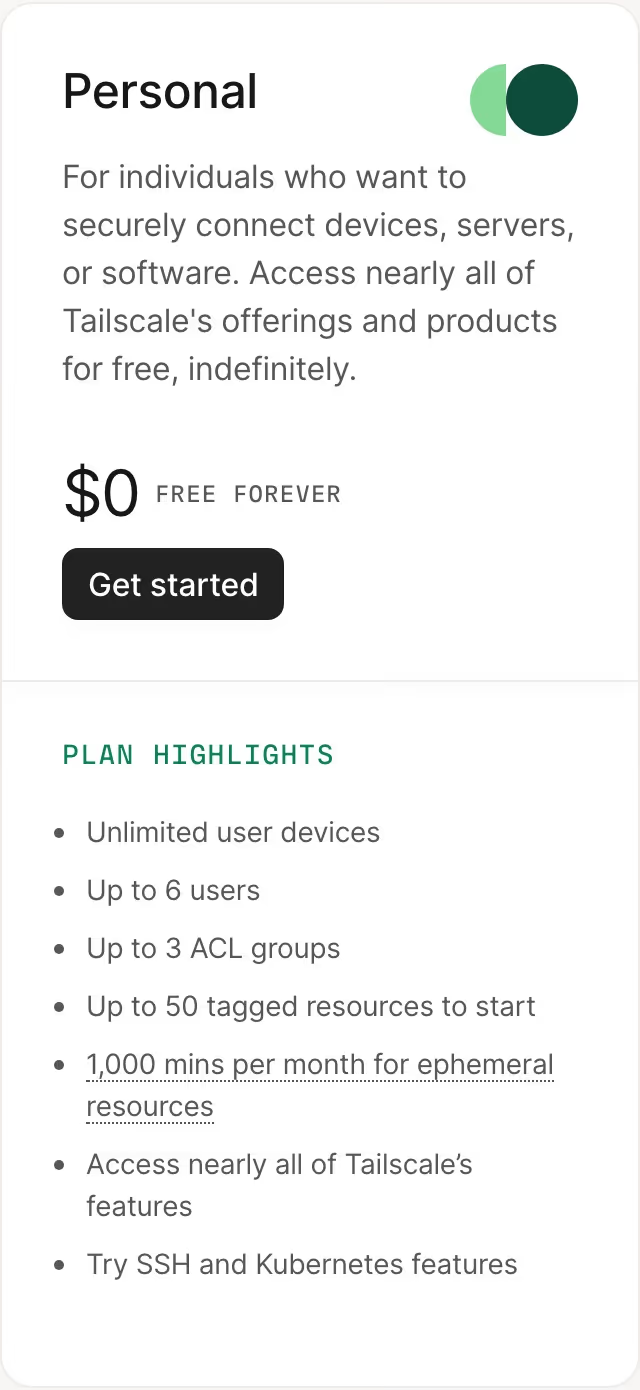
For a security/networking product, a permanent free tier is a real trust signal in itself — it says the company is confident enough in its paid tiers that free users won't need to be aggressively converted. Naming the actual limits (not "limited devices" but "unlimited devices, up to 6 users") gives a visitor enough information to self-qualify without contacting sales.
What to take from this
None of these eight pages use the same trick, which is itself the lesson: "make your pricing page good" isn't one technique, it's picking the framing that matches what's actually true about your product — two audiences (Notion), strictly additive tiers (Sentry, Superhuman), a real annual discount applied everywhere (Semrush), tier names that describe the real differentiator (Ramp), wildly variable usage unbundled into add-ons (Gusto), a discount concentrated on one recommended tier (ElevenLabs), or genuine confidence in a free tier (Tailscale). The throughline across all eight: every one of them prices around the thing that's actually true about how customers use the product, rather than defaulting to a generic three-tier template and hoping it fits. See the full pricing page hub for more real examples, browse by category to compare how a specific type of product handles it, or read BestSaaSWebDesigns' breakdown of the tech stacks behind some of these same companies' sites — the same catalog, a different angle.
At a glance
| Site | Category | Stack |
|---|---|---|
| Notion | Productivity & Collaboration | Next.js, Tailwind CSS |
| Sentry | Engineering & Infrastructure | Astro, Tailwind CSS |
| Semrush | Marketing | Svelte |
| Superhuman | Productivity & Collaboration | Next.js |
| Gusto | People & Culture | Next.js |
| Tailscale | Engineering & Infrastructure | Next.js, Tailwind CSS |
| Ramp | Finance & Commerce | Next.js, Tailwind CSS |
| Elevenlabs | Engineering & Infrastructure | Next.js, Tailwind CSS |
Frequently asked
Do these patterns apply outside of SaaS pricing pages specifically?
Some do — the additive "everything in X, plus" framing and specific (vs. vague) free-tier limits work for any tiered product. The add-on unbundling pattern is more specific to products like Gusto's, where usage genuinely varies a lot between customers.
Is showing a struck-through price on every tier, like Semrush does, ever risky?
It can read as inflated-then-discounted if the "original" price never actually applied to real customers. It works here because the discount is tied to a real mechanic (paying annually vs. monthly) rather than an arbitrary anchor price.
Why does Gusto's captured pricing section look different from a typical tiered comparison?
Gusto's pricing page includes a dedicated add-ons section beneath its base plans — payroll-adjacent features like next-day pay or R&D tax credit scanning are priced and sold separately rather than bundled into a higher tier, since usage of each varies enormously by customer.
Does labeling pricing tiers by AI capability, like Ramp does, actually communicate anything?
It works better than a generic Starter/Pro/Enterprise ladder specifically because Ramp's product differentiation between tiers genuinely is how much AI automation you get — the label matches the real upgrade reason, rather than being a marketing gloss on an otherwise ordinary seat-count tier.
Why would a usage-based product like ElevenLabs price in credits instead of features?
Because the product's real cost driver is compute per generation, not which buttons a user can click — every tier from Free through Pro gets the same core feature set, and the only thing that actually changes tier to tier is how many credits (10k → 30k → 121k → 600k per month) and which higher-cost capabilities (professional voice cloning, studio-quality audio) that budget unlocks.
Can my AI coding agent search these pricing pages?
Yes. The free BestSaaSWebDesigns MCP server lets Claude Code, Cursor, VS Code, Codex or ChatGPT filter the catalog to sites with a captured pricing page, by style, stack or category. Setup takes one step at bestsaaswebdesigns.com/mcp.
Related reading
24 SaaS About Us Page Examples, Module by Module
We read 24 real SaaS About Us pages against the same seven-module checklist — team photos, named people, stat tiles, timelines, investor walls, hiring CTAs, manifestos — and counted what's actually there. Only one page uses a timeline.
24 Product Landing Page Examples, Measured Fold to Footer
Twenty-four product landing pages read start to finish from our own screenshots — what's in the fold, where the logo strip actually sits, how the page closes, and how long each one really runs, in pixels.
22 SaaS Affiliate Program Pages, and the Terms They Actually Publish
Semrush publishes a 120-day cookie window and a four-tier commission table. Typeform caps you at $500 per referral. Seven of these 22 pages publish no rate at all. A page-by-page read of what SaaS affiliate pages actually disclose.