
Overlays & feedback
Popover
A popover is a small floating panel anchored to the element that opened it, showing extra content or controls without blocking the page.
- Also called
- Pop-over, Flyout, Info card
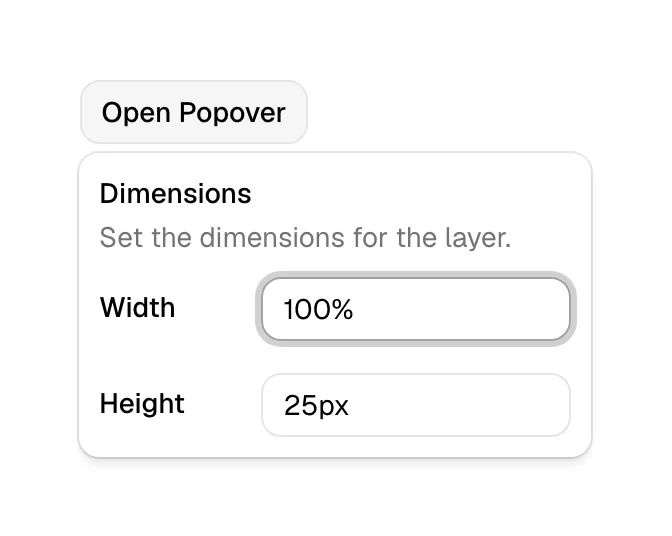
What is a popover?
A popover sits between a tooltip and a dialog. It opens on click (sometimes on hover), points at its trigger with a small arrow or close placement, and can contain anything short: a few lines of explanation, a list of options, a mini form, a preview card. Clicking elsewhere closes it, and the page behind keeps working.
On SaaS sites popovers do quiet, useful jobs. A "What counts as a seat?" link on the pricing page opens a short explanation; a team member's avatar shows a profile card; a "Share" button opens a small panel with a copy-link field. In product mockups they add realism: Codeant's homepage shows a security map with a popover titled "No authentication on API reads", pointing at the exact node it describes.
Keep popovers small and dismissible. If the content needs scrolling, several steps or a decision that must be made, it has outgrown a popover and wants a dialog or a page. Position it so it never runs off-screen, close it on Escape, and make sure keyboard users can reach the content inside.
When to use a popover, and when not to
Use it for
- Context on demandExtra detail that some visitors want and most don't, tied to one specific element.
- Small interactive contentA short list, a copy button or a couple of controls that don't justify a dialog.
- Annotating a mockupPointing at one part of a product visual and explaining what it shows.
Avoid it for
- Essential informationPlan limits or prices that everyone needs belong on the page, not behind a click.
- One-line hintsA short label on hover is a tooltip; a popover is heavier than needed.
- Long or multi-step tasksAnything with several fields or steps belongs in a dialog or its own page.
Anatomy of a popover
- 1TriggerThe button, link, icon or avatar the popover is attached to.
- 2PanelA small card with a shadow or border so it reads as floating above the page.
- 3Arrow or offsetA caret or tight placement that ties the panel visually to its trigger.
- 4ContentText, a short list, a preview or a few controls.
- 5Close controlAn optional close icon; outside clicks and Escape should also close it.
Common popover variants
1. Info popover
A short explanation opened from a question-mark icon, common on pricing tables.
2. Hover card
A preview of a profile, link or record shown when hovering over it.
3. Action popover
A compact panel with controls such as share, copy link or choose a color.
Spotted in our design reviews
Where our reviews mention a popover:
"See how your attack surface connects to real risk." sits above a window mockup on a purple-to-pink sky, plotting hosts to root causes to data, with a popover titled "No authentication on API reads", a red CRITICAL tag and a five-item legend.
Codeant · Attack graph, offensive and defensive lists
Often confused with
Popover vs. tooltip
A tooltip holds a short text label and appears on hover or focus. A popover can hold rich, interactive content and usually opens on click.
Popover vs. dialog
A dialog dims and blocks the page until handled. A popover is anchored to its trigger and leaves the page usable.
Popover vs. dropdown menu
A dropdown menu is a popover that holds only a list of commands or links. A general popover can hold any content.
Frequently asked
Should popovers open on hover or click?
Click, in most cases. Hover doesn't exist on touch screens, and hover-opened panels with interactive content close when the pointer drifts. Reserve hover for read-only preview cards.
Can a popover contain links and buttons?
Yes, that is the main difference from a tooltip. Make sure keyboard users can move focus into it and that Escape closes it.