
Overlays & feedback
Dropdown menu
A dropdown menu is a list of links or options that opens below a button or nav item when it is clicked or hovered, and closes once something is chosen.
- Also called
- Dropdown, Drop-down, Nav dropdown, Menu button
- Spotted on
- 29 of 422 homepages
- Browse examples
- Hero sections →
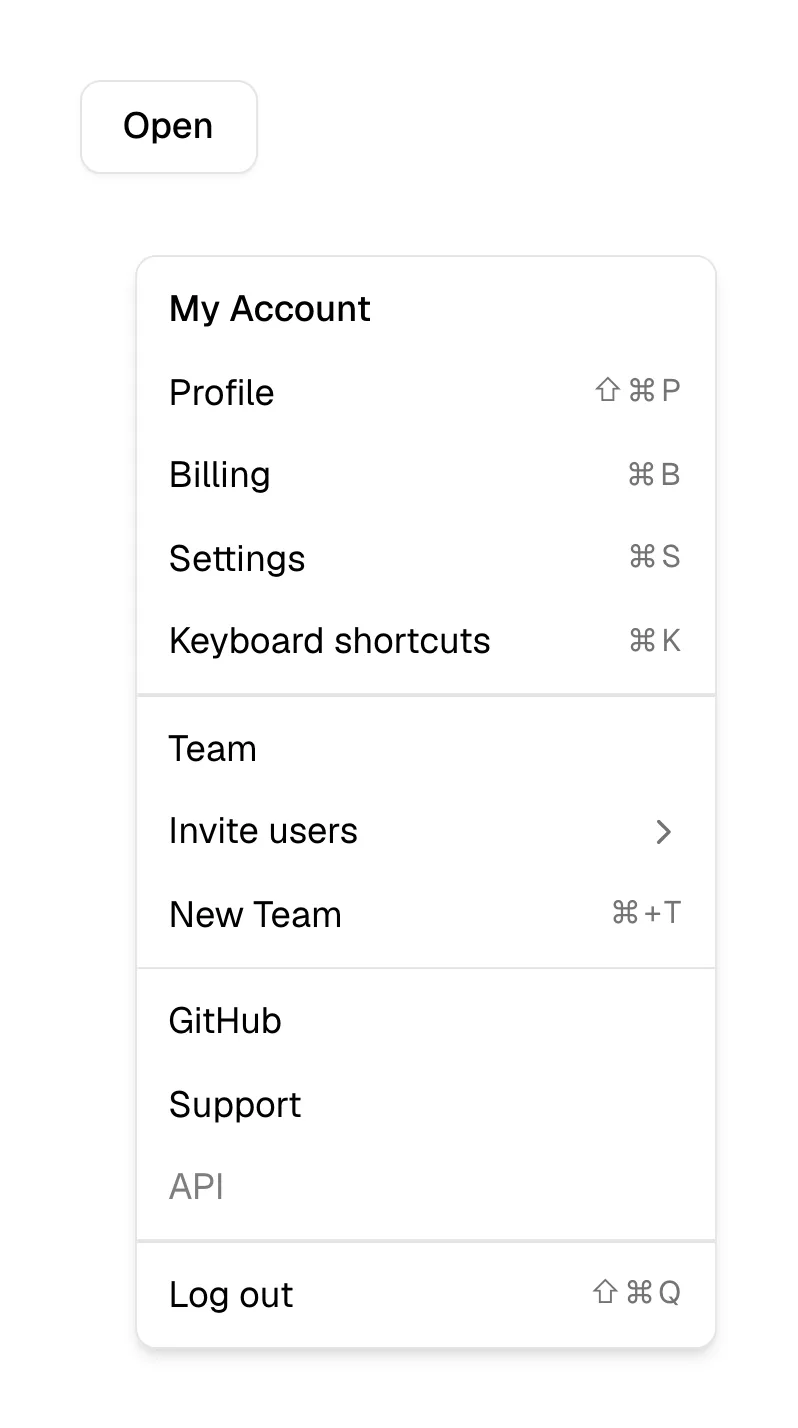
What is a dropdown menu?
On SaaS sites the dropdown's main job is navigation. Top-level items such as "Product", "Solutions" and "Resources" get a small chevron, and clicking or hovering opens a short list of pages beneath them. Swimm's navigation holds four of them, and Context and Zaro mark "Features" or "Product" as dropdowns while keeping "Pricing" a plain link, which is a sensible split: the page visitors look for most is never hidden.
Dropdowns also live inside product UI shown on the page. Prompt-box heroes often carry a model or mode dropdown, as Lovable's "Build" and Perplexity's "Model" controls do, and Temporal's interactive demo starts with a scenario dropdown. In these places the dropdown says "you can change this" without any extra copy.
The interaction details decide whether a nav dropdown feels solid or fiddly. Hover menus need a small delay before closing, so a diagonal mouse path doesn't snap them shut. They must also open with a click or Enter for keyboard and touch users, close on Escape and an outside click, and use a chevron that rotates to show the open state. Once a dropdown grows to several columns with descriptions and images, it has become a mega menu.
When to use a dropdown menu, and when not to
Use it for
- Grouped navigationFive to eight related pages that would crowd the nav bar as separate links.
- Options for one controlA button with a handful of variants, such as choosing a model or region.
- Secondary choicesSign-in options, language or theme that most visitors won't change.
Avoid it for
- Pricing and the main CTAThe pages and actions most visitors want should be direct links, not menu items.
- Very long listsDozens of options need search; use a combobox or a dedicated page.
- Rich product overviewsWhen each item needs an icon, description and preview, a mega menu fits better.
Anatomy of a dropdown menu
- 1TriggerA nav label or button with a chevron that rotates when the menu opens.
- 2PanelA card under the trigger with a border or shadow separating it from the page.
- 3Menu itemsLinks or options, optionally with an icon and a one-line description.
- 4Group labelsOptional small headings dividing items, such as "By team" and "By use case".
- 5Footer linkAn optional "See all" or featured link at the bottom of the panel.
Common dropdown menu variants
1. Nav dropdown
A short list of links under a top-level navigation item.
2. Account dropdown
Sign-in options or account links under a "Sign in" or avatar button.
3. Control dropdown
A selector inside a product UI, such as a model, scenario or language picker.
Spotted in our design reviews
Our reviews describe a dropdown menu on 29 of the 422 SaaS homepages in the catalog. A few of them:
The top carries a dark purple pill banner reading "Looking for Superhuman Mail?" with a "Learn more" button, then a white navigation bar with five dropdowns, "Contact sales" and "Sign in".
Superhuman · Above the fold
The nav holds the "swim" wordmark and four dropdowns, "Services", "Solutions", "Resources" and "Company", with a blue "Book a call" button at far right.
Swimm · Above the fold
The header lists "Solutions", "Product" and "Resources" with dropdown arrows, then "Pricing", "Sign in" and "Get Started".
Stacker · Above the fold
A "NEW" badge leads into a cream prompt box with a "Starter prompts" dropdown and blue send arrow, flanked by two pill menus.
Retool · Above the fold
A black strip above the header announces Arrow 2; the header holds the logo, eight centered links, a "Sign in" dropdown and a dark "Get started" pill.
Quiver · Above the fold
A floating white navigation bar holds the logo, "Product" and "Solutions" dropdowns, "Security", "Blog", "Sign in" and a black "Contact us" button.
Zaro · Above the fold
The navigation bar holds the "chargebee" logo, dropdown links, an orange "Startup Offers" link, an outlined "Start Free Trial", a filled "Get a Demo" and "Login".
Chargebee · Above the fold
The serif headline "Make any video you can think of" sits centred over a wide input reading "Describe your video, or drop footage..." with a plus button, an "Auto" dropdown, a sparkle icon and a send arrow.
Usecardboard · Above the fold
Often confused with
Dropdown menu vs. mega menu
A mega menu is a wide, multi-column panel with descriptions and often images. A dropdown menu is a single narrow list.
Dropdown menu vs. select
A select is a form field whose chosen value is submitted with the form. A dropdown menu triggers navigation or actions directly.
Dropdown menu vs. context menu
A context menu holds actions for a specific item and often opens on right-click. A dropdown menu opens from a visible labeled button.
Frequently asked
Should nav dropdowns open on hover or click?
Either can work on desktop, but they must also open on click or Enter, since touch and keyboard users can't hover. If you use hover, add a short close delay so the menu doesn't vanish on a diagonal mouse move.
Should the top-level dropdown label also be a link?
Avoid it. When "Product" both opens a menu and navigates to a page, touch users can't reach one or the other. Make the label a menu trigger and put an "Overview" link inside.
How many items should a nav dropdown hold?
Usually three to eight. Past that, group the items with labels or move to a mega menu.