
Overlays & feedback
Dialog
A dialog is a window that opens on top of the page, dims what is behind it and holds the visitor's attention until they complete or dismiss a single task.
- Also called
- Modal, Modal window, Pop-up
- Spotted on
- 8 of 422 homepages
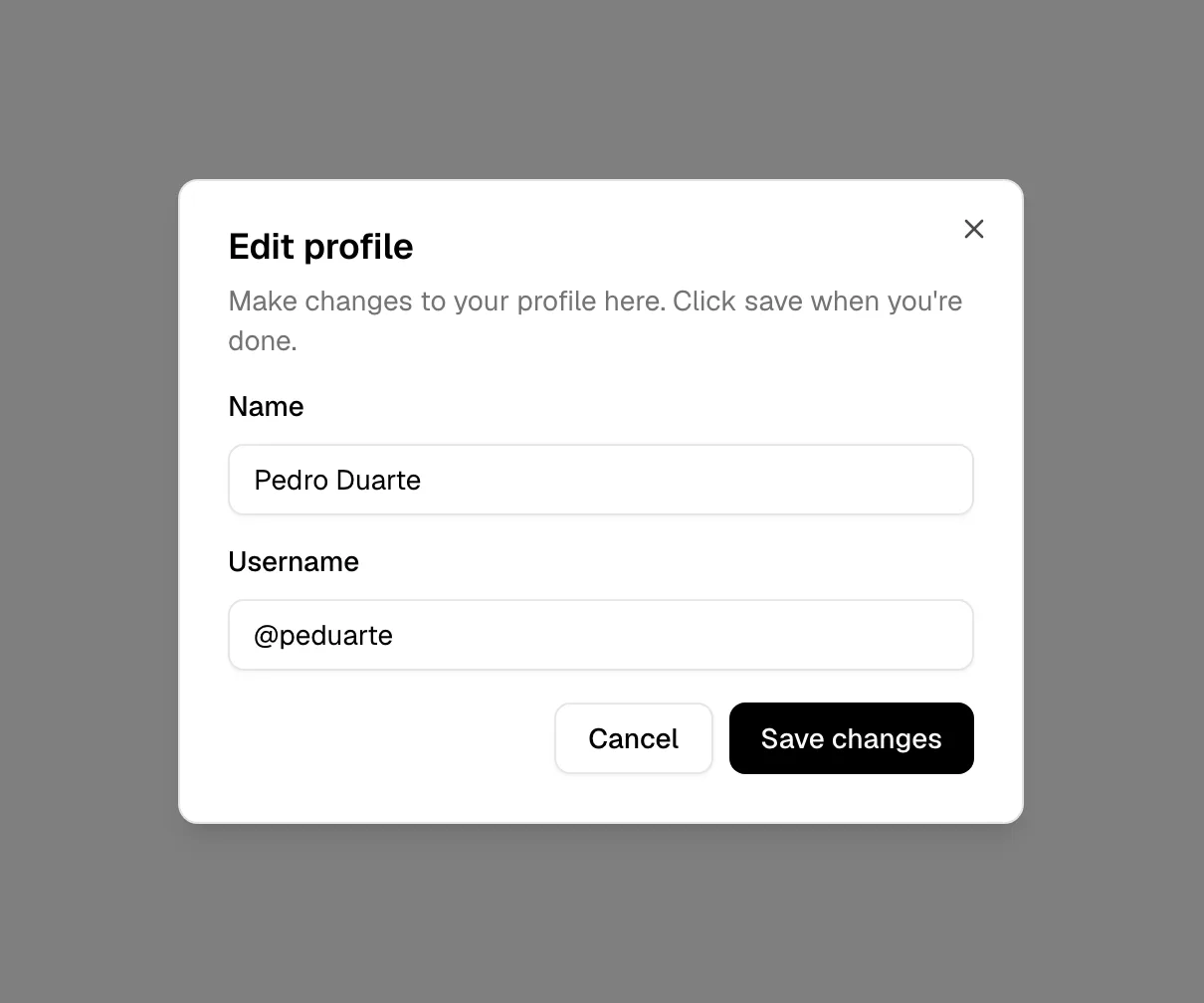
What is a dialog?
Dialogs, more often called modals, interrupt on purpose. They are right when the next step needs a decision or a little input and leaving the page would break the flow: a "Book a demo" form opened from the hero, a video player, a confirmation before an irreversible action. In product mockups they are equally common; Droplette shows an "Add your colors" dialog with a Done button, and Wiza's homepage includes a prospect profile modal as a large product visual.
Most visitors' feelings about modals come from the exit-intent and timed pop-ups that open uninvited: a newsletter form two seconds after landing, a discount when the cursor drifts toward the tab bar. They cover the content the visitor came for, so they're closed by reflex, and on mobile they can be hard to close at all. A dialog the visitor asked for (they clicked "Watch demo") is welcome; one they didn't is a toll booth.
Getting the mechanics right matters more than the styling. A proper dialog moves focus into itself, traps Tab inside until closed, closes on Escape and on a click outside (unless data would be lost), locks the page scroll behind it, and returns focus to the button that opened it. Keep the entrance motion short, a fade and slight scale, and respect reduced-motion settings.
When to use a dialog, and when not to
Use it for
- Requested by the visitorA button like "Watch the demo" or "Contact sales" that opens a focused task without leaving the page.
- Short, focused inputOne to four fields or a single choice that the visitor can finish in seconds.
- Irreversible actionsConfirming a cancellation, deletion or payment where a pause prevents mistakes.
Avoid it for
- Uninvited interruptionsTimed or exit-intent pop-ups that cover content the visitor was reading; use an inline signup or a banner instead.
- Long formsMulti-step onboarding or a twelve-field demo request deserves its own page.
- Information that can sit inlineIf nothing needs a decision, show the content on the page or in a popover.
Anatomy of a dialog
- 1ScrimA dimmed or blurred layer over the page that shows the rest of the site is temporarily inactive.
- 2ContainerA centered card, usually 400–640px wide, with a clear edge against the scrim.
- 3TitleA short heading stating the task, also used as the dialog's accessible name.
- 4ContentThe message, form fields or media the task needs, and nothing else.
- 5ActionsA primary button and a secondary or cancel option, plus a close icon in the corner.
Common dialog variants
1. Form modal
A signup, waitlist or demo-booking form opened from a CTA button.
2. Video lightbox
A large dark modal that plays a product video over the page; see full-screen overlay.
3. Confirmation dialog
A small dialog with a question and two buttons, used before destructive actions.
4. Exit-intent pop-up
Opens when the cursor leaves the page; effective in some funnels but widely disliked.
Spotted in our design reviews
Our reviews describe a dialog on 8 of the 422 SaaS homepages in the catalog. A few of them:
"Sync with your styles" shows an "Add your colors" dialog with a counter of 160 colors synced and a Done button.
Droplette · Setup steps in four cards
"Search the way you think." heads three equal cards labelled "By color", "by visual similarity" and "and without AI.", the last showing a dialog titled "AI content" with three options.
Cosmos · Search demonstration and search modes
"Enterprise-Grade API Management" shows an "Import a repo" dialog, "Event-Driven Architecture with Chainhooks" shows overlapping Call chips, and "Deep Onchain Observability" shows a Chainhooks table.
Hiro · Statement and three feature cards
The Design Systems panel shows a tokens editor with a typography dialog over a travel-app layout.
Penpot · AI Workflows, Design Systems and Code
A connectors dialog lists six tiles, including "Sage Intacct", Chase, Salesforce, Smart Vault, "QuickBooks" and NetSuite, each with a green check.
Adopt · Workflow, connectors and platform grid
A lilac “Check out our other features” button introduces “Moving to Simplecast: 98% Seamless, 2% Magic”, paired with a white importing-progress dialog.
Simplecast · Analytics and migration
Interface cards overlap photographs: search results over fashion images, a "Set naming convention" dialog beside a race car, a "Final_files" folder over a laptop.
Dropbox · Features
What stands out is how much product interface sits in the scroll: a contacts table under the hero, a prospect profile modal and framed feature cards appear as large mockups between the marketing blocks.
Wiza · Overview
Often confused with
Dialog vs. popover
A popover is anchored to the element that opened it and doesn't block the page. A dialog is centered, dims the page and must be dealt with before continuing.
Dialog vs. drawer
A drawer slides in from an edge and often leaves part of the page visible. A dialog floats in the middle.
Dialog vs. full-screen overlay
A full-screen overlay replaces the whole viewport. A dialog is a smaller window with the page still visible, dimmed, around it.
Frequently asked
Is a modal the same as a dialog?
In everyday use, yes. Strictly, a modal dialog blocks the page behind it, while a non-modal dialog lets visitors keep using the page. Most "modals" on marketing sites are modal dialogs.
Why are pop-ups so annoying?
Because most of them are uninvited. A modal that appears on a timer or on exit intent blocks what the visitor came to read and asks for something before giving anything. Modals opened by a click don't carry that cost.
What makes a modal accessible?
Focus moves into it when it opens, Tab stays inside it, Escape closes it, the page behind can't scroll or be focused, it has a labeled title, and focus returns to the trigger when it closes.