
Navigation
Tab bar
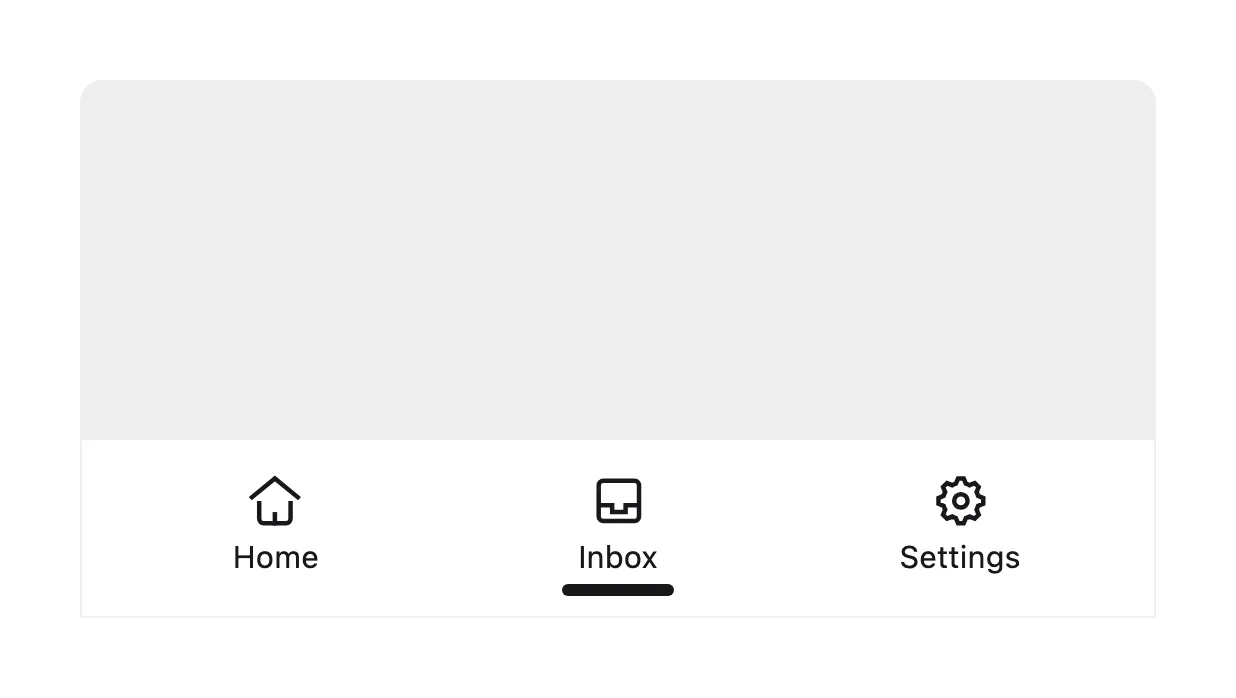
A tab bar is a row of three to five icon-and-label buttons fixed to the bottom of a mobile app screen, each switching to one top-level section.
- Also called
- Bottom navigation, Bottom tab bar, Bottom nav, App tab bar
- Browse examples
- Mobile designs →
What is a tab bar?
The tab bar is mobile app navigation, not website navigation. It lives at the bottom of the screen, within thumb reach, and stays put while each section's content scrolls above it. Tapping "Home", "Search" or "Inbox" switches the whole screen rather than one panel on it, which is the key difference from the tabs a marketing page uses to swap feature panels.
On SaaS marketing sites the tab bar shows up almost entirely inside phone mockups. A product with a mobile app frames a screenshot in a device, and the tab bar along the bottom is what makes the picture instantly read as "app" rather than "web page". In our mobile reviews Velozity's embedded office shrinks to a card with a bottom tab bar for "Workspace" and "AI Space", a rare case of the pattern showing up in a live page.
Marketing pages themselves rarely need one. A website's sections are not peers a visitor flips between all day, and a fixed bottom bar eats screen height on a page that is mostly read once. If you do show a tab bar in a mockup, keep the labels real; a row of generic icons with no words tells the visitor nothing about how the app is organized.
When to use a tab bar, and when not to
Use it for
- Showing a mobile appA phone screenshot on the homepage or a download page, where the bar signals a native app at a glance.
- Three to five peer sectionsA product's own mobile web app with a handful of destinations used repeatedly, such as Home, Search and Inbox.
- Explaining app structureA feature section that walks through the app's main areas one tab at a time.
Avoid it for
- Marketing page navigationA website that is read top to bottom doesn't need a fixed bottom bar; a compact header with a menu icon does the job.
- Switching panels in a sectionSwapping between feature panels inside one section is a job for tabs or a segmented control.
- More than five destinationsPast five items the labels shrink to unreadable; move secondary sections into a menu.
Anatomy of a tab bar
- 1ContainerA full-width strip pinned to the bottom edge, usually 50–80px tall, often with a hairline or blur separating it from content.
- 2Tab itemsThree to five equal-width buttons, each pairing an icon with a short label.
- 3Active stateA filled icon, brand color or small indicator showing which section is open.
- 4BadgeAn optional count or dot on an item, such as unread messages.
Common tab bar variants
1. Icon and label
The standard pattern: an icon above a one-word label for every item.
2. Icon only
Labels dropped to save space, which works only for universally understood icons.
3. Floating pill
The bar detached from the screen edge as a rounded, inset capsule, common in newer app designs.
4. Center action
A raised middle button, such as "New post", set between the regular tabs.
Spotted in our design reviews
Where our reviews mention a tab bar:
On a phone the embedded office shrinks to a single "Growhut HQ" card with a "Floors" button, a bottom tab bar for "Workspace" and "AI Space".
Velozity · Mobile
Often confused with
Tab bar vs. tabs
Tabs switch panels within one section of a page. A tab bar switches the whole screen of a mobile app between its top-level sections.
Tab bar vs. navigation bar
A navigation bar runs across the top of a website. A tab bar sits at the bottom of a mobile app, within thumb reach.
Tab bar vs. segmented control
A segmented control toggles between a few views of the same content; a tab bar moves between entirely different sections.
Frequently asked
Should a SaaS marketing site use a bottom tab bar on mobile?
Usually not. A marketing site is read once, top to bottom, and a fixed bottom bar takes screen height for links visitors rarely need. A header with a menu icon and one visible button serves it better.
How many items should a tab bar have?
Three to five. Fewer than three and it isn't worth the space; more than five and the labels get too small to read or tap reliably.