
Components
Tabs
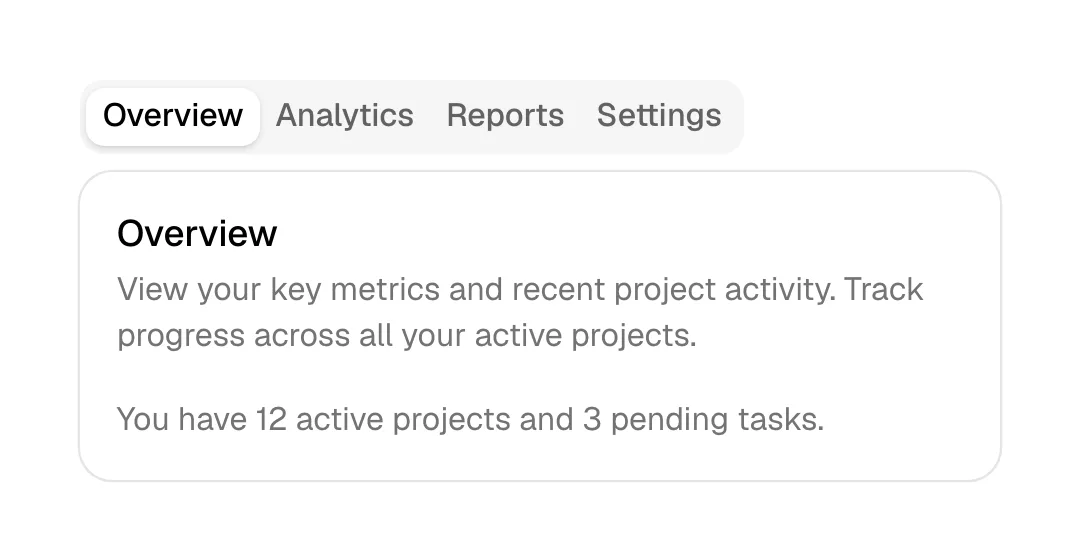
Tabs are a row of labeled controls that swap the content of one panel in place, so several views share the same spot on the page without scrolling.
- Also called
- Tabbed section, Tab switcher, Segmented control, Tab bar
- Spotted on
- 135 of 422 homepages
- Browse examples
- Feature sections →
What are tabs?
SaaS homepages use tabs when one product serves several audiences or jobs. Kajabi's tabs run "Courses", "Coaching", "Communities" and on; Pasteapp switches between "Developers", "Designers", "Writers" and "Teams"; developer tools put language tabs on a code sample, as WorkOS does from "Node.js" to "cURL". One panel, many stories, no extra scroll.
The trade-off is that only the first tab is guaranteed to be seen. Anything behind the second label is optional content, so the default tab should be the one most visitors need, and the labels should be specific enough that people want to click the others.
Mobile is where tabs get tested. A row of six labels does not fit at 390px, and sites either wrap it into rows of pills, let it scroll sideways and clip the last label, or unfold every tab into stacked blocks. The last option is often the most honest, because it shows all the content.
When to use tabs, and when not to
Use it for
- Parallel contentSeveral panels share a structure (image, heading, bullets) and differ by audience or use case.
- Self-selecting visitorsEach visitor only cares about one tab: their role, their language, their industry.
- Long pagesStacking every variant would add thousands of pixels of near-duplicate sections.
Avoid it for
- Sequential stepsSteps one to four should be read in order; a numbered list or stacked rows is clearer.
- Must-read contentPricing details or key differentiators hidden behind a second tab go unread.
- Comparing optionsIf visitors need to see two panels side by side, tabs make them memorize one before clicking the next.
Anatomy of tabs
- 1Tab listA horizontal or vertical row of labels, one marked active by fill, underline or weight.
- 2Active indicatorAn underline, filled pill or background that moves to the selected tab.
- 3PanelThe shared content area that changes: a screenshot, demo, code block or text column.
- 4Optional autoplaySome sites cycle tabs on a timer with a progress bar; useful only if visitors can stop it.
Common tabs variants
1. Underline tabs
Plain text labels with a line under the active one, the most restrained form.
2. Pill tabs
Each tab a pill, the active one filled, as in Guideflow's and Critter's heroes.
3. Vertical tabs
Labels stacked in a column beside the panel, often expanding into an accordion-like list.
4. Code tabs
Language or framework labels above a code sample, standard on developer-tool homepages.
Spotted in our design reviews
Our reviews describe tabs on 135 of the 422 SaaS homepages in the catalog. A few of them:
Tabs "Apps", "Websites", "Games" and "Tools" lead to a row of six framed thumbnails.
Base44 · Above the fold
Filter tabs for "Projects" and "People" sit above a category row starting with "Featured".
Contra · Above the fold
Below, a product frame carries four tabs, "Forms", "Success variants", "Actions" and "Analytics", over an editor with a field picker.
Getmagicform · Above the fold
Below, a panel with the tabs "For Me" and "Catch me up" holds the prompt box.
Runner · Above the fold
Below, a demo panel offers four tabs, from "REALTIME SPEECH-TO-TEXT API" to "VOICE AGENT API", beside a "TRY IT OUT" button and a lilac code sample.
Assemblyai · Above the fold
The right column holds a before-and-after panel with callouts "AI kicker", "Italic serif", "Side-tab border" and "AI beige", and command tabs "/polish", "/distill" and "/clarify" along its base.
Impeccable · Above the fold
A slim banner announces "Introducing Prime Agent" beside a copyable curl command, above a nav with four numbered tabs.
Primeintellect · Above the fold
A tab row follows, with "Global Chat" active, showing a chat that answers "Pull all tickets in the current sprint and identify any issues" with a ticket table.
Amplitude · Above the fold
Often confused with
Tabs vs. accordion
Tabs show one panel beside a row of labels; an accordion stacks every label and opens content under the one you click. Accordions reflow better on mobile.
Tabs vs. carousel
A carousel advances through slides in sequence with arrows or dots; tabs let visitors jump straight to a named panel.
Tabs vs. toggle switch
A toggle switches between exactly two states, such as monthly and annual pricing; tabs handle several named views.
Frequently asked
How many tabs are too many?
When the labels no longer fit on one line at desktop width, or need to be abbreviated to fit. Four to six is a common ceiling on homepages; beyond that, group them or use a different pattern.
Should tabs auto-rotate?
Only with a visible progress indicator and a stop on hover or click. Panels that change while someone is reading are the fastest way to lose them.