
Components
Table
A table is a grid of rows and columns with headers, used to compare values across items, such as plan features, prices or results, at a glance.
- Also called
- Data table, Comparison table, Grid table, Feature matrix
- Spotted on
- 87 of 422 homepages
- Browse examples
- Pricing pages →
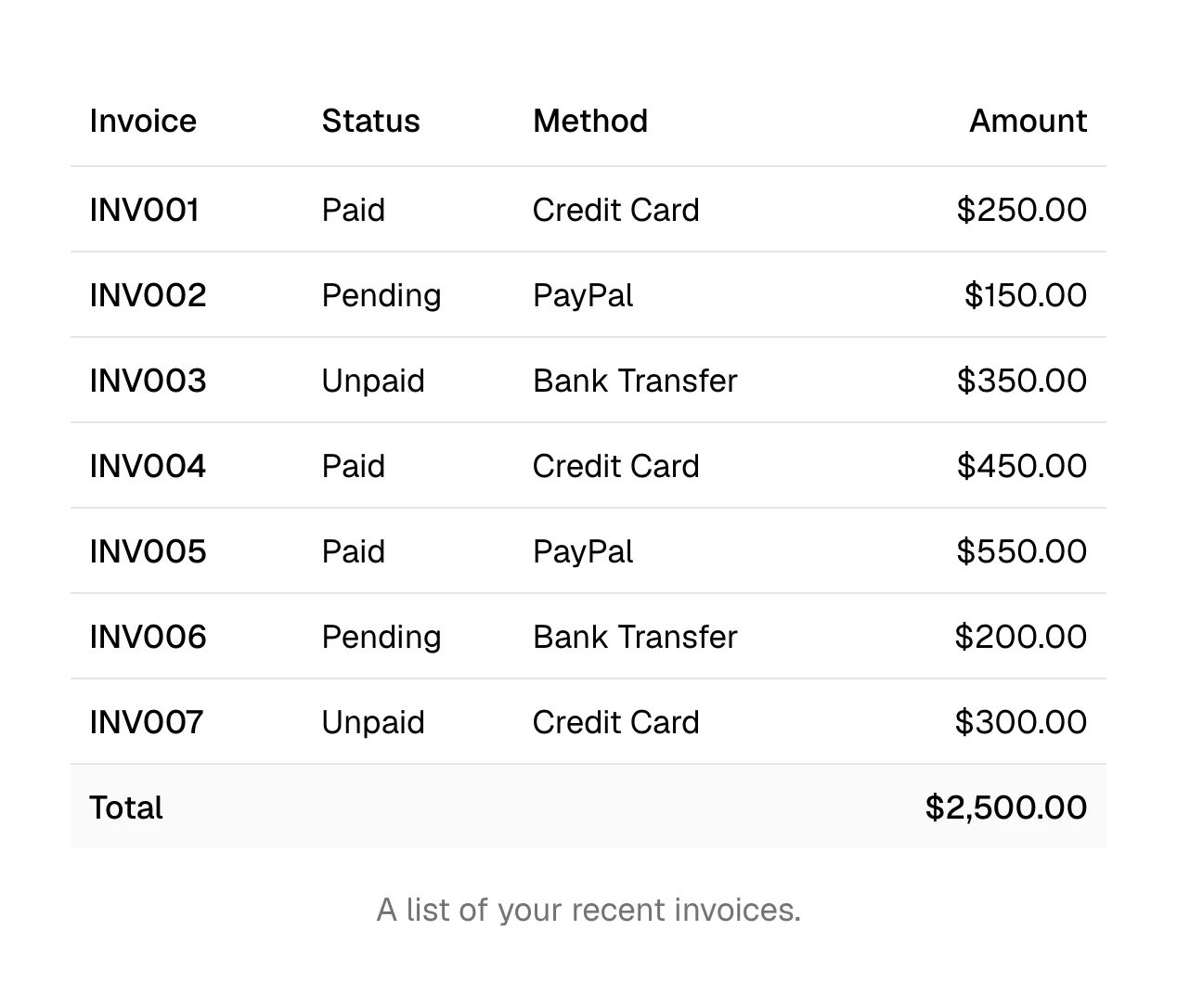
What is a table?
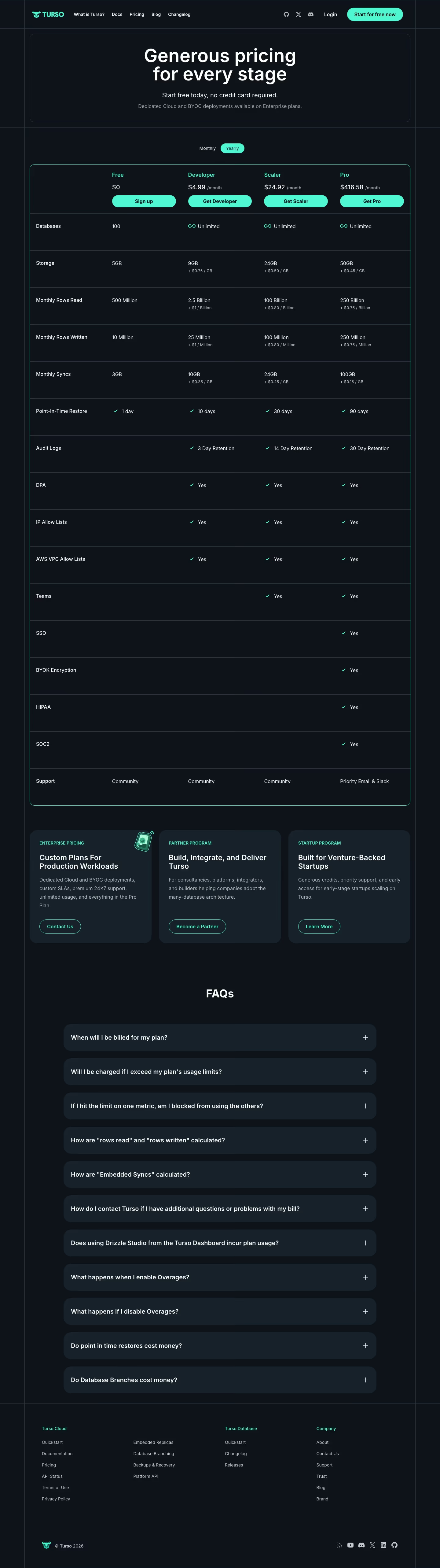
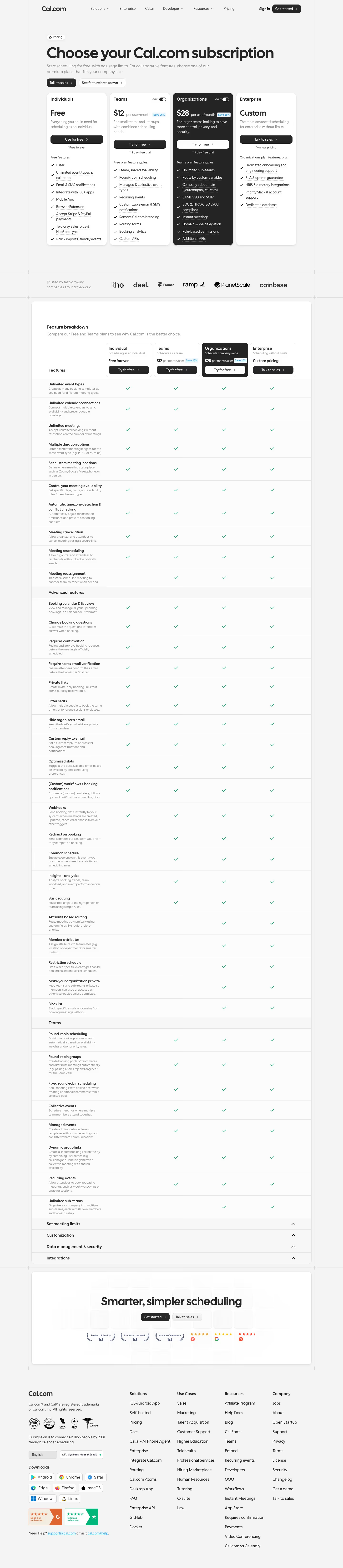
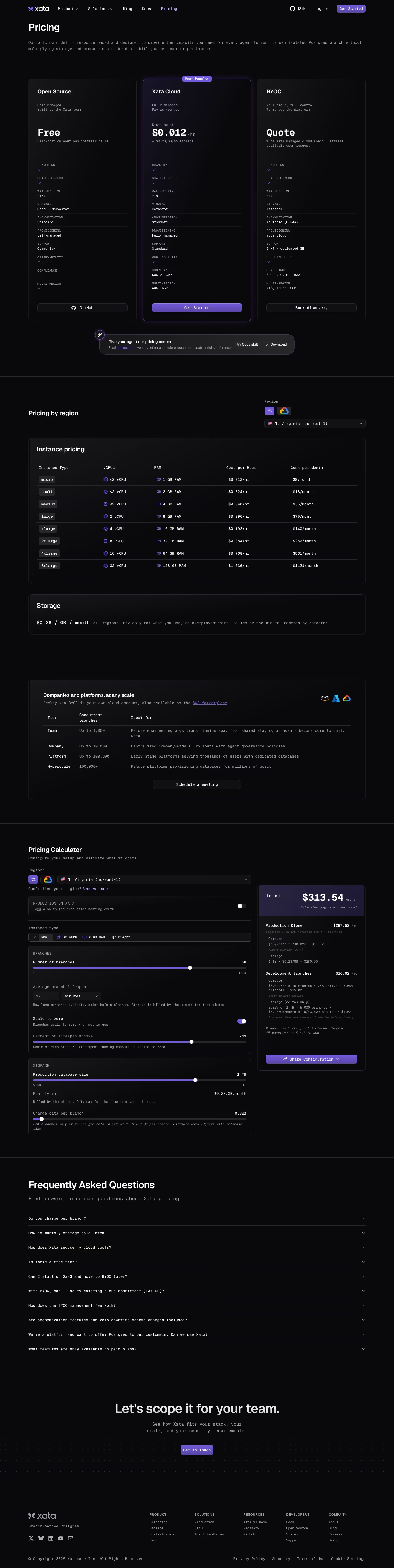
On SaaS marketing sites, tables appear in two places. The first is the pricing page, where a "Compare plans" table lists every feature against every tier with check marks, as Figma, Railway and Dropbox do below their plan cards. The second is inside product visuals: a ticket table, a deal table or an inventory table in a hero mockup shows a data-heavy product doing its job.
Tables also carry comparisons that would be wordy in prose: fees against competitors, before-and-after results, usage tiers. V7labs uses a six-row Before, "With V7" and Result table to make an outcome concrete.
Tables fail on mobile and at length. A ten-column matrix becomes a sideways scroll on a phone, and a hundred-row comparison is rarely read. Group rows under headings, freeze the plan names as you scroll, and tint the recommended column so the eye knows where to land.
Table examples from real SaaS sites
Each one is a pricing & plan capture whose design review mentions the table.



When to use a table, and when not to
Use it for
- Cross-comparisonSeveral items share the same attributes and visitors compare them column by column.
- Exhaustive detailBuyers who need every feature can find it without bloating the plan cards above.
- NumbersPrices, limits and benchmarks that need to line up to be compared.
Avoid it for
- Few attributesTwo or three facts per item fit on cards; a table adds weight for nothing.
- Narrative contentExplanations and benefits read better as sentences than as cells.
- Mobile-first pagesWide tables need a fallback, such as stacked cards or a plan switcher, on small screens.
Anatomy of a table
- 1Column headersPlan or item names, often sticky with a button underneath each.
- 2Row labelsFeature or attribute names in the first column.
- 3CellsValues, check marks, crosses or short text.
- 4Group rowsSection headings that break a long table into themes.
- 5HighlightA tinted or outlined column marking the recommended option.
Common table variants
1. Plan comparison
Features against tiers with check marks, under the pricing cards.
2. Competitor table
Your product against named alternatives on fees or features.
3. Mockup table
A data table inside a product screenshot or illustration.
Spotted in our design reviews
Our reviews describe a table on 87 of the 422 SaaS homepages in the catalog. A few of them:
Left and right, a "Customer Feedback" table and a "BPMN Diagram" swimlane connect to it by purple lines, with cursor tags "Rad" and "Brie".
Miro · Hero with live-canvas collage
The window below shows a sidebar with "Automations" and "Integrations", a two-row table starting with "Fix production errors", and a "Start from a template" panel.
Superlog · Top bar, hero text and product window
A pill-shaped form holds "Enter your website", a country selector "US" and a lilac "Get insights" button, followed by a wide dashboard mockup with a bubble chart and competitor table.
Semrush · Above the fold
Beneath, a dark Projects table lists rows such as "btc-tx-enabled-nft", with tabs reading "Projects", "Chainhooks", "API Hub" and "Monitor".
Hiro · Above the fold
A centred serif headline, "The world's data for AI agents", leads to one black "Try API for free" button and a query box with a results table, flanked by scattered sky-photo tiles.
Exa · Above the fold
A table labelled "Trusted by developers" holds twelve logos, from ClickUp to Google.
Langbase · Above the fold
Beneath it, a wide mock-up splits into a chat panel that answers "Show me all inbound-sourced pipeline" with a four-row table, and a canvas titled "Inbound Form Routing" with a "Publish" button.
Default · Above the fold
Beneath, a marble-backed screenshot shows a "Search" sidebar, an "Activity feed" listing Uber inc. transcripts and Visa proxy statements, and a chat table.
Quartr · Above the fold
Often confused with
Table vs. comparison table
A comparison table is a specific use of a table, setting plans or products against each other. "Table" covers any grid of data, including tables shown inside product mockups.
Table vs. pricing table
A pricing table usually means the plan cards with prices and buttons. The detailed feature table that follows them is a table in the strict sense.
Table vs. stacked list
A stacked list has one main item per row and no column headers. Use a table when columns must line up for comparison.
Frequently asked
How do I make a comparison table work on mobile?
Either let visitors pick one or two plans to compare, or turn each plan into a stacked card with its own feature list. Horizontal scrolling works but hides most columns at once.
Should every feature be in the pricing table?
Every feature that differs between plans, yes. Features every plan shares can be summarized in one row or a line above the table.