
Navigation
Tree
A tree is a nested list where items expand and collapse to reveal children, showing a hierarchy such as folders and files, docs pages or layers.
- Also called
- Tree view, File tree, Nested list, Hierarchy view
- Spotted on
- 6 of 422 homepages
- Browse examples
- Feature sections →
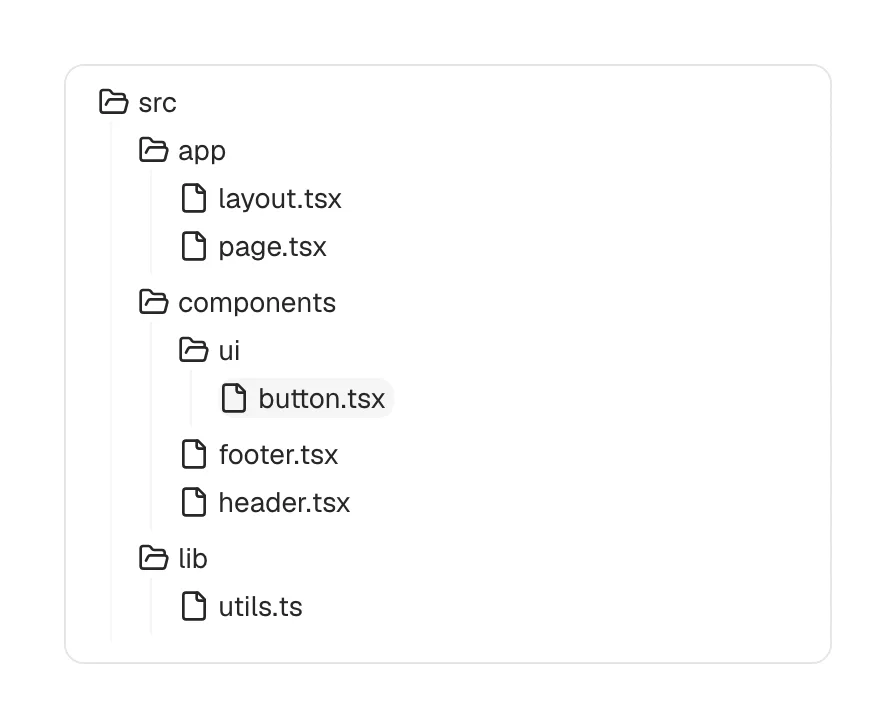
What is a tree?
A tree shows parent-child structure: folders inside folders, pages inside sections, layers inside groups. On SaaS sites it appears in two places. The first is product mockups for developer and design tools, where a file tree on the left is the strongest visual cue for "this works with your code". Mastra's hero carries a file-tree card, Keystroke shows a file tree beside an editor, and Kirki and Fountible both show a layers tree beside a canvas.
The second is documentation navigation. Large docs sites organize hundreds of pages into collapsible groups, and the left sidebar becomes a tree: click "Guides" to reveal its pages, click a page to reveal its sub-pages. Done well, the tree keeps the current branch open and the others closed, so readers always see where they are without scrolling through everything.
The pattern also works as an illustration of structure itself. Tuple draws product triggers as a file tree, and Lattice shows goals as a nested tree, both borrowing the shape to say "organized, hierarchical, under control".
When to use a tree, and when not to
Use it for
- Real hierarchyContent or data that genuinely nests more than one level deep, such as files or docs sections.
- Developer-tool visualsA mockup where a file tree immediately signals code, repos or a project structure.
- Large docsDocumentation with enough pages that grouped, collapsible sections beat a flat list.
Avoid it for
- Flat listsA dozen peer items need a simple list, not expand arrows.
- Deep nesting on mobileFour levels of indentation on a phone leave no room for the labels.
- Primary site navigationVisitors to a marketing site shouldn't have to expand branches to find Pricing.
Anatomy of a tree
- 1NodesEach row: a folder, page or item label, often with an icon for its type.
- 2Expand controlsChevrons or plus/minus toggles that open and close a node's children.
- 3IndentationConsistent left offsets, sometimes with guide lines, that show depth.
- 4Selected stateA highlight on the current file or page.
Common tree variants
1. File tree
Folders and files with type icons, the staple of code-editor mockups.
2. Docs navigation tree
Collapsible groups of pages in a documentation sidebar.
3. Layers panel
Nested groups and elements in design and website-builder tools.
Spotted in our design reviews
Our reviews describe a tree on 6 of the 422 SaaS homepages in the catalog. A few of them:
Five cards follow in two rows, two above three: "Performance" in mint with a "Team Calibration" grid, "Goals & OKRs" in lime with a nested goal tree, "Engagement" in pink with a survey question, "Grow" in butter with an "Individual development plan", and "Compensation" in green with a pay band slider.
Lattice · Platform overview and five product cards
A full-width dark editor screenshot shows a layer tree and canvas.
Fountible · Manifesto, editor screenshot and Bro chats
The dark band "Built for developers, by developers" holds a file-tree diagram under "Automate your workflow with Triggers".
Tuple · Footprint, App Veil privacy and triggers
A two-line heading, "Every agent you build is real code you own", sits above a file-tree and editor shot overlapped by a Cursor chat window.
Keystroke · Code ownership, closing call and footer
In the WordPress builder category the distinctive move is the hero itself: a working editor mockup with a layers tree, a canvas, a properties panel and named collaborator cursors, shown before any feature list.
Kirki · Overview
The page runs top to bottom as a header with a promo pill, a hero with a file-tree card, two rows of six customer logos, a tabbed code panel, a tabbed observability panel, a grid of nine case-study tiles, three agent-type cards, a books-and-releases pair, an FAQ, a closing line and a six-column footer.
Mastra · Overview
Often confused with
Tree vs. sidebar
A sidebar is a layout region; a tree is one possible list inside it. Many docs sidebars are trees, many app sidebars are flat lists.
Tree vs. accordion
An accordion expands content panels on a page, usually one level deep. A tree expands nested items many levels deep.
Tree vs. table of contents
A table of contents lists one page's headings; a tree shows the hierarchy of many pages or files.
Frequently asked
Why do so many developer-tool homepages show a file tree?
It is the most recognizable piece of a code editor. A file tree with real-looking paths tells developers in a glance that the product works inside their repository.
How deep should a docs navigation tree go?
Two or three levels is comfortable. Deeper than that, readers lose track of where they are; split the docs into separate sections instead.