
Navigation
Sidebar
A sidebar is a vertical panel along the left or right edge of a layout that holds navigation, filters or context next to the main content area.
- Also called
- Side navigation, Side nav, Left rail, Navigation drawer
- Spotted on
- 26 of 422 homepages
- Browse examples
- Blog pages →
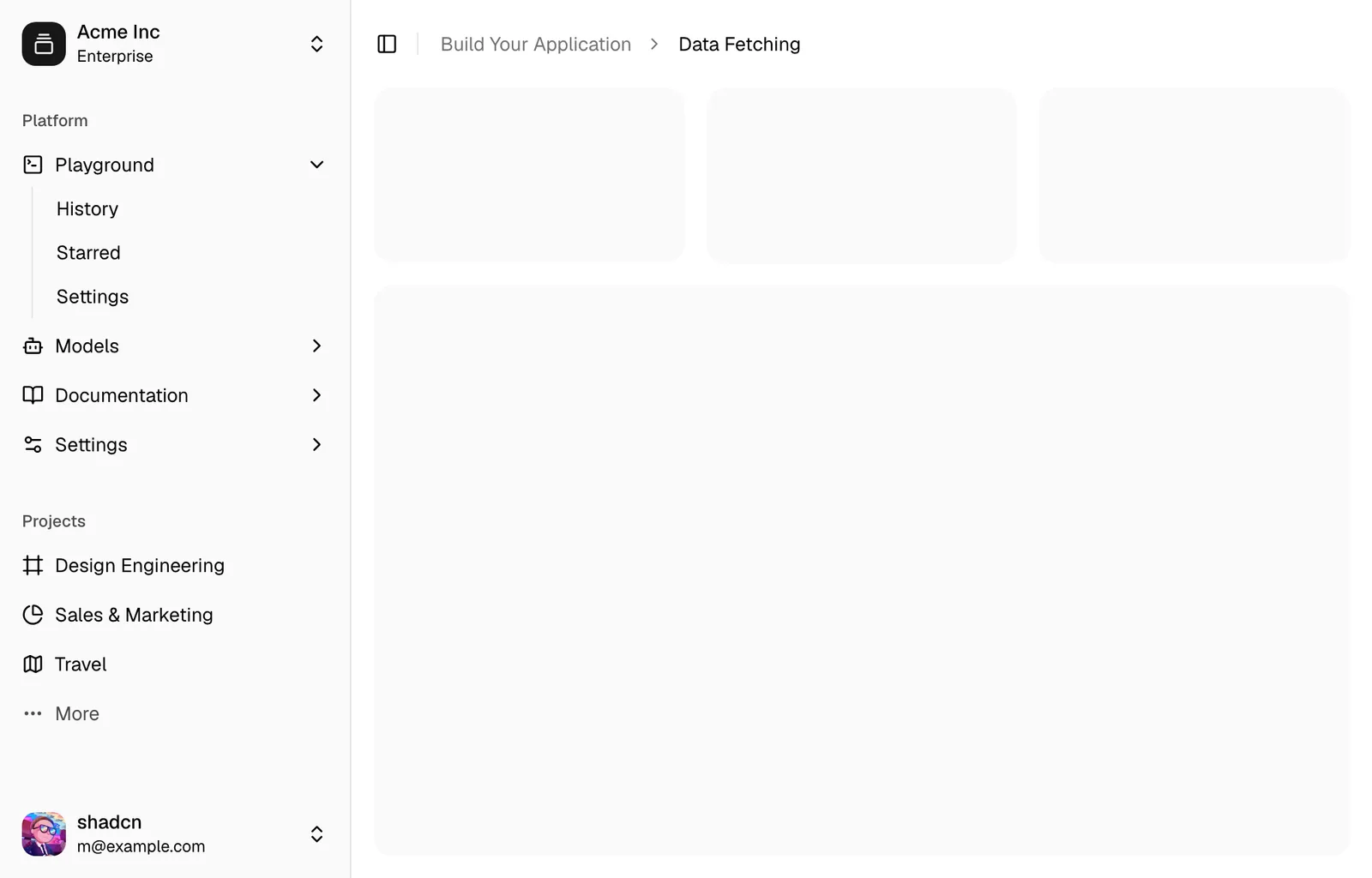
What is a sidebar?
In a SaaS product the sidebar is the app's main navigation, and that is where most visitors meet it on a marketing site: inside the product screenshot. Keystroke's hero window shows a left sidebar with "New chat", "Agents" and "Skills"; Devin's lists "Sessions", "Ask", "Wiki" and "Review"; Juno's console mockup names "Satellite", "Authentication" and "Datastore". Those labels do real explaining, because a sidebar is a table of contents for the product.
On the site itself the sidebar belongs to long, structured content: documentation, help centers, changelogs and some blog indexes. Notion's blog pairs a left sidebar of categories with a grid of cards. A few sites go further and move the whole site navigation into a left rail, as Reflag does, which reads as app-like and distinctive but costs horizontal room on every page.
A good sidebar is short enough to scan, groups items under a few plain headings and makes the current page obvious. In a mockup, the strongest sidebars use the product's real section names; a column of grey placeholder bars says "software" without saying anything about this software.
When to use a sidebar, and when not to
Use it for
- Deep, structured contentDocumentation or a help center with dozens of pages grouped into sections that readers jump between.
- Showing the product's shapeA product screenshot where the sidebar's real labels summarize what the app does.
- Filtering a long indexA blog, template gallery or integrations directory where categories narrow a large list.
Avoid it for
- Short marketing pagesA homepage or landing page with a handful of sections doesn't need a permanent column of links.
- Narrow screensOn phones a sidebar must collapse into a drawer or a dropdown; a squeezed column crushes the content.
- Duplicating the headerRepeating the top navigation's links in a side panel adds clutter without adding routes.
Anatomy of a sidebar
- 1ContainerA fixed-width column, often 220–280px, set off by a border, a tinted background or a darker shade.
- 2Group headingsSmall uppercase or muted labels that divide items into sections such as "Guides" and "API reference".
- 3ItemsLinks or rows, often with icons, that open each page or view.
- 4Active indicatorA highlight, bar or bold weight marking the current page.
- 5Footer areaAn optional bottom slot for the account menu, workspace switcher or a version selector.
Common sidebar variants
1. Docs sidebar
A long, collapsible list of guides and reference pages, usually paired with an on-page table of contents on the right.
2. App sidebar in a mockup
The product's own navigation shown inside a hero or feature screenshot.
3. Category sidebar
A short list of filters beside a blog or directory grid.
4. Collapsed rail
Icons only, expanding on hover or click, to save width for the content.
Spotted in our design reviews
Our reviews describe a sidebar on 26 of the 422 SaaS homepages in the catalog. A few of them:
Below, a black panel frames a Mac-style window with a sidebar ("New Chat", "Chats", "Models") and a transcript where a calendar and Slack request ends with an orange line of speed figures.
Mirai · Above the fold
Below it, a browser mock shows a "Work" workspace sidebar, with a chat reply opening "Your priorities this week are GTM/marketing work, revenue alignment, and staying on top of comms."
Arc · Above the fold
Below, a full-width product window shows a left sidebar with "New chat", "Agents", "Systems", "Artifacts", "Skills" and "Apps", and a prompt box where a typed request mentions Snowflake, PostHog, Slack and Metabase as blue inline chips.
Keystroke · Split hero and app mock-up
The headline "Feature flags on autopilot" spans the width in very large white type beside the sidebar.
Reflag · Above the fold
The window below shows a sidebar with "Automations" and "Integrations", a two-row table starting with "Fix production errors", and a "Start from a template" panel.
Superlog · Top bar, hero text and product window
Beneath, a violet arc of light sits over a dimmed app window with a sidebar of Daily notes, All notes, Tasks and Map, a middle column dated "Sun, April 2nd, 2023" and an April 2023 calendar.
Reflect · Above the fold
Below, a wide framed screenshot shows a sidebar with navigation entries, a prompt reading "What's on your mind today?" and a tool menu listing "Web search", "Code" and "Deep research".
Unsloth · Above the fold
Below, the window shows a workspace sidebar and a Claude terminal running an /mcp command.
Superset · Above the fold
Often confused with
Sidebar vs. drawer
A drawer slides in over the page when opened and is hidden the rest of the time. A sidebar stays visible as part of the layout.
Sidebar vs. table of contents
A docs sidebar lists all pages in the docs; a table of contents lists the headings within the current page.
Sidebar vs. navigation bar
A navigation bar runs horizontally across the top of every page; a sidebar runs vertically beside the content.
Frequently asked
Should a SaaS marketing site use a sidebar?
On the docs, help center and sometimes the blog, yes. On the homepage and product pages a top navigation bar is clearer, and a permanent side column usually wastes width.
What happens to a sidebar on mobile?
It should collapse, either into a drawer opened from a menu button or into a dropdown at the top of the content. Squeezing it beside the text leaves both unreadable.
Why do so many hero screenshots show an app sidebar?
Because it is the most compact summary of the product. A sidebar listing real sections tells the visitor what the app does before they read a single feature card.