
Components
Floating action button
A floating action button is a round button fixed to a screen corner, above the page content, that opens one key action such as chat, help or create.
- Also called
- FAB, Chat launcher, Help button, Floating button
- Spotted on
- 4 of 422 homepages
- Browse examples
- Contact pages →
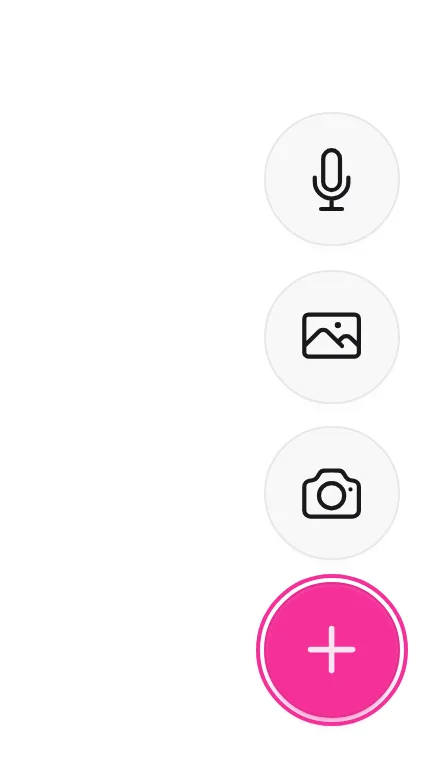
What is a floating action button?
In apps, the floating action button is the one most important action on a screen, always within thumb reach. On SaaS marketing sites it almost always means one thing: the chat or help launcher in the bottom-right corner, which opens a support or sales conversation without leaving the page. Remote's mobile site keeps a purple chat button floating over most screens; Sanity shows a chat bubble offering pricing help on its contact page.
Its strength is availability: it follows the visitor down the page. Its cost is that it covers content. On mobile, a floating button can sit over the bottom of a paragraph, a cookie banner or the page's own primary button; Culture Amp's "Ask Alix" chat button overlaps the copy on mobile.
A well-behaved floating button is small, stays out of the way of fixed bars, and opens something useful straight away. Avoid launchers that pop a greeting the moment the page loads, and never stack two floating buttons in the same corner.
Floating action button examples from real SaaS sites
Each one is a mobile capture whose design review mentions the floating action button.


When to use a floating action button, and when not to
Use it for
- Always-available helpLive chat or an AI assistant should be one tap away on any page.
- Long pagesVisitors scroll far, and the action shouldn't depend on where they stop.
- One clear actionThere is exactly one thing worth pinning to the corner.
Avoid it for
- Covering contentIf it hides buttons, text or form fields on mobile, move or shrink it.
- Several actionsA floating button that expands into five options is a menu in disguise.
- Primary conversionSign-up belongs in the page's own buttons, not a corner bubble.
Anatomy of a floating action button
- 1ButtonA 48-64px circle or rounded square, in the brand color, with a shadow lifting it above the page.
- 2IconA chat bubble, question mark, plus or arrow.
- 3PositionFixed to the bottom-right (sometimes bottom-left) with a consistent margin.
- 4Badge or promptAn optional unread dot or short teaser message beside it.
- 5Opened panelThe chat window, help panel or sheet it reveals.
Common floating action button variants
1. Chat launcher
Opens a live chat or AI assistant; the most common type on SaaS sites.
2. Help button
Opens docs search or a help menu.
3. Back to top
A small arrow that appears after scrolling far down.
4. Extended FAB
A pill with an icon and a label such as "Ask AI".
Spotted in our design reviews
Our reviews describe a floating action button on 4 of the 422 SaaS homepages in the catalog. A few of them:
A chat bubble floats at right.
Brainfish · Above the fold
A chat bubble offering pricing help overlaps the lower right.
Sanity · Contact Us
The promo puts its portrait below the text, an "Ask Alix" chat button overlaps the copy, and the logo strip crops after four.
Cultureamp · Mobile
The footer turns into collapsible rows with plus icons, and a purple chat button floats over most screens.
Remote · Mobile
Often confused with
Floating action button vs. chat widget
The chat widget is the whole support tool, including the conversation window. The floating action button is just its closed state: the round launcher in the corner.
Floating action button vs. button
A regular button sits in the page flow and scrolls away. A floating action button is fixed to the viewport and stays visible.
Frequently asked
Does a floating chat button hurt mobile usability?
It can, when it overlaps buttons or text. Keep it small, leave a margin from the screen edge, and hide or raise it when a sticky bar or cookie banner is showing.
Should it open automatically?
No. An automatic pop-up greeting interrupts reading; let visitors open it when they want help.