
Navigation
Floating navbar
A floating navbar is a navigation bar detached from the page edges, usually a rounded pill with a gap around it, that hovers over the content below.
- Also called
- Floating nav, Pill navigation, Floating header, Detached navbar
- Spotted on
- 15 of 422 homepages
- Browse examples
- Hero sections →

What is a floating navbar?
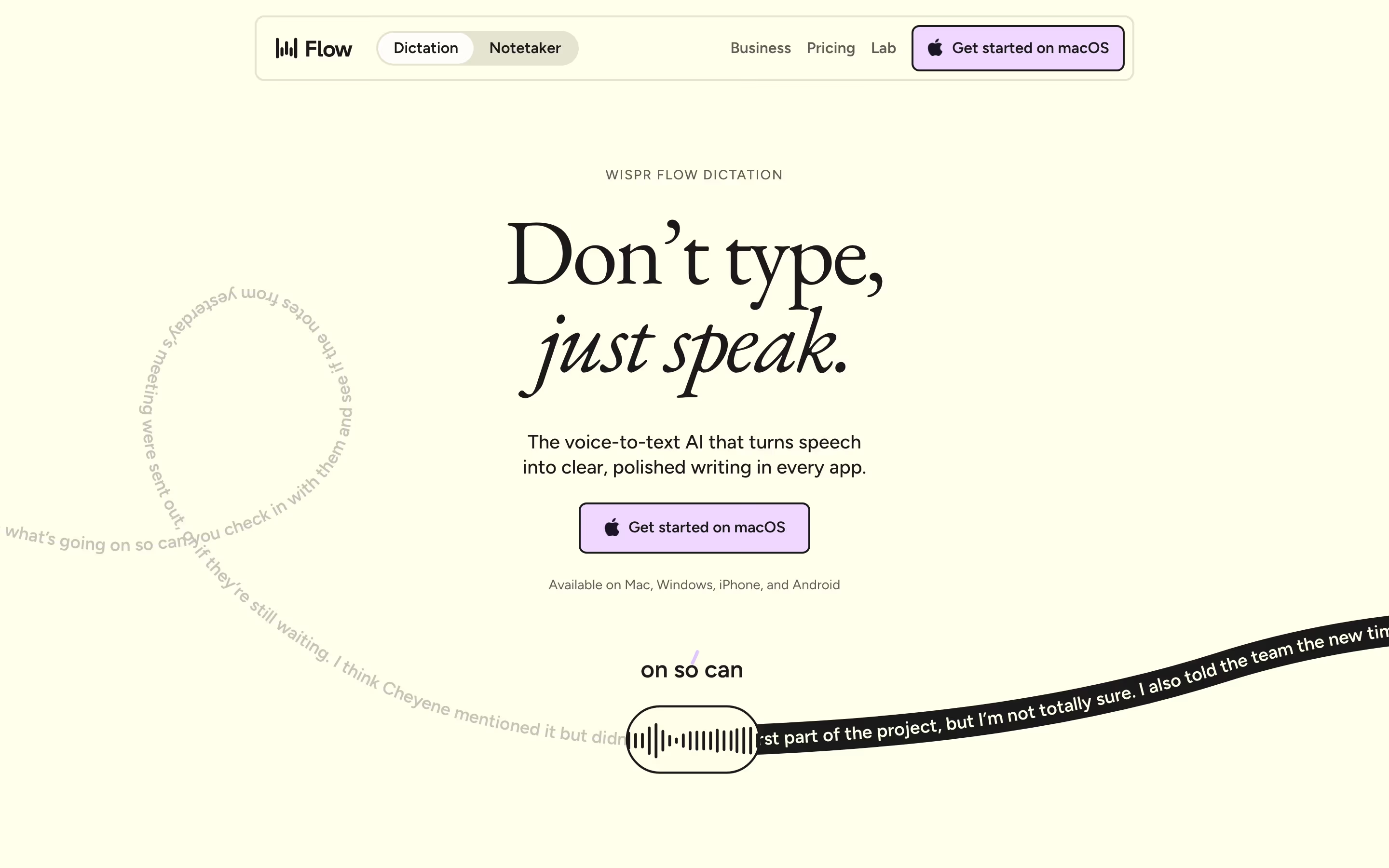
A standard navbar runs edge to edge and reads as part of the page. A floating navbar is inset from the edges, rounded, and often has a shadow or blur, so it reads as an object sitting on top of the page. In our reviews it appears as a "floating pill nav" on sites such as Craft, Duckie, Wispr Flow and Modal, frequently combined with a full-bleed hero image or gradient that shows around it.
Its appeal is that the hero gets the whole canvas. With a floating bar, the hero photo or color can run right to the top of the viewport, and the navigation becomes a compact element in front of it instead of a band above it. When it stays fixed on scroll it also takes less visual space than a full-width sticky header.
The weak versions forget legibility. A translucent pill over a busy photo or a moving video needs a solid or blurred background and enough contrast for the links, and the pill has to be wide enough to hold the primary button without crowding.
Floating navbar examples from real SaaS sites
Each one is a hero capture whose design review mentions the floating navbar.




When to use a floating navbar, and when not to
Use it for
- Full-bleed hero visualsA photo, gradient or video that should run to the top edge of the viewport.
- Short navigationFour to six links and one button, which fit comfortably in a centered pill.
- Sticky on scrollA compact bar that follows the visitor without covering a full-width strip of content.
Avoid it for
- Large link setsEnterprise sites with many top-level items and a mega menu need the width of a full bar.
- Busy backgrounds without blurA transparent pill over a detailed image makes the links hard to read.
- Plain white pagesOn a flat white hero a floating pill adds little; the visual payoff comes from something showing around it.
Anatomy of a floating navbar
- 1ContainerA rounded pill or card inset from the viewport edges, often with a soft shadow, border or backdrop blur.
- 2LogoKept small at the left end of the pill.
- 3LinksA short row of top-level destinations, usually centered.
- 4Primary buttonOne filled button at the right end, often matching the pill's radius.
Common floating navbar variants
1. Centered pill
A narrow pill centered over the hero, the most common form in our catalog.
2. Full-width inset card
A bar that spans almost the full width but keeps a margin and rounded corners.
3. Below an announcement bar
A strip runs edge to edge at the top, and the floating nav sits beneath it, as on Clerk and Adant.
Spotted in our design reviews
Our reviews describe a floating navbar on 15 of the 422 SaaS homepages in the catalog. A few of them:
A floating pill navigation lists "Product", "Imagine", "Community", "Pricing", "Learn" and "Download", with "Log in" and a black "Try Craft Free" button.
Craft · Above the fold
A black announcement bar reads "Clerk raises $50m Series C" with "Learn more", above a floating nav with six items plus "Sign in" and "Sign up".
Clerk · Above the fold
The six platform tiles stack as full-width rows, the footer columns fall to two across, and the announcement strip and floating nav bar are not visible at the top of the capture.
Proof · Mobile
Distinctive for its category: a floating pill navigation and a timeline that narrates a sales day.
Clarify · Overview
The page is 6719 pixels long and runs from a blue banner and floating nav through a dark hero with two rows of customer logos and a dark lifecycle section, then a light-blue half with three framework cards, a story carousel and three statistics, before a dark closing block.
Langchain · Overview
Top to bottom it holds a floating pill nav, a hero beside a glowing orbit graphic, a four-cell stat row, a twelve-logo grid, a lime pixel-type statement, a two-cell panel, four testimonials, a product screenshot, four feature cells, an FAQ, two card carousels and a closing call to action.
Morphllm · Overview
From the top it runs a green announcement bar, a floating pill nav, a text-only hero, two rows of drifting logos, a 2x2 feature grid, one pale green panel, two accordion sections, a mosaic of customer cards, a tabbed example carousel, a closing call to action and a footer.
Modal · Overview
It runs about 6835 pixels at 1440 wide: a floating nav pill, a centered hero with a phone-framed video, a logo strip, process cards, a creator video carousel, feature cards, a case-study carousel, an audience picker, an FAQ panel and a dark footer.
Jointrybe · Overview
Often confused with
Floating navbar vs. navigation bar
A navigation bar is any site header. A floating navbar is a specific treatment of it: detached from the edges and layered over the page.
Floating navbar vs. glassmorphism
Glassmorphism is a frosted, translucent style. Many floating navbars use it for their background, but a floating bar can also be solid.
Frequently asked
Should a floating navbar be sticky?
Usually yes. Its compact size is the main argument for keeping it visible on scroll, and it covers less content than a full-width sticky header.
How does a floating navbar work on mobile?
Most collapse to a smaller pill holding the logo, a button and a menu icon. Keep the side margins so it still reads as floating, and make sure the tap targets stay large.
Does a floating navbar need a background blur?
Only if content scrolls underneath it. Over a static hero a solid pill is fine; once text passes behind it, a blur or opaque fill keeps the links readable.