
Forms & inputs
Select
A select is a form control that shows the current choice in a compact field and opens a list of fixed options when clicked, letting the visitor pick one.
- Also called
- Dropdown, Select menu, Dropdown field, Picker
- Spotted on
- 19 of 422 homepages
- Browse examples
- Contact pages →
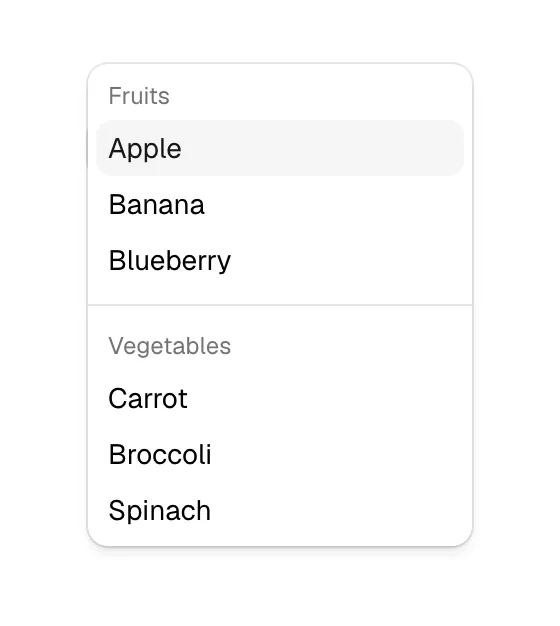
What is a select?
The select is the default answer to "pick one from a list" in SaaS forms: country, company size, role, use case, "How did you hear about us?". ClickHouse's contact form has a "Use Case" dropdown and Backboard's has a "Deployment Interest" one. It also appears outside forms as a language selector in the footer, which Mailchimp, ElevenLabs and Runway all place near the bottom of the page.
In AI product mockups and hero inputs the select has found a new job as the model picker: a small dropdown beside a prompt box to choose which model runs, seen on Perplexity, Agentsky and Bolt. It signals choice and power-user control without explaining anything.
The native select is underrated: it is accessible, works with every keyboard, and on phones opens the system's own picker. Style the closed field to match your inputs and keep the native list unless you need search, icons or multi-select. Every select needs a visible label; a placeholder like "Select..." vanishes once something is chosen.
When to use a select, and when not to
Use it for
- Five to fifteen optionsToo many for radio buttons, few enough to scan without typing.
- Saving spaceThe options are predictable, so hiding them until needed keeps the form short.
- One answerThe visitor picks exactly one value from a fixed list.
Avoid it for
- Very long listsHundreds of options need a combobox the visitor can type into.
- Two or three optionsShow them as radio buttons or a segmented control so nothing is hidden.
- NavigationA list of links under a nav item is a dropdown menu, not a select field.
Anatomy of a select
- 1LabelA visible label above the field naming the question.
- 2FieldShows the selected value, or a neutral prompt before a choice is made.
- 3ChevronA downward arrow signaling that a list will open.
- 4Options listThe menu of choices, with the current one checked or highlighted.
Common select variants
1. Native select
The browser's built-in control, styled only in its closed state; best on mobile.
2. Custom listbox
A designed menu with icons, descriptions or grouped options, which must replicate native keyboard behavior.
3. Inline selector
A compact select inside a sentence or toolbar, such as a model or language picker.
Spotted in our design reviews
Our reviews describe a select on 19 of the 422 SaaS homepages in the catalog. A few of them:
The nav holds six items, a language selector, "Login" and an orange "See a demo".
Rippling · Above the fold
A pill-shaped form holds "Enter your website", a country selector "US" and a lilac "Get insights" button, followed by a wide dashboard mockup with a bubble chart and competitor table.
Semrush · Above the fold
The serif headline "Make any video you can think of" sits centred over a wide input reading "Describe your video, or drop footage..." with a plus button, an "Auto" dropdown, a sparkle icon and a send arrow.
Usecardboard · Above the fold
A "NEW" badge leads into a cream prompt box with a "Starter prompts" dropdown and blue send arrow, flanked by two pill menus.
Retool · Above the fold
Bordered cards follow: a full-width "The best model, every time" card with a model picker, then "98%" "less errors", "Build big without breaking" with a "1000x" graphic, and a purple "Build with your design system" card.
Bolt · Logos and feature cards
"Watch a Workflow recover from failure" opens a full-width demo with a scenario dropdown, a progress bar ("Workflow runs", "Something breaks", "It recovers") and "Play" and "Start Over" controls.
Temporal · Interactive demo and SDK rows
Start working.", holds a white card with eight agent chips, a model dropdown and a blue "Start Agent" button.
Agentsky · Picker, steps and the blue band
Each has a "Get started" pill and each canvas ends in a floating prompt bar with an "arrow-2" model selector.
Quiver · Logo grid and four feature demos
Often confused with
Select vs. dropdown menu
A dropdown menu lists actions or links that run when clicked; a select stores a chosen value in a form.
Select vs. combobox
A combobox adds a text input so visitors can type to filter; a select only allows picking from the list.
Select vs. radio button
Radio buttons show every option at once; a select hides them until opened.
Frequently asked
Native select or custom dropdown?
Start with native. It's accessible and familiar on every device. Go custom only for features native can't do, such as icons, descriptions or search, and test it with a keyboard and screen reader.
Should a demo form use selects for company size and role?
They are a reasonable fit, but each one adds a decision. Ask only what sales actually uses to route the lead, and consider radio buttons when there are four or fewer bands.