
Forms & inputs
Checkbox
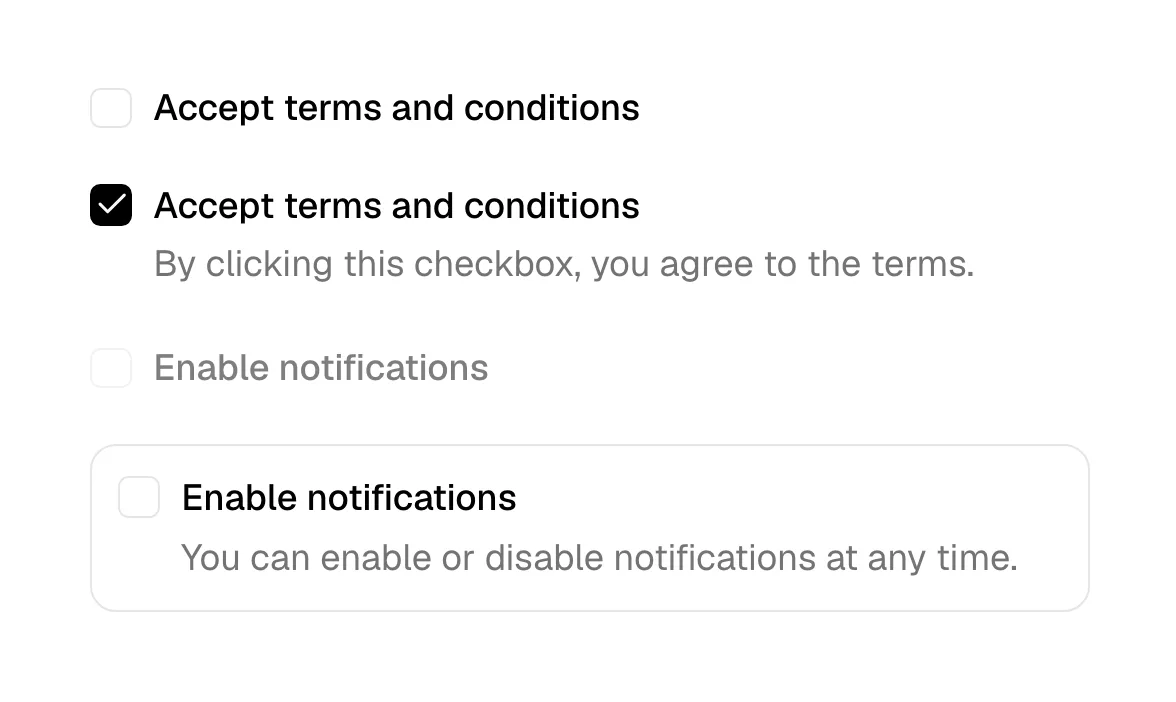
A checkbox is a small square input that a visitor ticks or clears to say yes or no to one option, or to pick any number of options from a list.
- Also called
- Check box, Tick box, Checkmark input
- Spotted on
- 8 of 422 homepages
- Browse examples
- Contact pages →
What is a checkbox?
Checkboxes are the quiet workhorses of SaaS forms. On a marketing site they handle consent ("Send me product updates"), terms acceptance under a signup form, "I'm interested in" lists on demo-request forms, and the human-verification box that sits under many waitlist forms. Rig places one under its email field and "Join Waitlist" button, and Felix shows a "Verify you are human" strip right under its input.
They also appear as illustration. A product mockup with a checklist, a permissions form or a settings panel reads as "this tool keeps work organized" in a glance: Supabase shows a table-creation form with an "Enable Row Level Security (RLS)" checkbox, and Bondapp shows checkbox rows tagged by priority.
Good checkboxes have a label that is part of the click target, a box at least 16px with a generous hit area around it on mobile, and a visible focus ring. Consent boxes should start unticked; pre-checking a marketing opt-in is a dark pattern and, in many regions, not valid consent.
When to use a checkbox, and when not to
Use it for
- Independent choicesEach option can be on or off regardless of the others, such as picking which products a lead is interested in.
- Explicit consentThe visitor must actively agree to something, like receiving a newsletter or accepting terms.
- Saved on submitNothing should happen until the form is sent, which is exactly what a checkbox implies.
Avoid it for
- Only one answer allowedIf picking one option must clear the others, use radio buttons or a segmented control.
- Instant settingsA preference that takes effect the moment it is flipped reads better as a toggle switch.
- Long option listsTwenty checkboxes in a demo form is a survey; use a searchable select or ask fewer questions.
Anatomy of a checkbox
- 1BoxA square, usually 16-20px with slightly rounded corners, that shows the checked, unchecked or indeterminate state.
- 2Check markThe tick (or a dash for indeterminate) drawn in the brand color or white on a filled box.
- 3LabelText beside the box that is also clickable, so the visitor can tap the words rather than aim for the square.
- 4Helper or error textAn optional line below, for example linking to the privacy policy or saying the box is required.
Common checkbox variants
1. Consent checkbox
A single box under a signup or newsletter form, usually linking to terms or a privacy policy.
2. Checkbox group
A short list of options on a demo or contact form, such as products of interest or team size bands.
3. Checkbox card
A whole card acts as the click target, with the box in a corner, common for picking add-ons or plans.
4. Verification checkbox
The "I'm not a robot" style challenge placed under a form to filter bots.
Spotted in our design reviews
Our reviews describe a checkbox on 8 of the 422 SaaS homepages in the catalog. A few of them:
Directly under the input, a grey strip carries a Cloudflare "Verify you are human" checkbox with small Privacy and Help links.
Felix · Free-time note and human check
Beneath them, a screenshot of a table-creation form with a "Enable Row Level Security (RLS)" checkbox is partly faded on its left side.
Supabase · Logo band and dashboard demo
Start working." shows checkbox rows tagged P0 to P2, and "Delegate the admin to Bond." lists recurring tasks.
Bondapp · Problem statements and task-card explainers
It shows a chapter sidebar headed "WHAT TO REVIEW" with checkboxes, a "FILES (5)" list, and five file rows with paths such as src/billing/stripe-client.ts.
Stagereview · Chapter explainer and dashboard section
"Keep your agents browsing." introduces a green panel with a checkbox card reading "Are you human?".
Steel · Feature rows and enterprise block
Visible cards show yellow and black payment cards, a limits form with checkboxes, and a vendor list naming "AWS" and "Google Ads".
Pleo · Features
"Rig is almost ready." sits over one email field, an orange "Join Waitlist" button and a human-verification checkbox.
Rig · Terminal, waitlist, FAQ, closer and footer
A Pro card shows "$199 / mo" under "Monthly" and "Yearly" toggles, with add-ons such as "SSO & SCIM" in a checkbox column, beside a navy Enterprise card at "$12,495" per year.
Coderbyte · Pricing, FAQ and closing
Often confused with
Checkbox vs. radio button
Radio buttons allow exactly one choice from a group; checkboxes allow any number, including none.
Checkbox vs. toggle switch
A toggle switch implies an immediate effect, like a setting turning on. A checkbox implies the choice is saved when the form is submitted.
Frequently asked
Should a newsletter opt-in checkbox be pre-checked?
No. Leave it unticked and let the visitor choose. A pre-checked box inflates the list with people who never meant to subscribe, and in many regions it doesn't count as consent.
How big should a checkbox be on mobile?
The visible box can stay around 18-20px, but the tappable area, including the label, should be roughly 44px tall so it is easy to hit with a thumb.