
50 Design Styles, Shown on Real Websites (Plus the Words to Prompt Each One)
A field guide to 50 design styles, from minimalism, bento grids and glassmorphism to pixel art, neo-brutalism and Art Deco. 33 are shown on a real, live website from our catalog, and every style lists what to look for and the words to use in a prompt.
By Derek Paul
A design style is a named set of visual choices (palette, typography, shape, texture and layout) that people recognise together. Naming the style is the fastest way to brief a designer, a developer or an image model. This guide covers 50 of them: the UI and web design styles you'll meet on product sites today, plus the graphic design and art movements they borrow from. For 33, you'll see the style on a real, live product website from our catalog of 400+ SaaS homepages, with a screenshot we captured ourselves. The other 17 (mostly historical movements and a few UI styles that product sites rarely use today) are described without an image, and we say so instead of borrowing one.
Every entry has the same parts: a one-line definition, Look for (how to recognise it), Prompt words (what to type) and Best for / watch out (where it works and where it breaks).
All 50 design styles at a glance
| # | Style | Family | Signature | Real example |
|---|---|---|---|---|
| 1 | Minimalism | Minimal & structural | Few elements, lots of space | Vercel |
| 2 | Monochrome | Minimal & structural | One hue, many tints | Beside |
| 3 | Swiss / International | Minimal & structural | Grid, flush-left grotesque type | Rig |
| 4 | Bento grid | Minimal & structural | Mixed-size rounded tiles | Graphite |
| 5 | Utilitarian / document | Minimal & structural | Reads like plain text | PlanetScale |
| 6 | Editorial serif | Minimal & structural | Big serif headline, magazine pacing | Granola |
| 7 | Dark mode | Minimal & structural | Near-black ground, product glows | Linear |
| 8 | Technical grid | Minimal & structural | Visible rules, mono labels | AgentMail |
| 9 | Flat design | Minimal & structural | No shadows, solid fills | — |
| 10 | Material Design | Minimal & structural | Paper layers, elevation | — |
| 11 | Glassmorphism | Depth & surface | Frosted, translucent panels | Typeform |
| 12 | Claymorphism / clay 3D | Depth & surface | Soft, matte, toy-like 3D | Clay |
| 13 | Inflated 3D | Depth & surface | Glossy, puffed-up shapes | Ploy |
| 14 | Isometric | Depth & surface | 3D drawn at fixed angles | Bretton |
| 15 | Aurora gradient | Depth & surface | Blurred bands of colour light | Lovable |
| 16 | Fluid gradient | Depth & surface | Sweeping colour ribbon | Stripe |
| 17 | Grain & noise | Depth & surface | Film-grain texture | Better Auth |
| 18 | Cinematic photography | Depth & surface | A photographed scene as hero | Mercury |
| 19 | Chiaroscuro | Depth & surface | Hard light against black | Raycast |
| 20 | Skeuomorphism | Depth & surface | Imitates real materials | — |
| 21 | Neumorphism | Depth & surface | Soft extruded plastic | — |
| 22 | Pixel art | Retro-digital | Visible square pixels | Cofounder |
| 23 | Dithering | Retro-digital | Dot patterns fake tones | TesterArmy |
| 24 | ASCII art | Retro-digital | Pictures made of characters | Cline |
| 25 | Terminal / monospace | Retro-digital | Code type, caps labels | Inngest |
| 26 | Synthwave / perspective grid | Retro-digital | Grid floor to a horizon | Temporal |
| 27 | Neon | Retro-digital | Glowing tube lines on dark | Graphite |
| 28 | Halftone / Pop Art | Retro-digital | Print dots, bold outlines | Greptile |
| 29 | Retro computing | Retro-digital | Old hardware, warm nostalgia | Tavus |
| 30 | Y2K | Retro-digital | Chrome, gloss, iridescence | — |
| 31 | Frutiger Aero | Retro-digital | Glossy aqua, bubbles, sky | — |
| 32 | Vaporwave | Retro-digital | Pastel glitch, statues | — |
| 33 | Hand-drawn line | Hand-made & expressive | Loose ink drawings | Notion |
| 34 | Mascot / anthropomorphic | Hand-made & expressive | Objects with faces | Fly.io |
| 35 | Painterly | Hand-made & expressive | Brushwork illustration | Synara |
| 36 | Collage / mixed media | Hand-made & expressive | Photos, drawings, UI layered | Intercom |
| 37 | Expressive typography | Hand-made & expressive | Type as the image | Cntrl |
| 38 | Stickers / scrapbook | Hand-made & expressive | Tilted labels, tape, cut-outs | Cntrl |
| 39 | Neo-brutalism | Hand-made & expressive | Black outlines, hard shadows | Tranch |
| 40 | Web brutalism | Hand-made & expressive | Deliberately unstyled | Basecamp |
| 41 | Memphis | Hand-made & expressive | Squiggles, clashing shapes | — |
| 42 | Kawaii | Hand-made & expressive | Cute faces, pastel, round | — |
| 43 | Neoclassical | Historical | Columns, symmetry, marble | — |
| 44 | Art Nouveau | Historical | Whiplash curves, botanicals | — |
| 45 | Art Deco | Historical | Geometric glamour, gold | — |
| 46 | Bauhaus | Historical | Primary colours, basic shapes | — |
| 47 | Constructivism | Historical | Diagonals, red and black | — |
| 48 | De Stijl | Historical | Black grid, primary blocks | — |
| 49 | Mid-century modern | Historical | Organic geometry, warm retro | — |
| 50 | Psychedelic | Historical | Melting type, vibrating colour | — |
Minimal and structural styles
These styles let layout, spacing and type do the work. They are the default for most product sites, so the differences between them are in the details.
1. Minimalism
Minimalism removes everything that isn't needed, leaving a few elements and a lot of empty space.
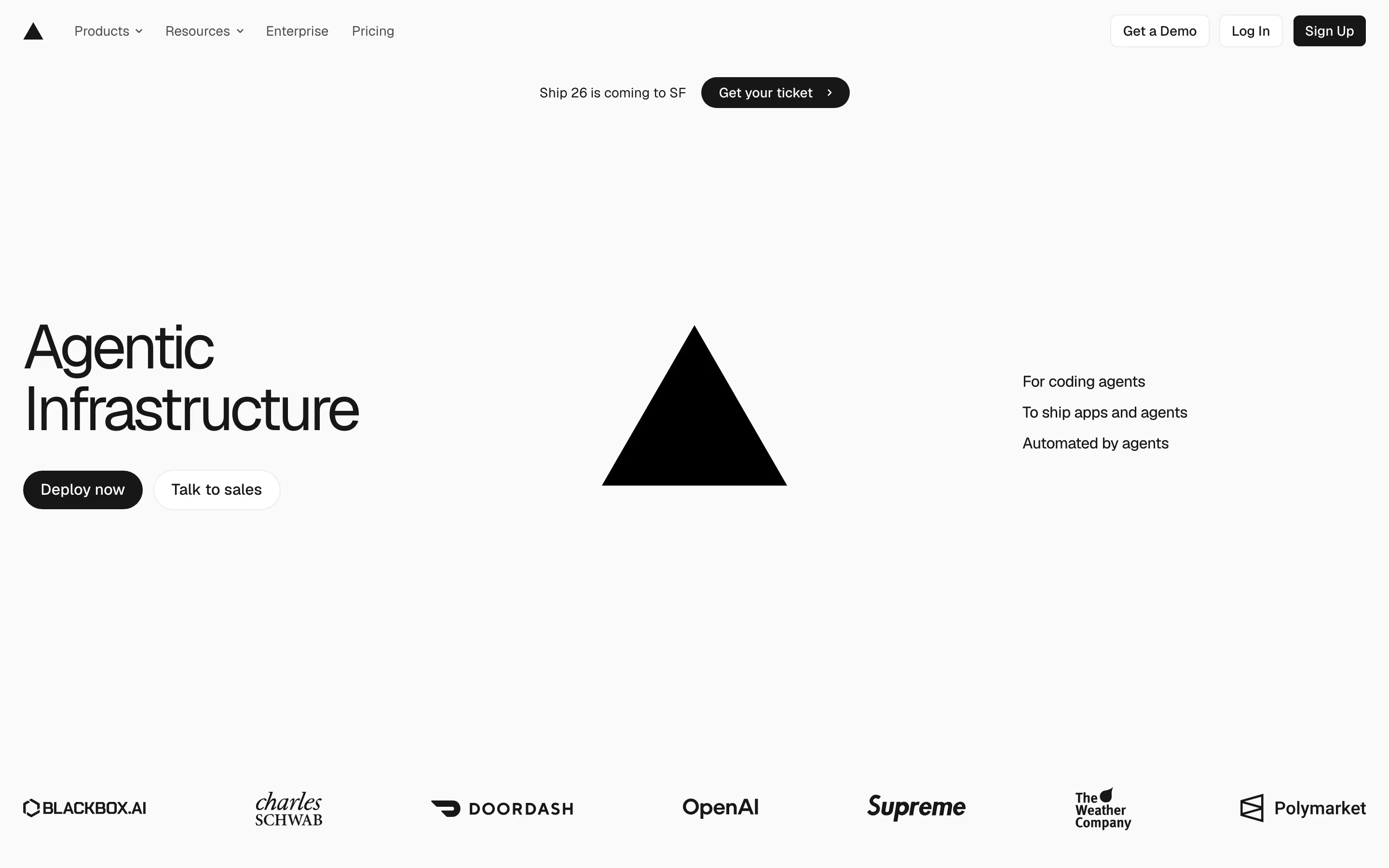
- Look for: a near-empty canvas, one focal object, one or two typefaces, black and white plus at most one accent.
- Seen on: Vercel's hero holds only "Agentic Infrastructure", two buttons, its black triangle mark in the middle of the page and three short lines on the right, all in black on off-white.
- Prompt words: minimalist, generous whitespace, single focal element, restrained palette, sans-serif, no decoration.
- Best for / watch out: confident brands with a recognisable mark. With nothing to look at, a weak headline has nowhere to hide. More in the minimal hub.
2. Monochrome
Monochrome builds the whole page from one hue (often grey) in several tints, so hierarchy comes from value rather than colour.
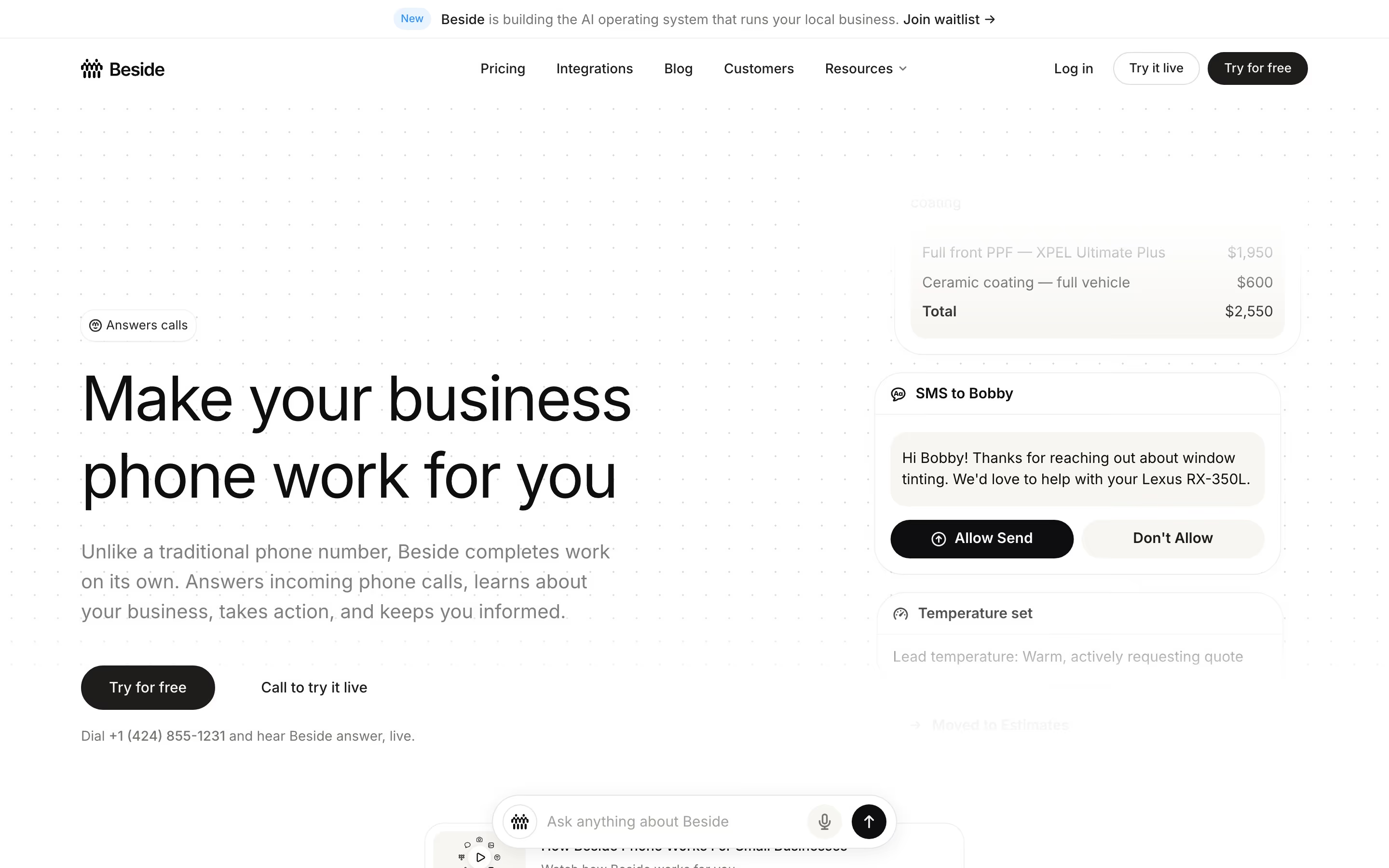
- Look for: tints of one colour for background, cards, dividers and secondary text; one dark tone for the primary action.
- Seen on: our review of Beside records a near-monochrome scheme, with #fefefe as the ground, #e9e9e9 and #c9c9c9 for cards and dividers, and #888888 for secondary text. The hero's only strong tone is the black headline and button.
- Prompt words: monochrome, greyscale palette, tonal hierarchy, single accent for CTA, soft grey cards.
- Best for / watch out: products whose interface screenshots should carry the colour. Low-contrast greys can fail accessibility checks, so test body text.
3. Swiss / International Typographic Style
The Swiss style came from 1950s Swiss graphic design: a strict grid, flush-left sans-serif type, asymmetric layouts and big type set against plain colour fields.
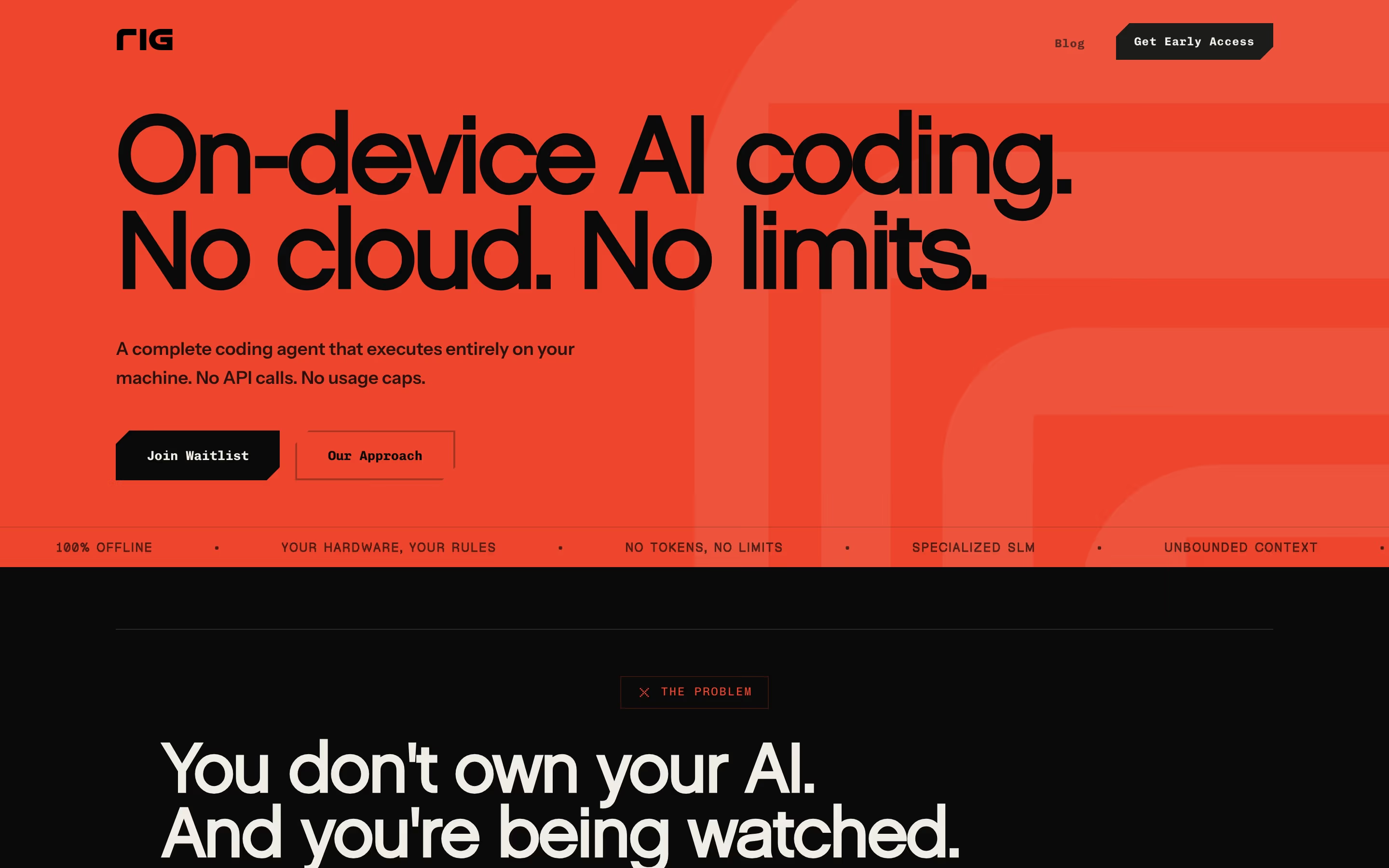
- Look for: a visible or implied grid, flush-left ragged-right text, grotesque sans-serifs, large type as the main image, flat colour.
- Seen on: Rig is Swiss-influenced rather than a textbook case. "On-device AI coding. No cloud. No limits." is set huge and flush left on one solid orange field, with no illustration, and a ticker strip of short claims runs underneath.
- Prompt words: Swiss style, International Typographic Style, modular grid, flush-left grotesque, oversized headline, flat colour field, asymmetric layout.
- Best for / watch out: statements that fit in one sentence. Very large type eats the space where you'd otherwise show the product.
4. Bento grid
A bento grid packs content into rounded tiles of different sizes, like the compartments of a Japanese bento box.
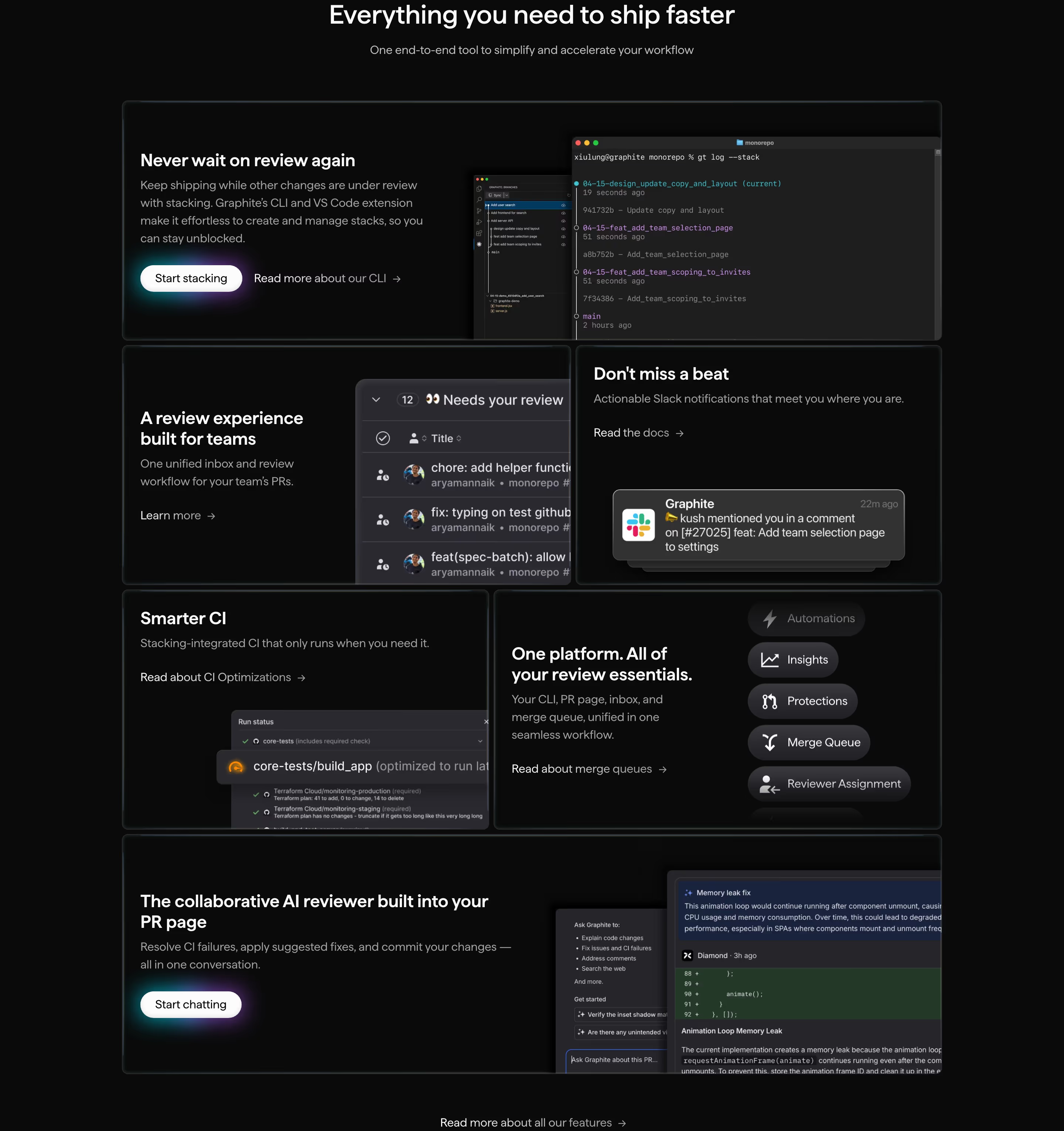
- Look for: rounded rectangles in a tight grid, one or two tiles spanning wider, each tile holding one idea, often with a product crop or a big number.
- Seen on: Graphite's "Everything you need to ship faster" section is a six-card bento. "Never wait on review again" spans the full width, and smaller cards pair a heading with a cropped CLI window, a pull-request list or a Slack notification.
- Prompt words: bento grid layout, modular rounded tiles, mixed tile sizes, one hero tile, cropped UI inside cards, consistent gutters.
- Best for / watch out: showing many features in one scan. On mobile the tiles stack into a long single column, so order them by importance.
5. Utilitarian / document style
The utilitarian style makes a marketing page look like documentation: plain text, inline links and tables, with almost no decoration.
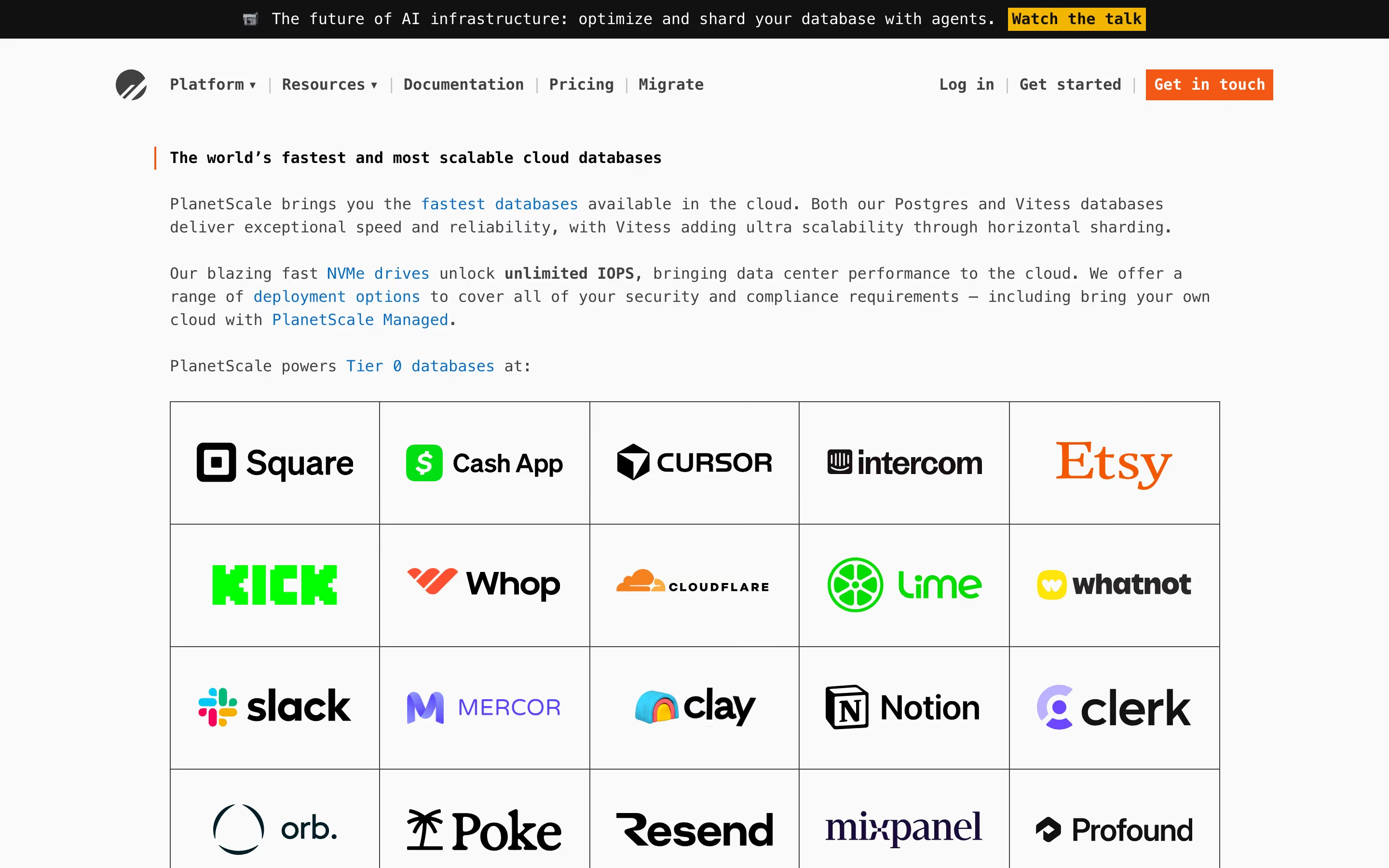
- Look for: body-size text instead of a giant headline, inline links, ruled tables, monospace or text-like fonts, no hero image.
- Seen on: PlanetScale's hero is a few paragraphs of text with blue inline links, followed by customer logos in a table with hard borders. Our review notes "ASCII-style diagrams and dotted rules instead of illustrations" further down.
- Prompt words: utilitarian, documentation-style layout, plain text, inline links, ruled table, monospace, no imagery.
- Best for / watch out: technical buyers who trust specifics over polish. Without a visual anchor, the first screen needs strong writing.
6. Editorial serif
The editorial style borrows from magazines: a large serif headline, calm spacing and an image placed like a feature photo.
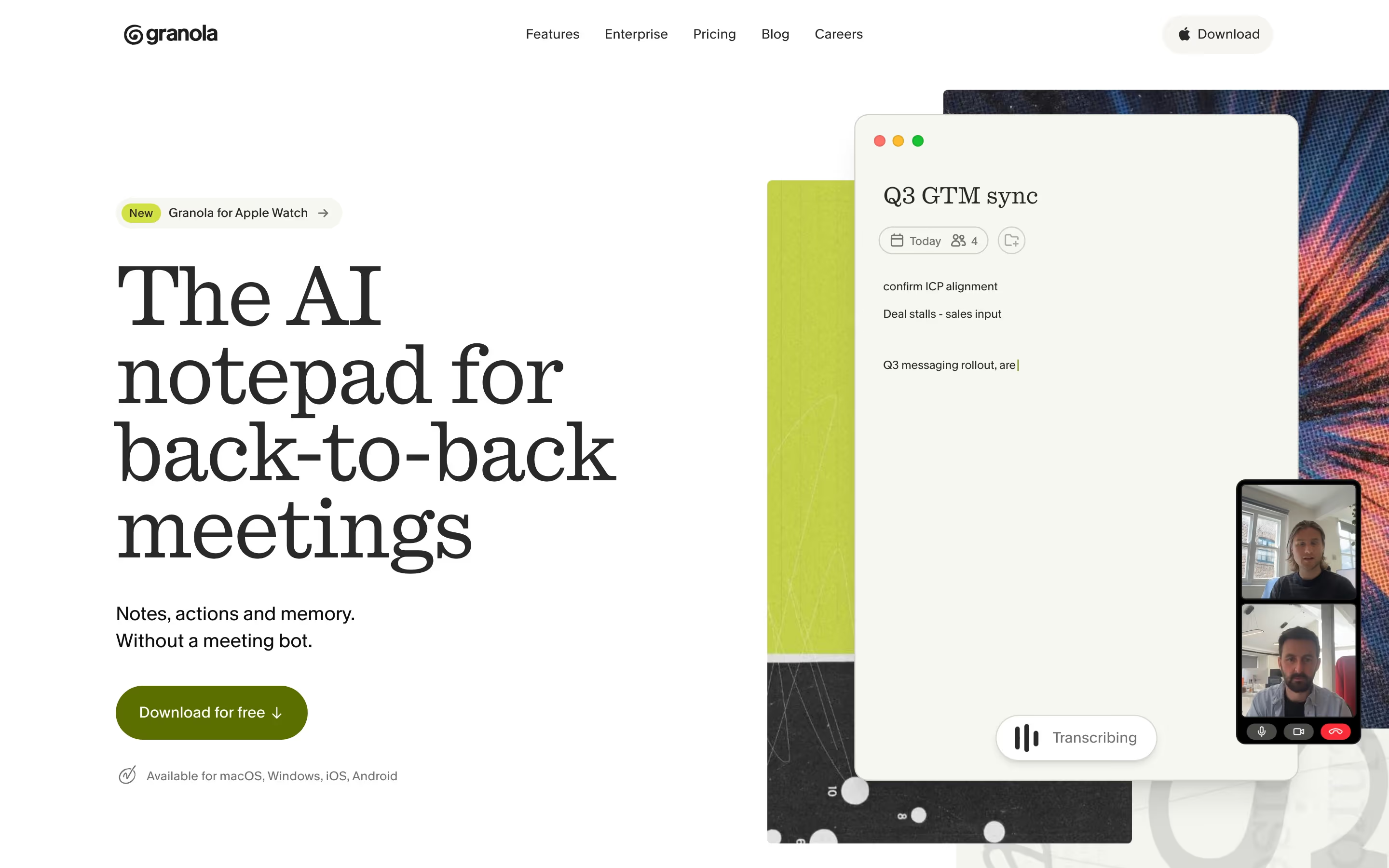
- Look for: serif display type (sometimes with one italic word), generous line height, muted or warm palettes, images that feel art-directed.
- Seen on: Granola sets "The AI notepad for back-to-back meetings" in a large serif across four lines, with an olive button and an app window titled "Q3 GTM sync" on the right. Tana uses the one-italic-word variant: "Do work in the meeting".
- Prompt words: editorial layout, serif display headline, italic emphasis word, magazine spacing, warm off-white background, art-directed imagery.
- Best for / watch out: products that want to feel considered and calm. Serifs at small sizes on low-resolution screens can look fussy, so keep them for headings. Our font study shows serif is still a minority choice in SaaS.
7. Dark mode
Dark mode puts the page on a near-black ground so that product UI, accent colours and light effects stand out.
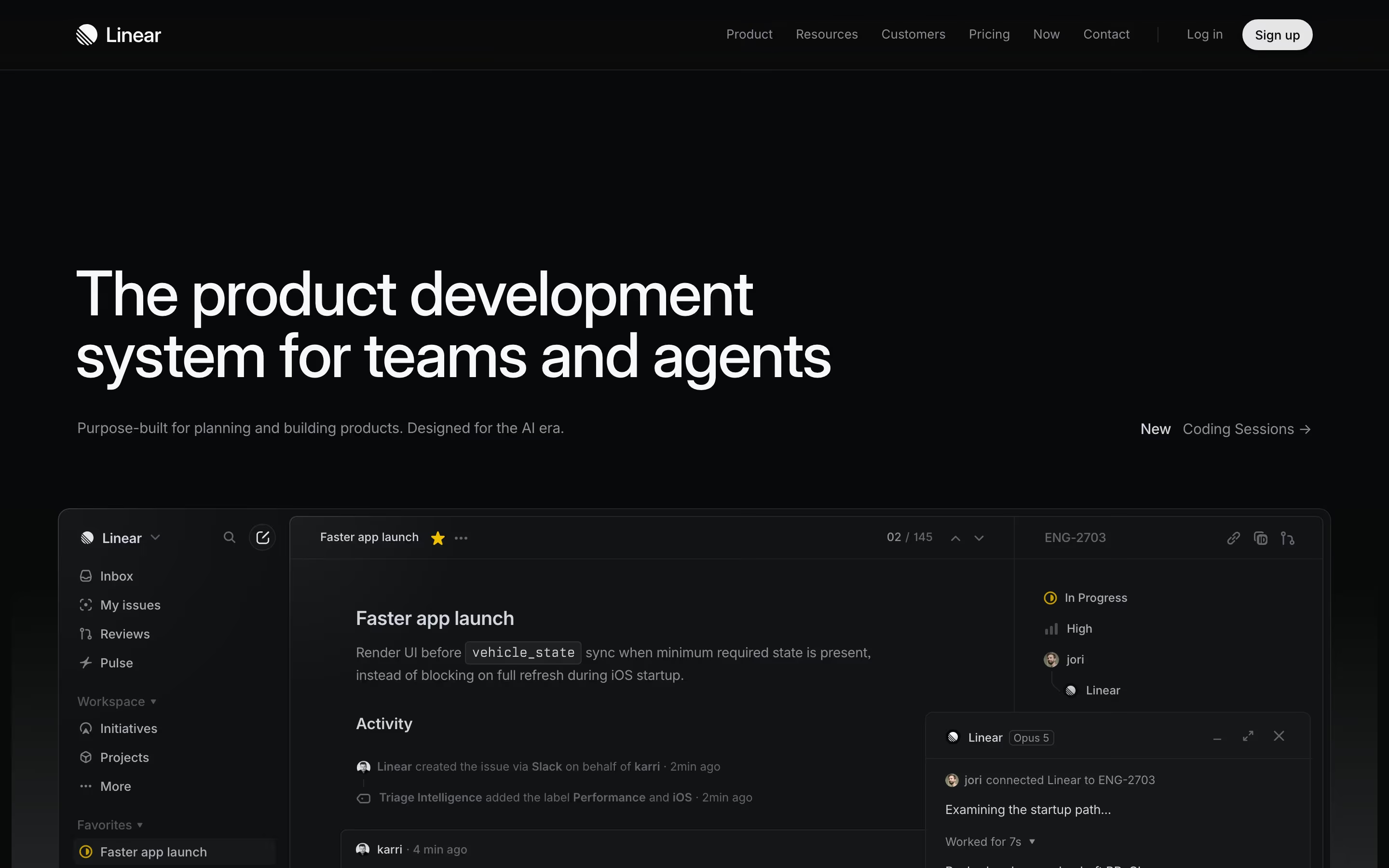
- Look for: near-black backgrounds, off-white text, one accent colour, glowing or bright product screenshots.
- Seen on: Linear's hero is a white sans-serif headline on near-black, with its actual dark-themed app shown below, so the marketing page and the product look the same.
- Prompt words: dark mode UI, near-black background, off-white text, single accent colour, product screenshot as hero, subtle glow.
- Best for / watch out: developer and AI tools. Pure white on pure black can glare, so use off-white. See 12 dark mode SaaS websites and the dark hub.
8. Technical grid
The technical grid shows the page's structure: thin rules, dashed boxes and small monospace labels make the layout look engineered.
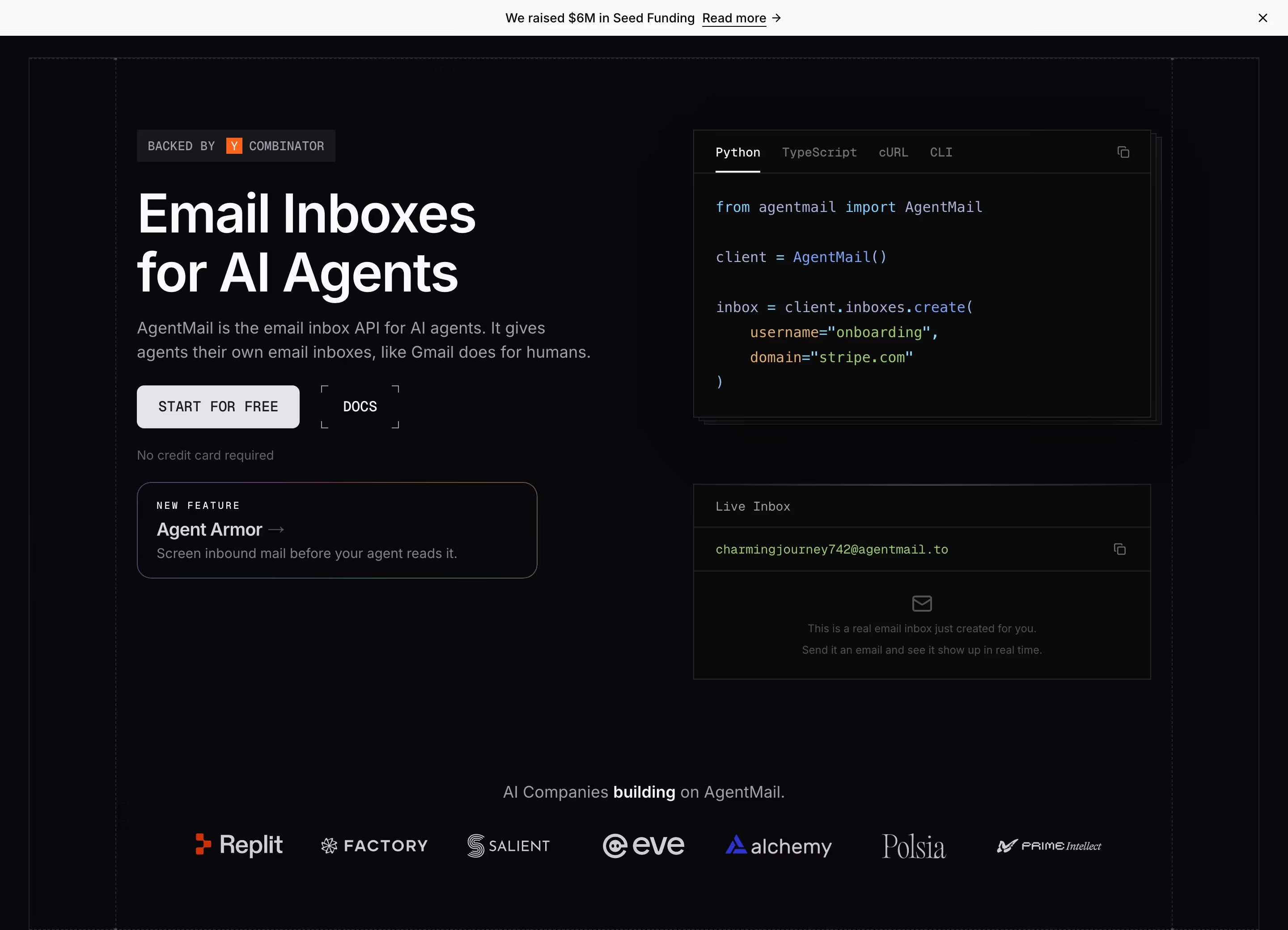
- Look for: hairline or dashed grid lines, corner markers, bracketed or numbered section labels, uppercase monospace eyebrows.
- Seen on: AgentMail frames its hero in dashed lines, labels its buttons in uppercase monospace ("START FOR FREE", "DOCS"), and our review notes section tags such as "[ What we offer ]".
- Prompt words: technical grid, visible layout lines, dashed borders, monospace labels, bracketed section numbers, blueprint feel.
- Best for / watch out: APIs and infrastructure. Too many lines turn into visual noise, so let the rules frame sections rather than every element.
9. Flat design
Flat design removes shadows, gradients and textures, and uses solid fills, simple icons and clear type.
- Look for: solid colour blocks, 2D icons, no bevels or drop shadows, strong contrast.
- Seen on: no single hero in our catalog is a clean, pure example, since most product sites mix flat fills with some depth. Flat design went mainstream with Microsoft's Metro design language (Windows Phone 7, 2010) and Apple's iOS 7 redesign (2013), which dropped the earlier leather-and-felt textures.
- Prompt words: flat design, solid colour fills, 2D icons, no shadows, no gradients, high contrast.
- Best for / watch out: clarity and speed. Fully flat buttons can stop looking clickable, which is why most "flat" sites now add a little depth back.
10. Material Design
Material Design is Google's design system, introduced in 2014. It treats UI as layers of paper with consistent elevation, shadows and motion.
- Look for: cards at defined elevations, bold primary colours, floating action buttons, ripple feedback, a strict spacing scale.
- Seen on: no clear example in our catalog. Marketing sites rarely follow Material visually, even when their product apps do.
- Prompt words: Material Design, elevation shadows, card layers, floating action button, bold primary colour, 8dp grid.
- Best for / watch out: app UI that should feel familiar to Android users. On a marketing page it can read as generic.
Depth, light and surface styles
These styles make the screen feel physical: you notice light, material, texture and space before you notice the layout.
11. Glassmorphism
Glassmorphism makes panels look like frosted glass: semi-transparent, blurred behind and lit from the edge.
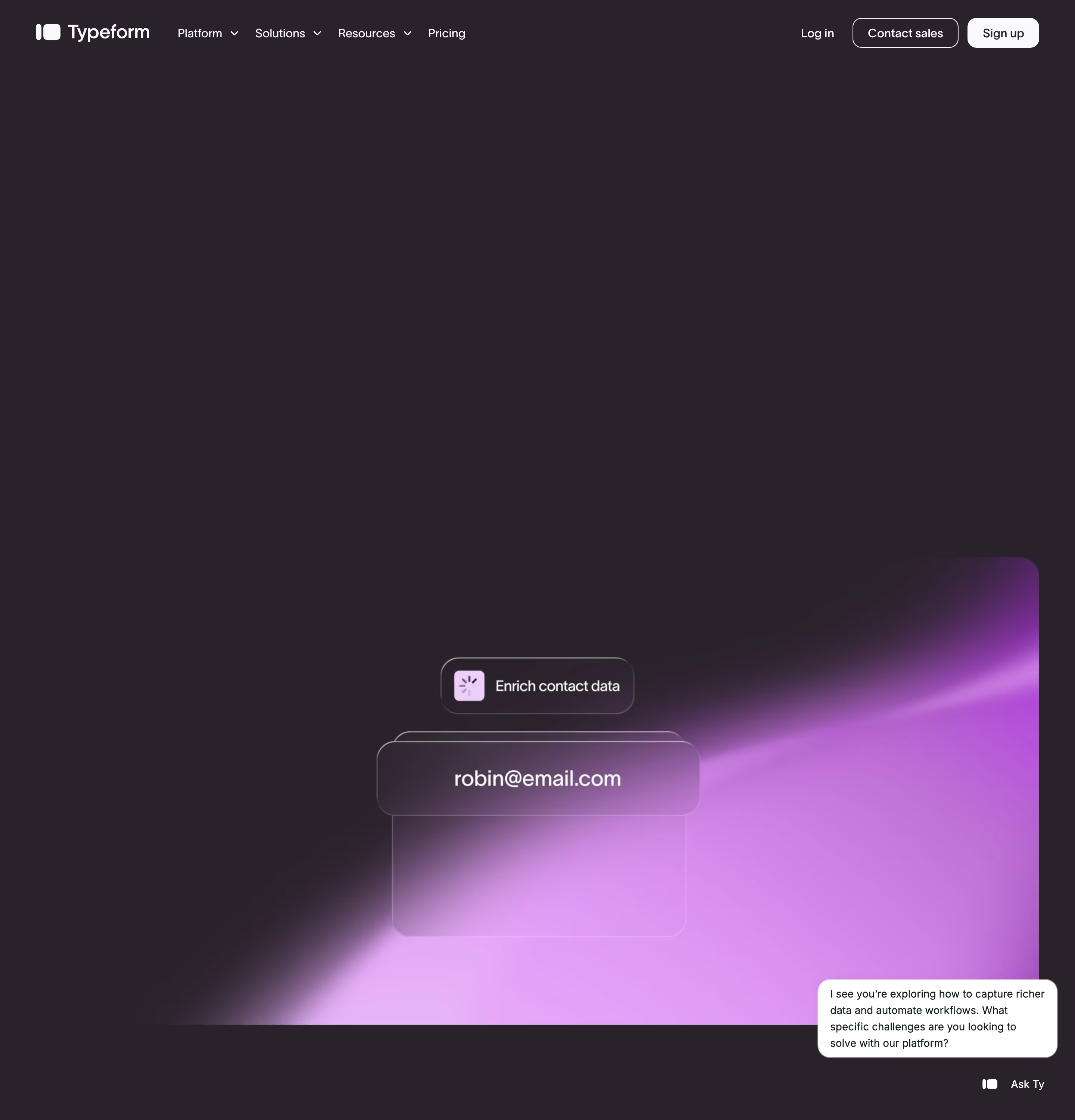
- Look for: translucent cards with background blur, thin light borders, colourful light behind the glass, soft shadows.
- Seen on: Typeform's hero floats translucent panels (one reading "robin@email.com") in front of a vivid magenta-to-violet glow on dark plum, so the colour shows through the glass.
- Prompt words: glassmorphism, frosted glass panels, backdrop blur, semi-transparent cards, glowing gradient behind, thin white border.
- Best for / watch out: showing an interface as light and modern. Text on glass loses contrast quickly. On the web it depends on CSS
backdrop-filter, so check legibility over every background it can scroll over.
12. Claymorphism / clay 3D
Claymorphism uses soft, matte, rounded 3D forms that look modelled from clay or plasticine.
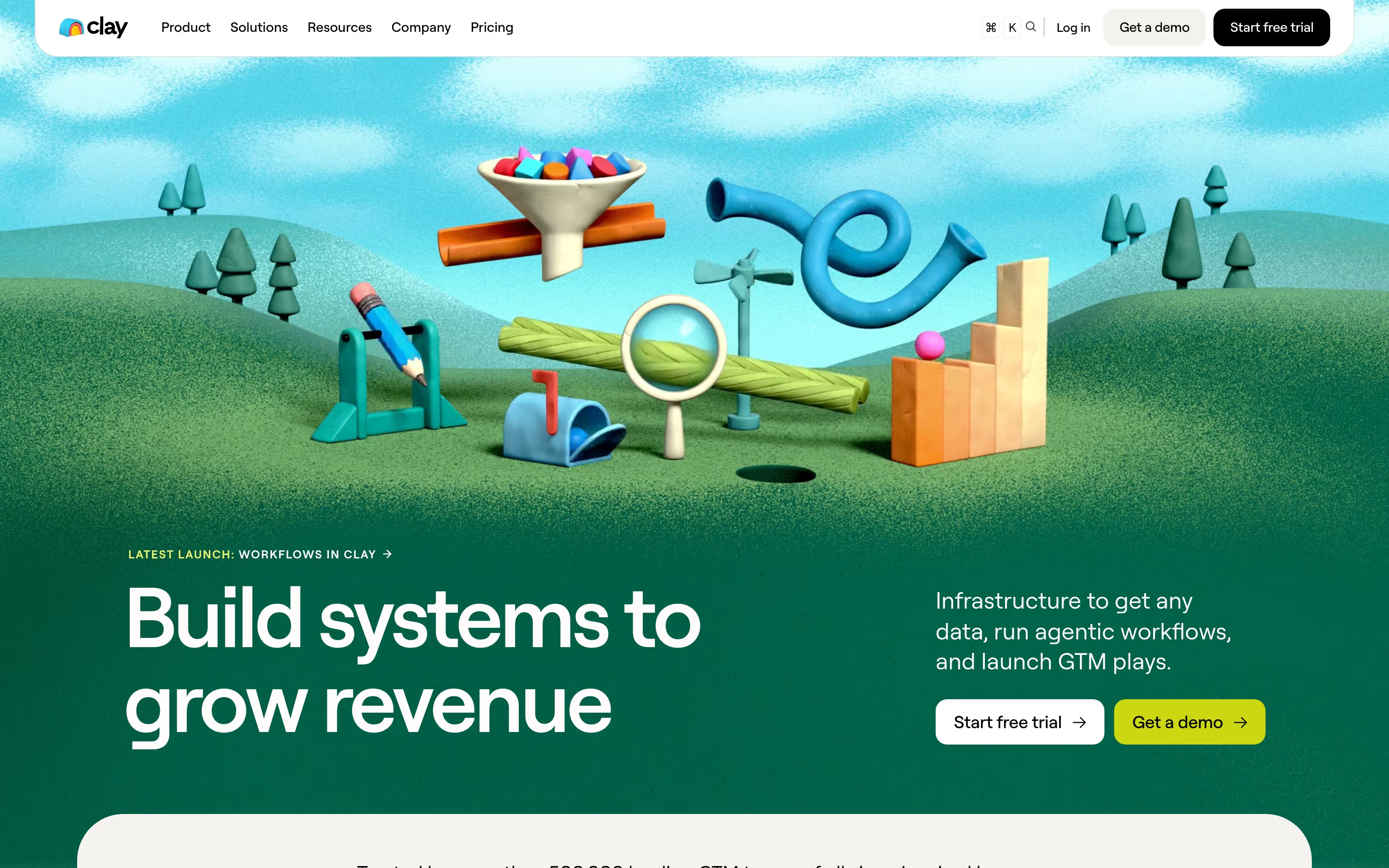
- Look for: rounded 3D objects, matte surfaces, soft shadows, saturated toy-like colours, playful scenes.
- Seen on: Clay's hero is a clay-rendered landscape of hills and trees holding a funnel, a pencil, a mailbox and a magnifying glass. Our review notes that these claymation scenes replace product screenshots across the page.
- Prompt words: claymorphism, clay render, matte plasticine 3D, soft rounded shapes, toy-like colours, soft studio lighting.
- Best for / watch out: making an abstract or data-heavy product feel friendly. It costs real 3D production time, and on its own it doesn't show what the product looks like.
13. Inflated 3D
Inflated 3D uses glossy, puffed-up shapes, like balloons or soft plastic, as the brand's graphic element.
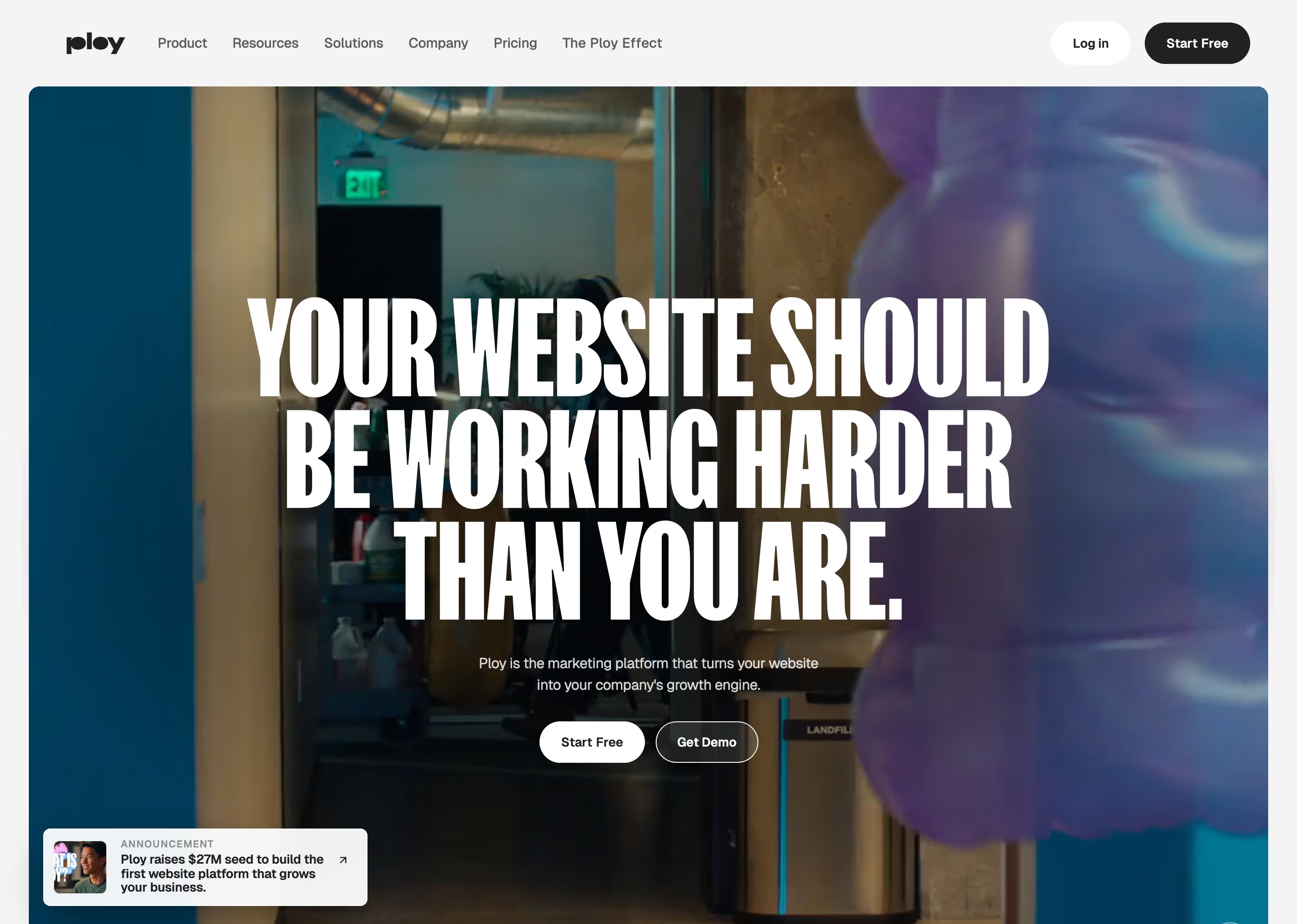
- Look for: glossy highlights, bulging rounded volumes, bright single-colour forms, often cropped at the frame edge.
- Seen on: Ploy puts a glossy purple inflated form at the edge of its hero photo, behind "YOUR WEBSITE SHOULD BE WORKING HARDER THAN YOU ARE." Our review notes the same blob forms recur in the headline band, the three-engine block and the footer wordmark.
- Prompt words: inflated 3D, glossy balloon shapes, puffy volumes, soft reflections, single saturated colour, cropped at edge.
- Best for / watch out: a memorable brand shape that can repeat. Used once, it looks like decoration. Used everywhere, it becomes the brand.
14. Isometric
Isometric illustration draws 3D objects at fixed angles with no perspective, so every edge stays parallel and the scene reads like a diagram.
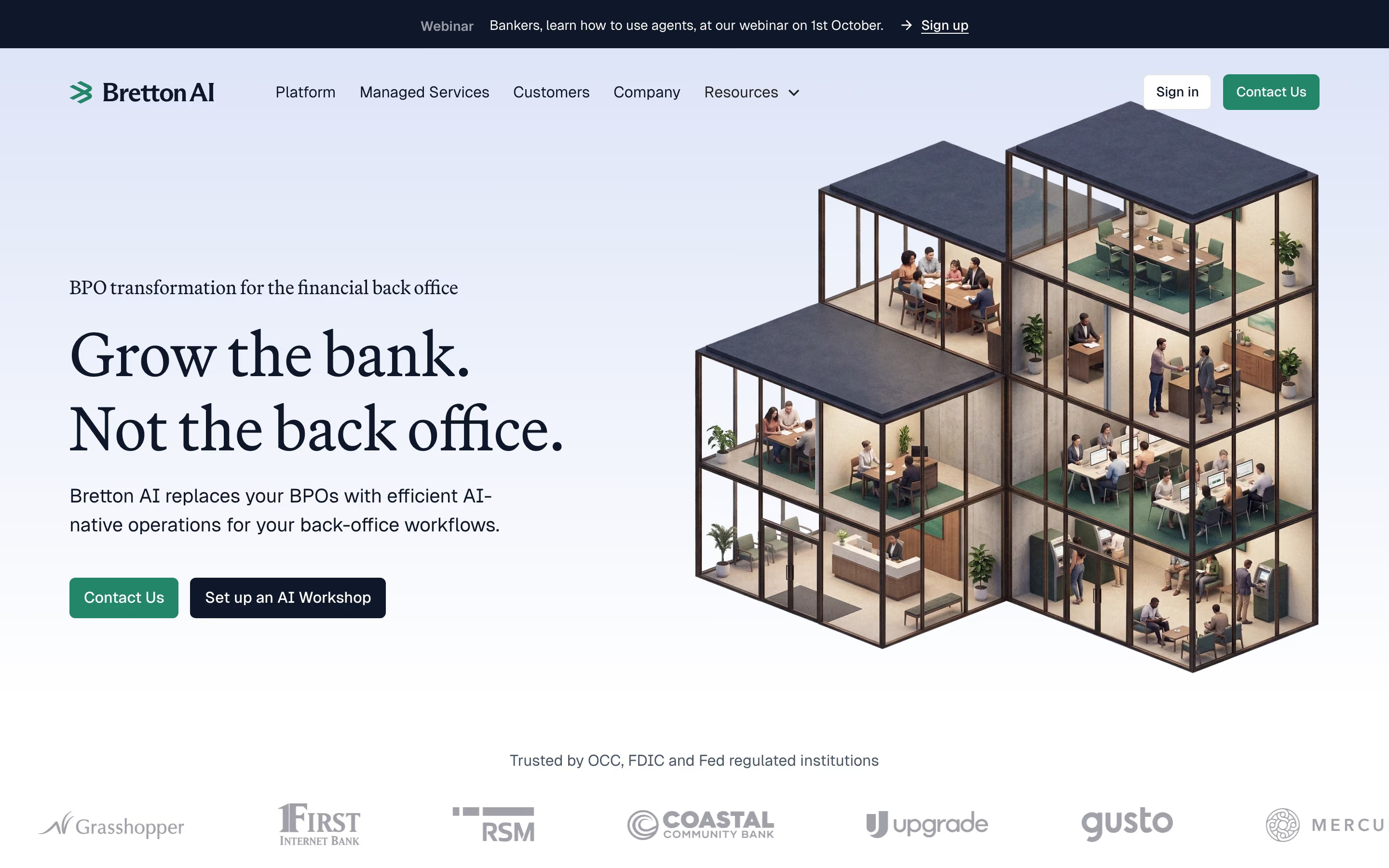
- Look for: 30-degree angles, cutaway buildings or stacked blocks, no vanishing point, labelled layers.
- Seen on: Bretton pairs "Grow the bank. Not the back office." with an isometric glass building, each room showing people at desks. Raycast, Gong and Ditto also use isometric drawings further down their pages.
- Prompt words: isometric illustration, 30-degree axonometric, cutaway view, stacked layers, no perspective, clean shading.
- Best for / watch out: explaining architecture, layers or how parts connect. Stacks of labelled boxes get generic fast, so the subject needs to be specific.
15. Aurora gradient
The aurora style uses soft, blurred bands of colour, like the northern lights, as a background light source.
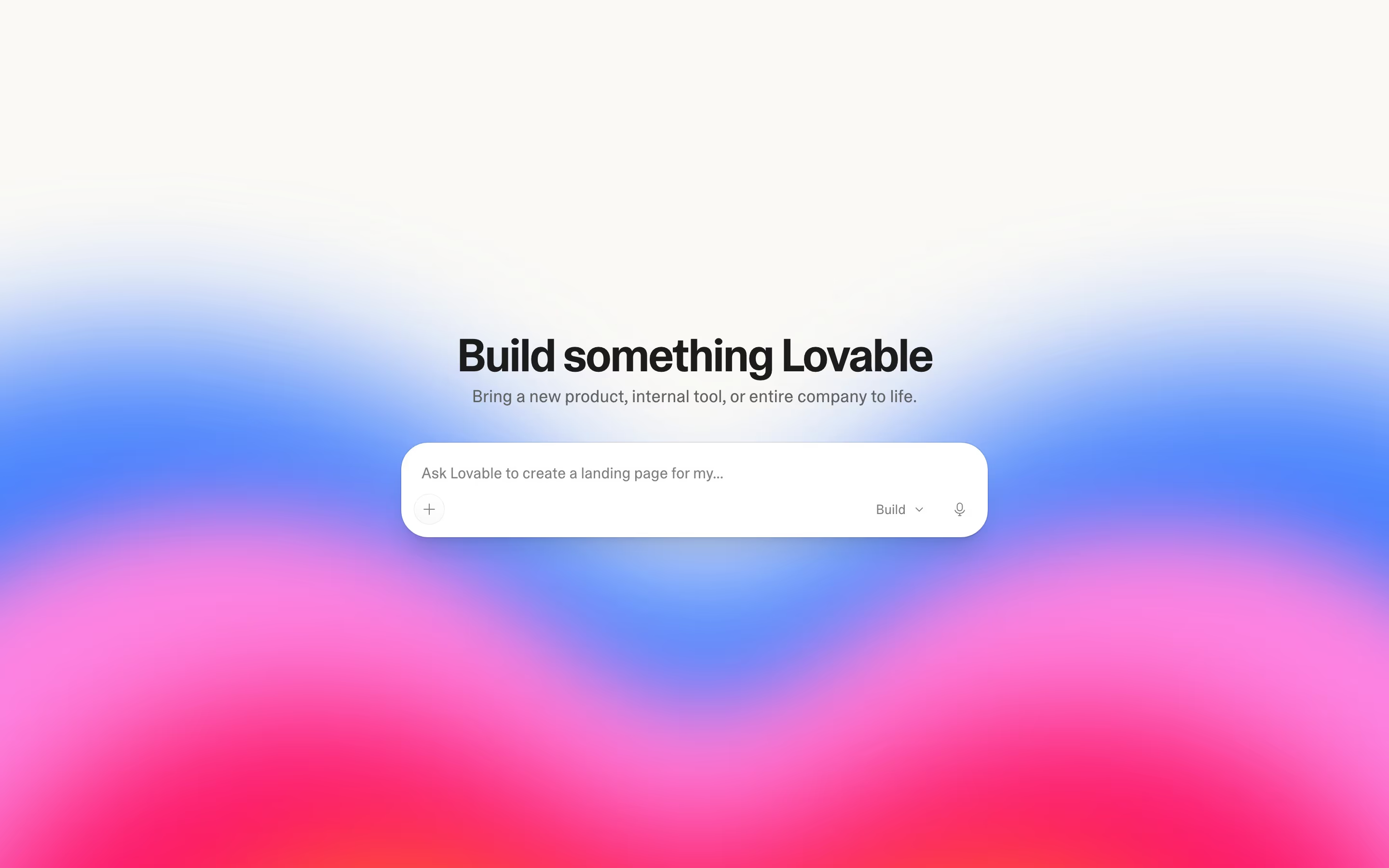
- Look for: heavily blurred colour fields, two to four hues blending, no hard edges, often glowing up from the bottom of the frame.
- Seen on: Lovable's hero is an off-white page that fades into wide, blurred bands of blue, pink and red behind the headline "Build something Lovable" and a single prompt box.
- Prompt words: aurora gradient, blurred colour bands, soft glow, northern-lights background, smooth colour transitions, minimal UI on top.
- Best for / watch out: atmosphere around one action. Large blurred gradients can band on some screens, and stacking text on the brightest area hurts contrast.
16. Fluid gradient
A fluid gradient is a sharp-edged ribbon or wave of blended colour that sweeps across the page, more defined than an aurora.
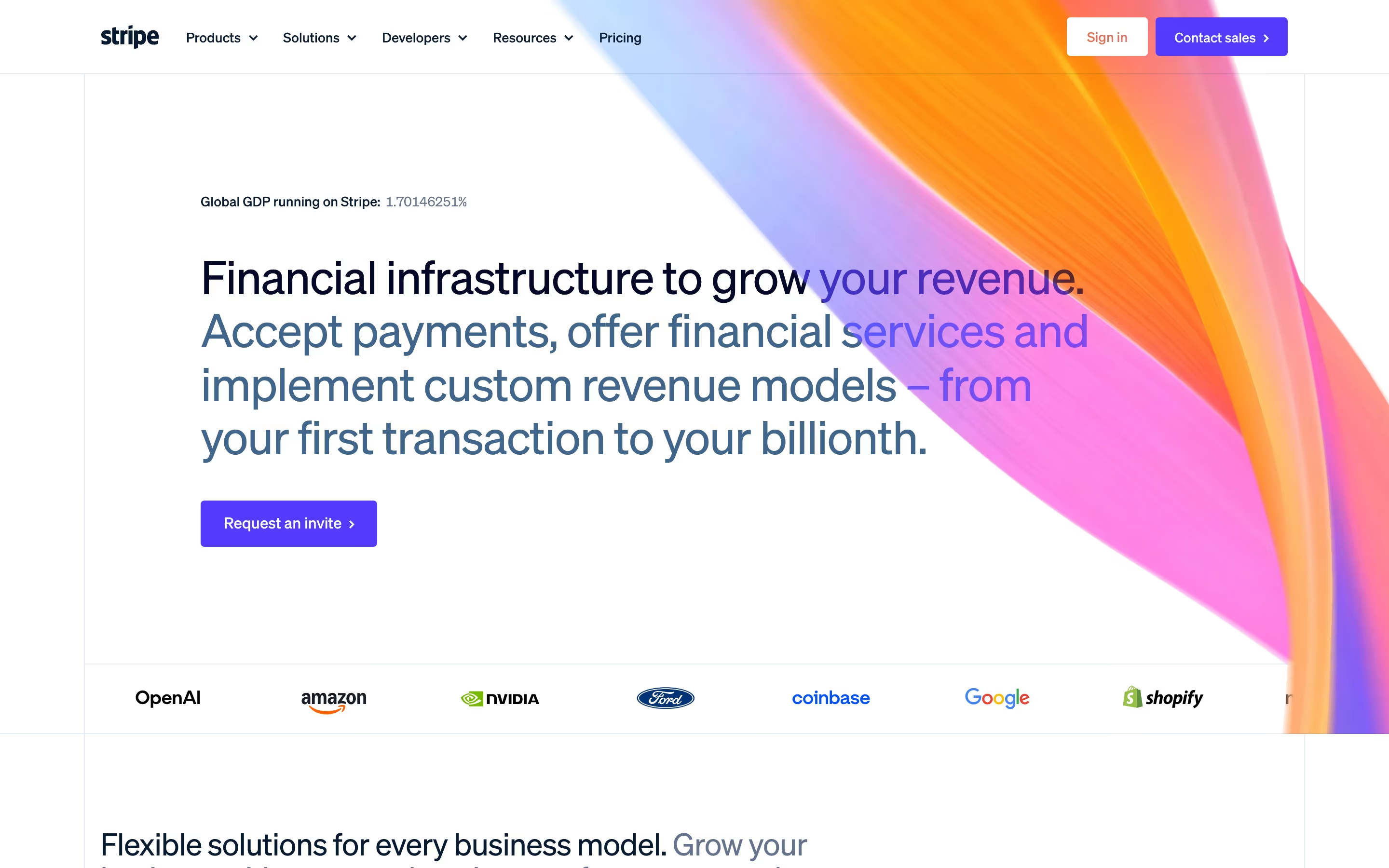
- Look for: one flowing shape with a crisp edge, several hues blended inside it, usually behind or beside the headline.
- Seen on: Stripe's hero runs a large ribbon of orange, pink, purple and blue down the top right of an otherwise white page, behind "Financial infrastructure to grow your revenue."
- Prompt words: fluid gradient ribbon, flowing colour wave, blended orange pink purple blue, crisp edges, white background.
- Best for / watch out: a signature visual that needs no product shot. Easy to imitate, hard to make your own.
17. Grain and noise
Grain adds a film-like speckle to flat colour or gradients so that digital surfaces feel printed or photographic.
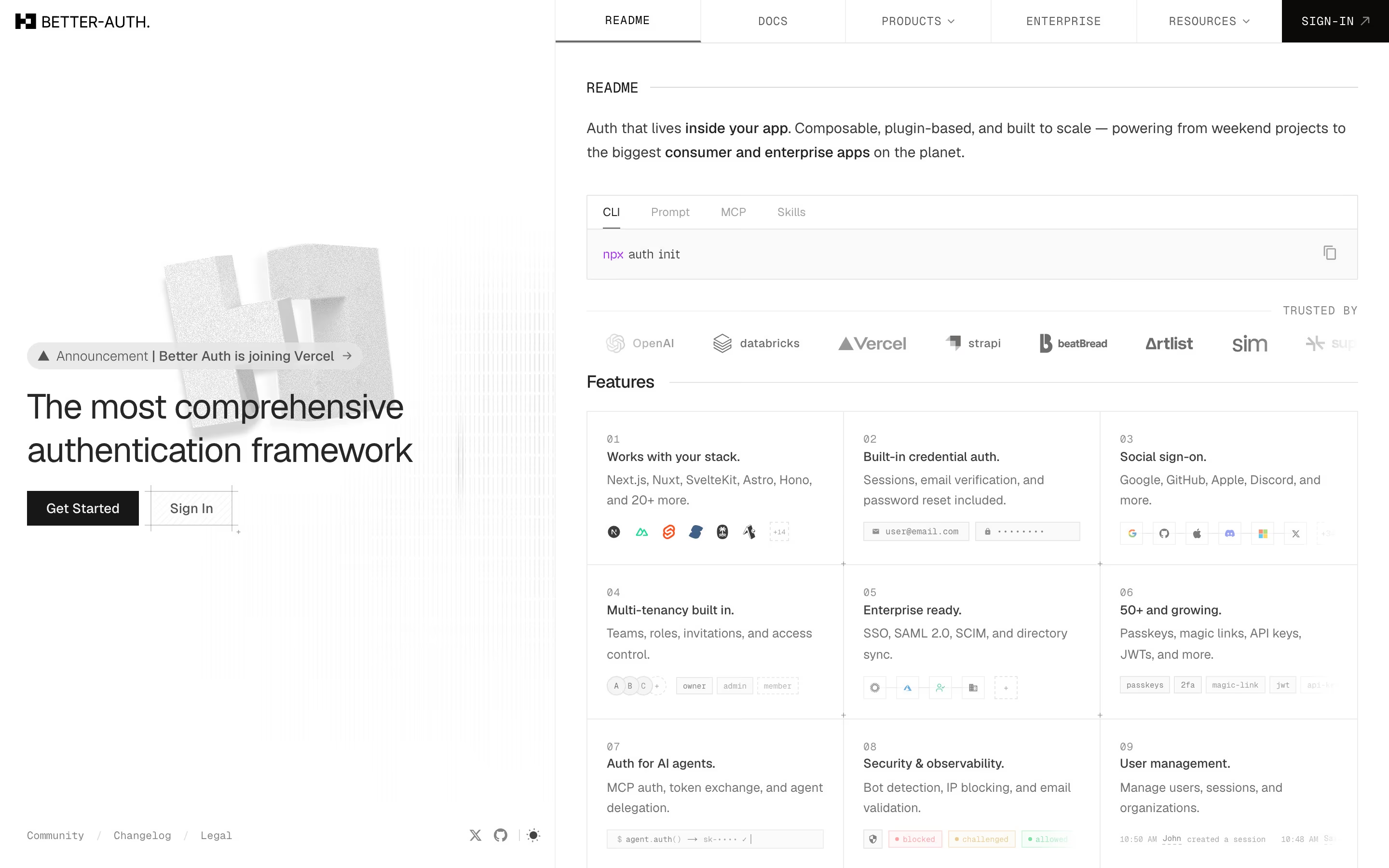
- Look for: visible speckle on gradients or 3D renders, slightly gritty dark backgrounds, a tactile, analogue feel.
- Seen on: Better Auth's otherwise monochrome hero has a grainy grey block letterform behind its headline. Our review of Inngest records its background as "a near-black, grainy field (#181617)".
- Prompt words: film grain, noise texture, grainy gradient, analogue print feel, subtle speckle.
- Best for / watch out: stopping gradients and 3D from looking plastic. Heavy grain compresses badly and can make small text look dirty.
18. Cinematic photography
Cinematic photography uses a single, carefully lit photograph of a scene, rather than UI or illustration, as the hero image.
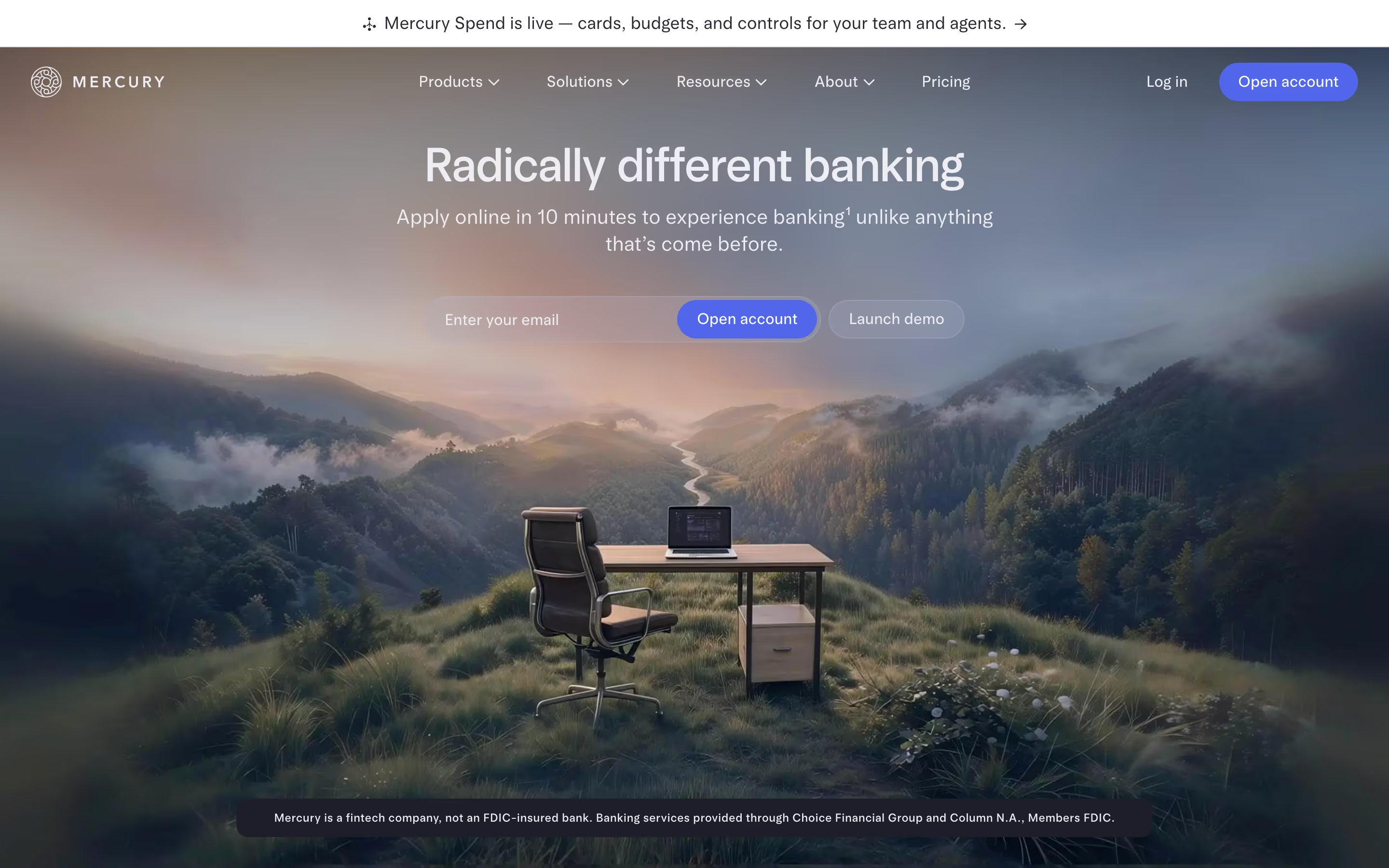
- Look for: a wide photographic scene, film-like colour grading, natural light, text laid over sky or shadow.
- Seen on: Mercury's hero places "Radically different banking" over a photograph of a desk and chair on a misty mountainside at dusk. Attentive does the same with a warm, backlit interior and a serif headline.
- Prompt words: cinematic photography, wide shot, golden-hour light, film colour grade, shallow depth, text over sky.
- Best for / watch out: selling a feeling, such as calm, ambition or trust. It shows nothing of the product, so the next section has to.
19. Chiaroscuro (dramatic light on black)
Chiaroscuro is a painting term for strong contrast between light and dark (tenebrism is its most extreme form). On the web it means hard light shapes cutting through a black page.
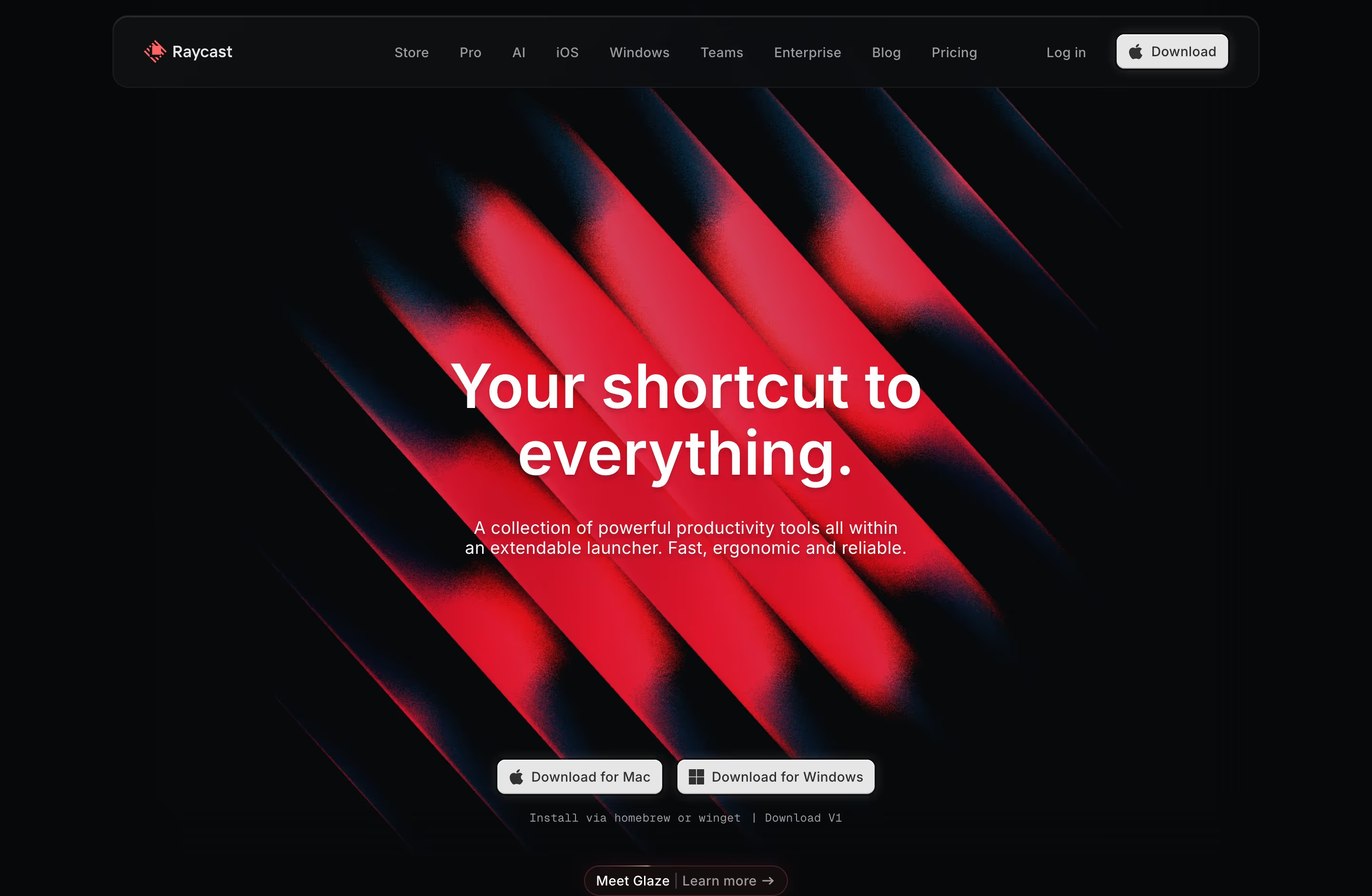
- Look for: mostly black frame, one intense light source, glowing edges, deep shadows.
- Seen on: Raycast's hero is a black field cut by diagonal bars of glowing red light, with "Your shortcut to everything." in white at the centre.
- Prompt words: chiaroscuro, dramatic lighting, light beams on black, high contrast, glowing edges, deep shadow.
- Best for / watch out: a bold, premium first impression. The image is pure mood, so the headline has to explain the product.
20. Skeuomorphism
Skeuomorphism makes digital elements imitate real materials and objects, such as leather, paper, metal knobs or wood.
- Look for: realistic textures, stitched edges, bevelled buttons, objects that mimic physical tools.
- Seen on: no clear example in our catalog. It was the look of early iPhone apps until Apple's iOS 7 (2013) replaced it with flat design.
- Prompt words: skeuomorphic, realistic textures, leather and paper materials, bevelled buttons, physical-object metaphors.
- Best for / watch out: making an unfamiliar tool feel familiar. Full skeuomorphism looks dated today, but small touches (a real-looking toggle, a paper card) still work.
21. Neumorphism
Neumorphism (soft UI) makes elements look extruded from the background using a light and a dark shadow on the same colour.
- Look for: one background colour everywhere, controls that look pressed in or pushed out, very low contrast.
- Seen on: no clear example in our catalog. It spread through design-sharing sites around 2020 and was widely criticised for poor contrast and unclear buttons.
- Prompt words: neumorphism, soft UI, extruded shapes, dual soft shadows, monochrome pastel background, rounded controls.
- Best for / watch out: concept shots and small decorative controls. For real interfaces, its low contrast is an accessibility problem.
Retro-digital styles
These borrow from old screens, games and print processes. In our catalog they lean heavily towards developer tools: 51 of the 142 engineering and infrastructure sites we've reviewed (36%) have ASCII art, dithering, pixel art or monospace type noted in their design review, against 41 of the other 280 sites (15%).
22. Pixel art
Pixel art builds images from visible square pixels and a limited palette, in the manner of 8-bit and 16-bit video games.
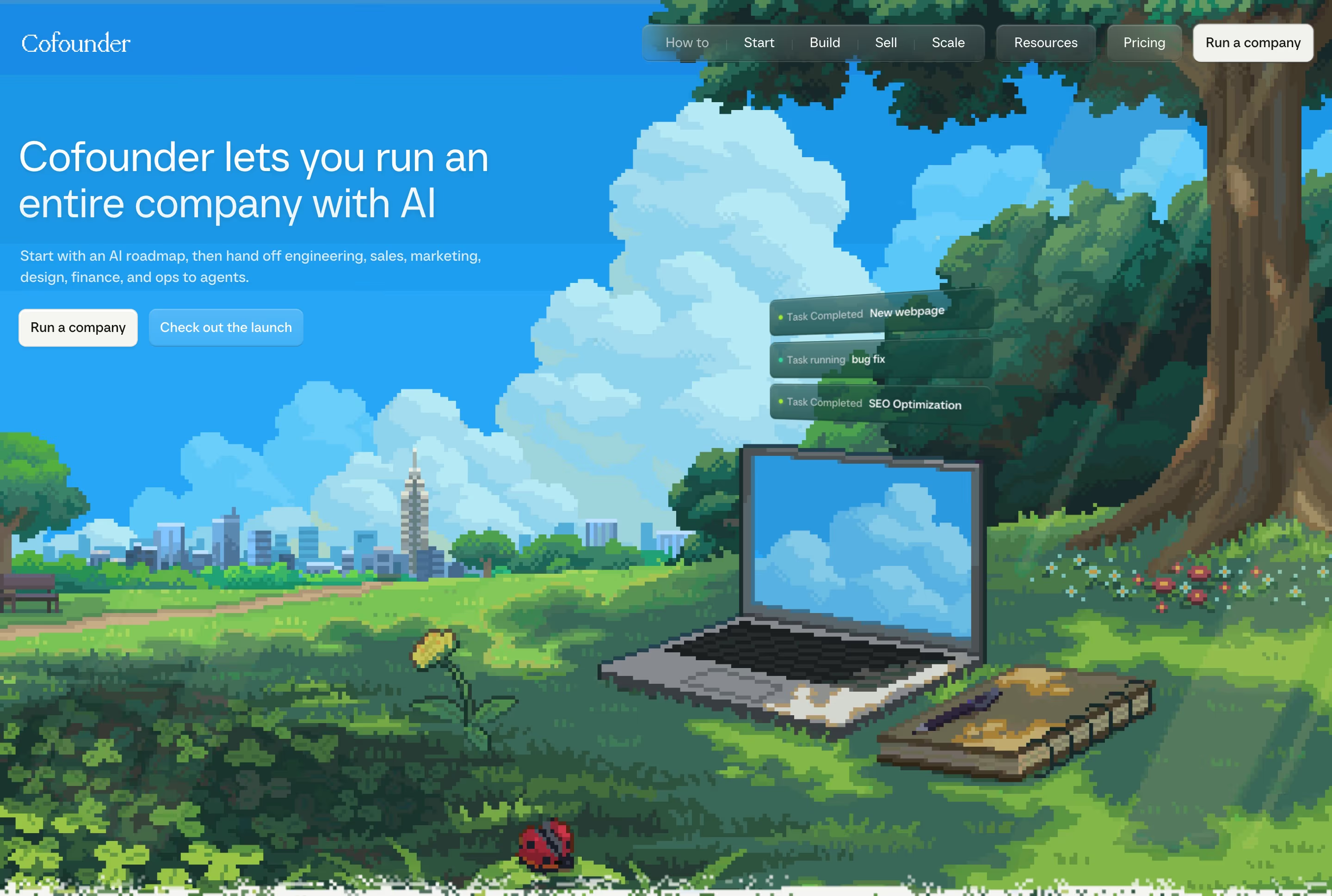
- Look for: hard square pixels, limited colour counts, no anti-aliasing, game-like scenes or sprites.
- Seen on: Cofounder opens on a full-bleed pixel-art park, with a skyline, a large tree, flowers and a laptop on the grass, behind "Cofounder lets you run an entire company with AI". Browserbase uses a pixelated mountain range.
- Prompt words: pixel art, 16-bit, limited palette, visible pixels, no anti-aliasing, retro game scene.
- Best for / watch out: warmth and personality for a technical product. Keep UI text in a normal font, because pixel fonts at body size are hard to read.
23. Dithering
Dithering uses patterns of dots or pixels to suggest shades and gradients with very few colours, a technique from early computer graphics and printing.
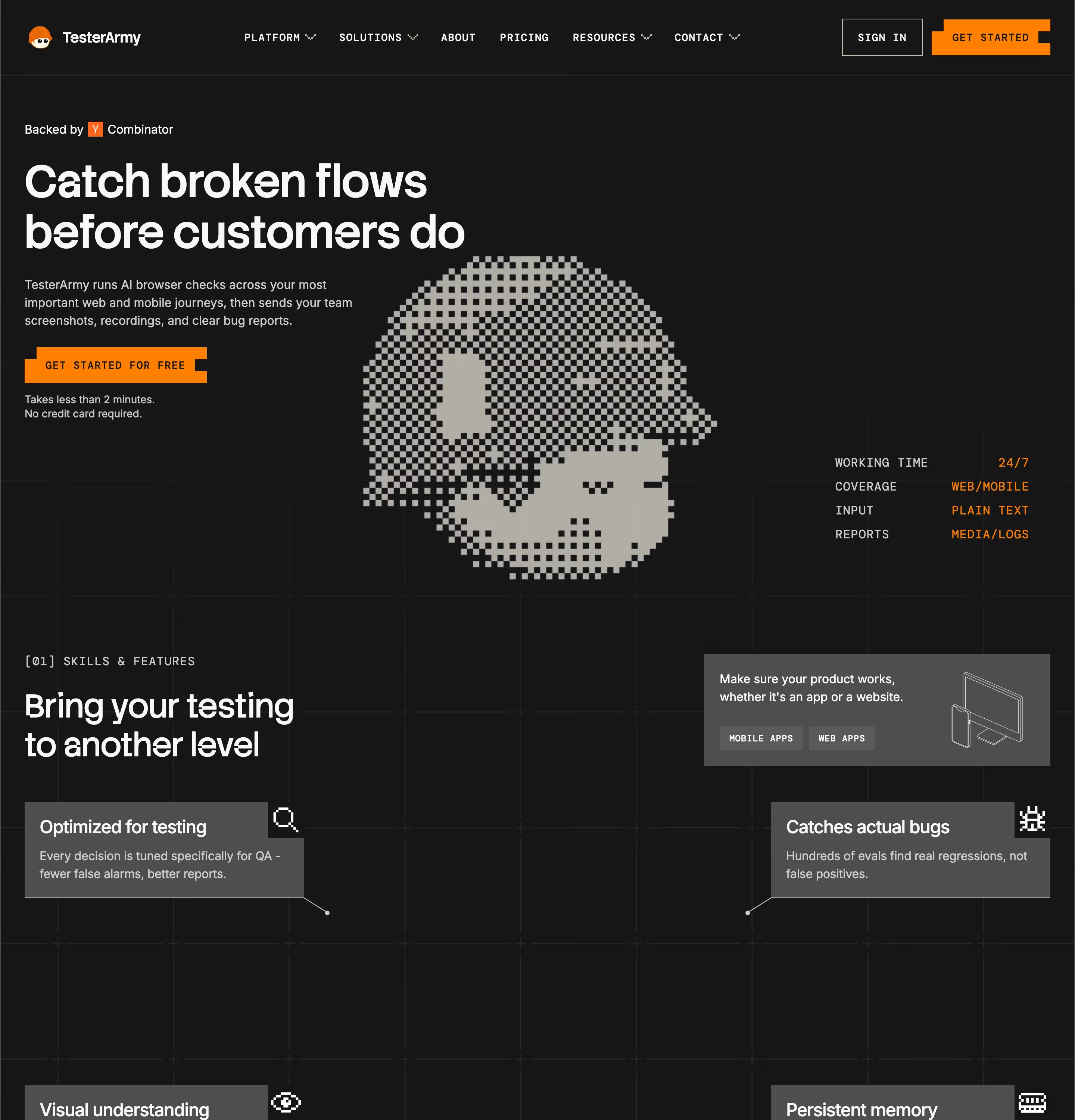
- Look for: checkerboard or scattered-dot shading, one or two colours, a crunchy low-fi texture.
- Seen on: TesterArmy's hero signature is a large pixel-dithered head beside short spec lines ("WORKING TIME 24/7"). Our reviews also note dithered artwork on Tavus and Sanity.
- Prompt words: dithered illustration, 1-bit shading, ordered dither, two-colour, low-fi texture.
- Best for / watch out: a strong graphic identity on a limited palette. Fine dither patterns can shimmer when scaled, so render at exact sizes.
24. ASCII art
ASCII art draws pictures from text characters: letters, numbers and punctuation set in a monospace grid.
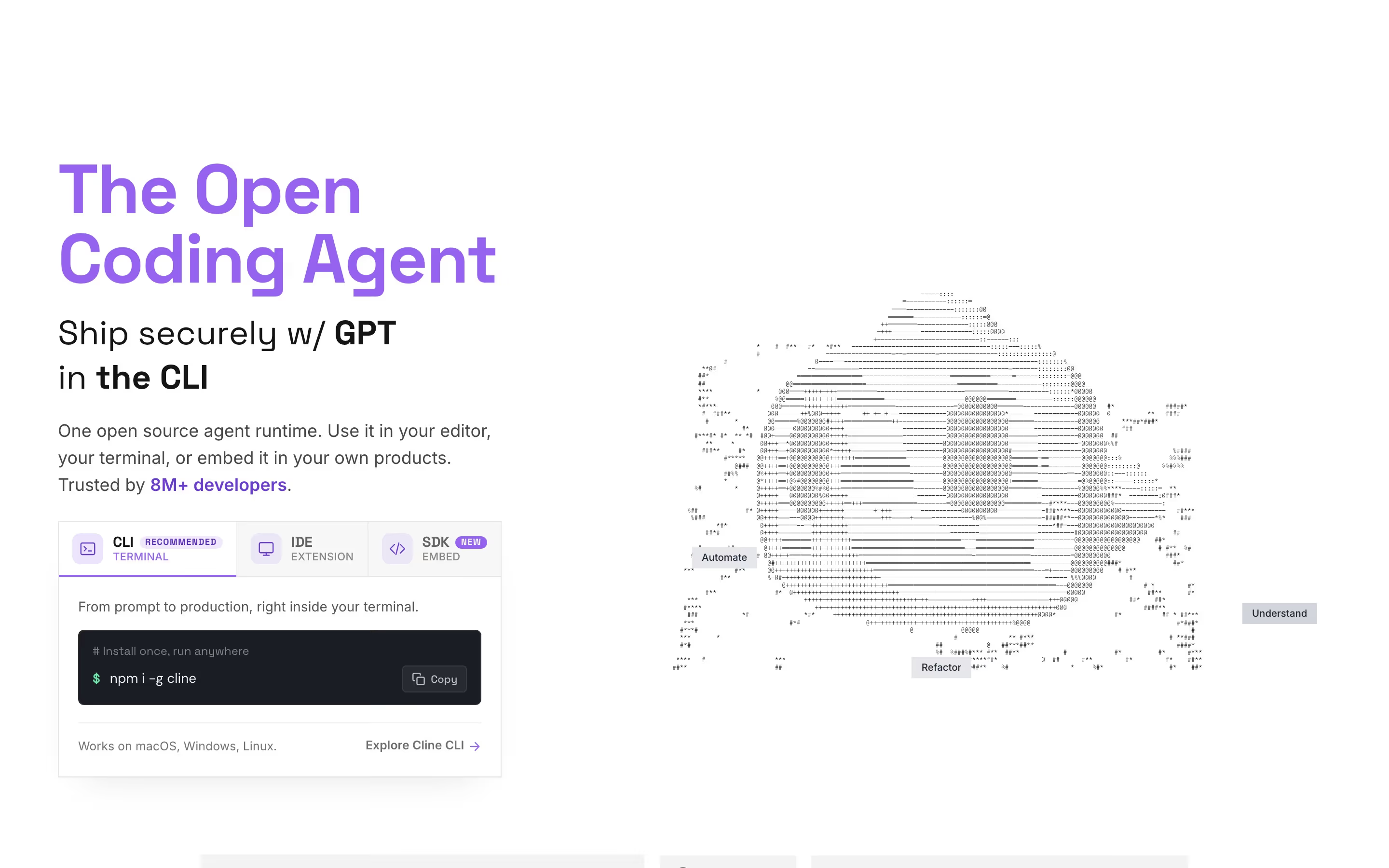
- Look for: shapes made of characters, monospace grids, light tones on white or green and white on black.
- Seen on: Cline's hero places an ASCII-art head (labelled "Automate", "Refactor" and "Understand") beside "The Open Coding Agent". Our reviews record ASCII skylines on Firecrawl and ASCII-style diagrams on PlanetScale.
- Prompt words: ASCII art, made of text characters, monospace grid, terminal aesthetic, light grey characters on white.
- Best for / watch out: tools used in the terminal. Screen readers will read the characters aloud unless you hide the art from them.
25. Terminal / monospace
The terminal style uses code typefaces, uppercase labels and command-line references to make the page look like a developer's environment.
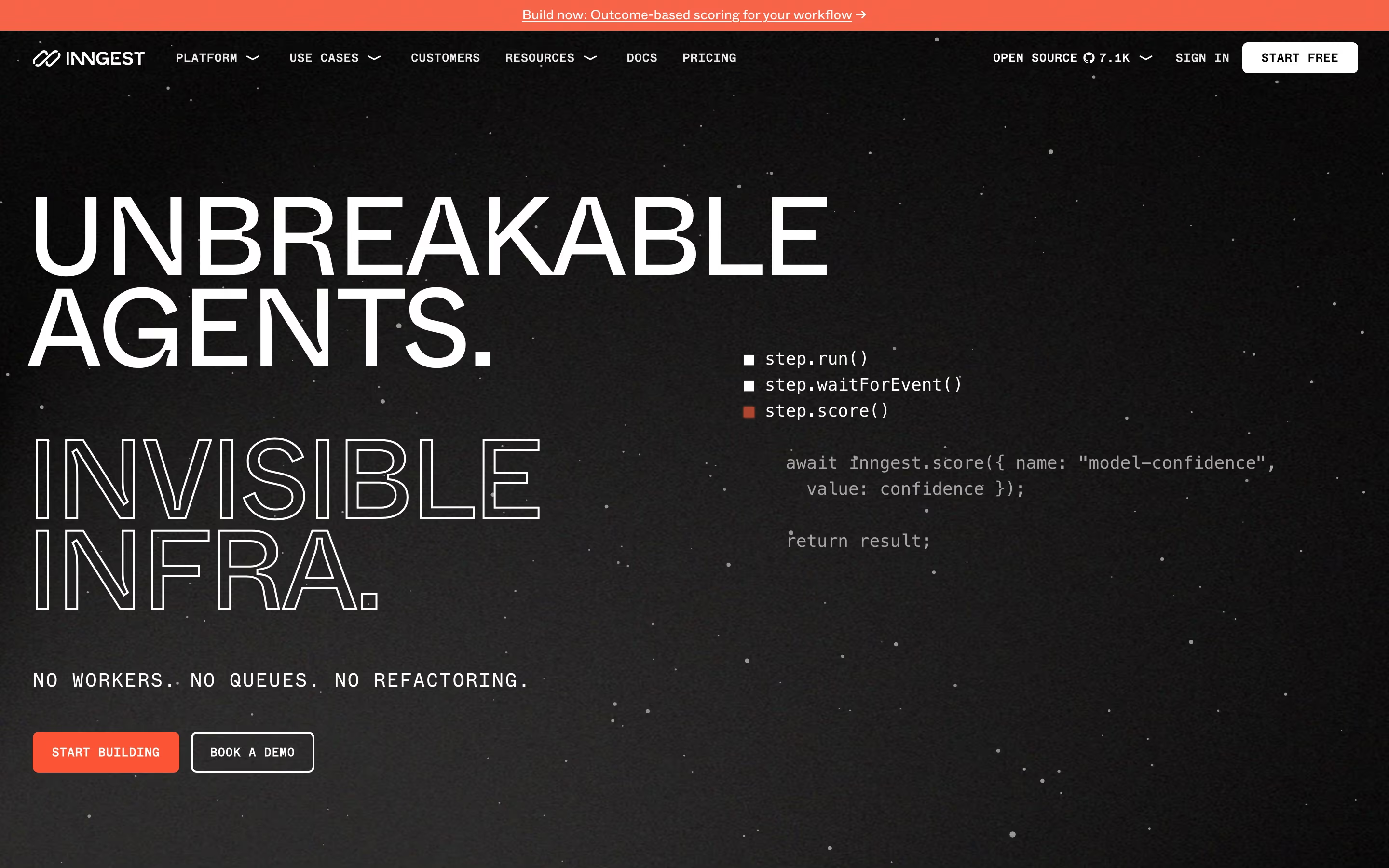
- Look for: monospace type for labels or body, code snippets in the hero, uppercase eyebrows, dark backgrounds.
- Seen on: Inngest stacks "UNBREAKABLE AGENTS." over an outlined "INVISIBLE INFRA.", with monospace code lines (
step.run(),step.waitForEvent()) beside them and a coral "START BUILDING" button. - Prompt words: terminal aesthetic, monospace typography, code snippet hero, uppercase labels, dark background, single bright accent.
- Best for / watch out: developer products. Monospace body text slows reading, so keep it for labels and code.
26. Synthwave / perspective grid
Synthwave is a 1980s retro-futurist look: neon on dark, chrome type and a glowing grid floor running to a horizon.
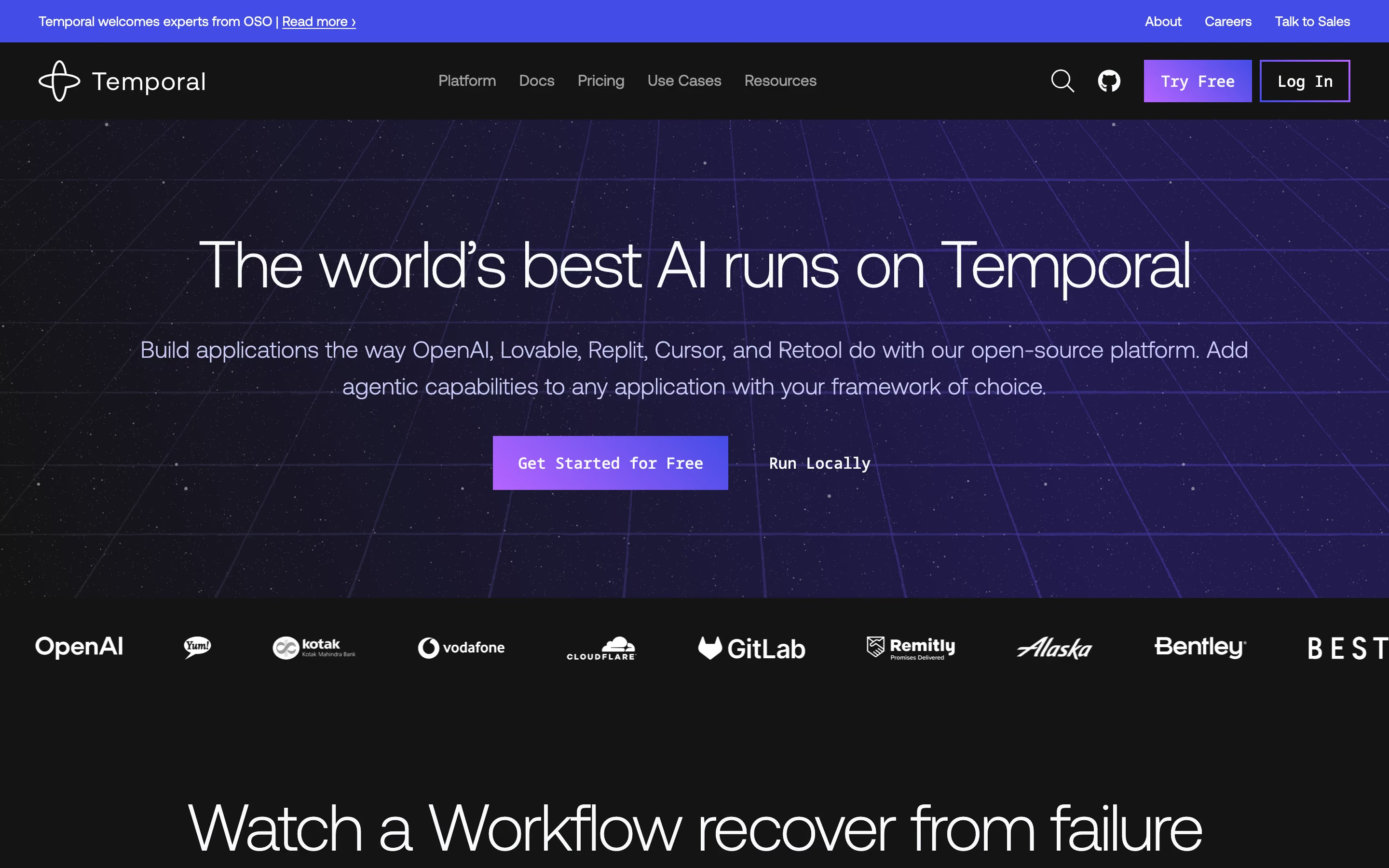
- Look for: a perspective grid receding to a horizon, purple, pink and cyan light, dark sky, sometimes a striped sun.
- Seen on: Temporal borrows the grid horizon only. Its hero sits on a violet perspective grid under "The world's best AI runs on Temporal", without the sunsets or chrome type of full synthwave. Qodo also puts its headline over a perspective grid.
- Prompt words: synthwave, retro-futurist, neon perspective grid, horizon line, purple and cyan glow, 1980s.
- Best for / watch out: a hint of nostalgia and speed. The full look (sunsets, chrome) quickly reads as a costume.
27. Neon
The neon style draws glowing lines that look like neon tubes, usually on a dark background.
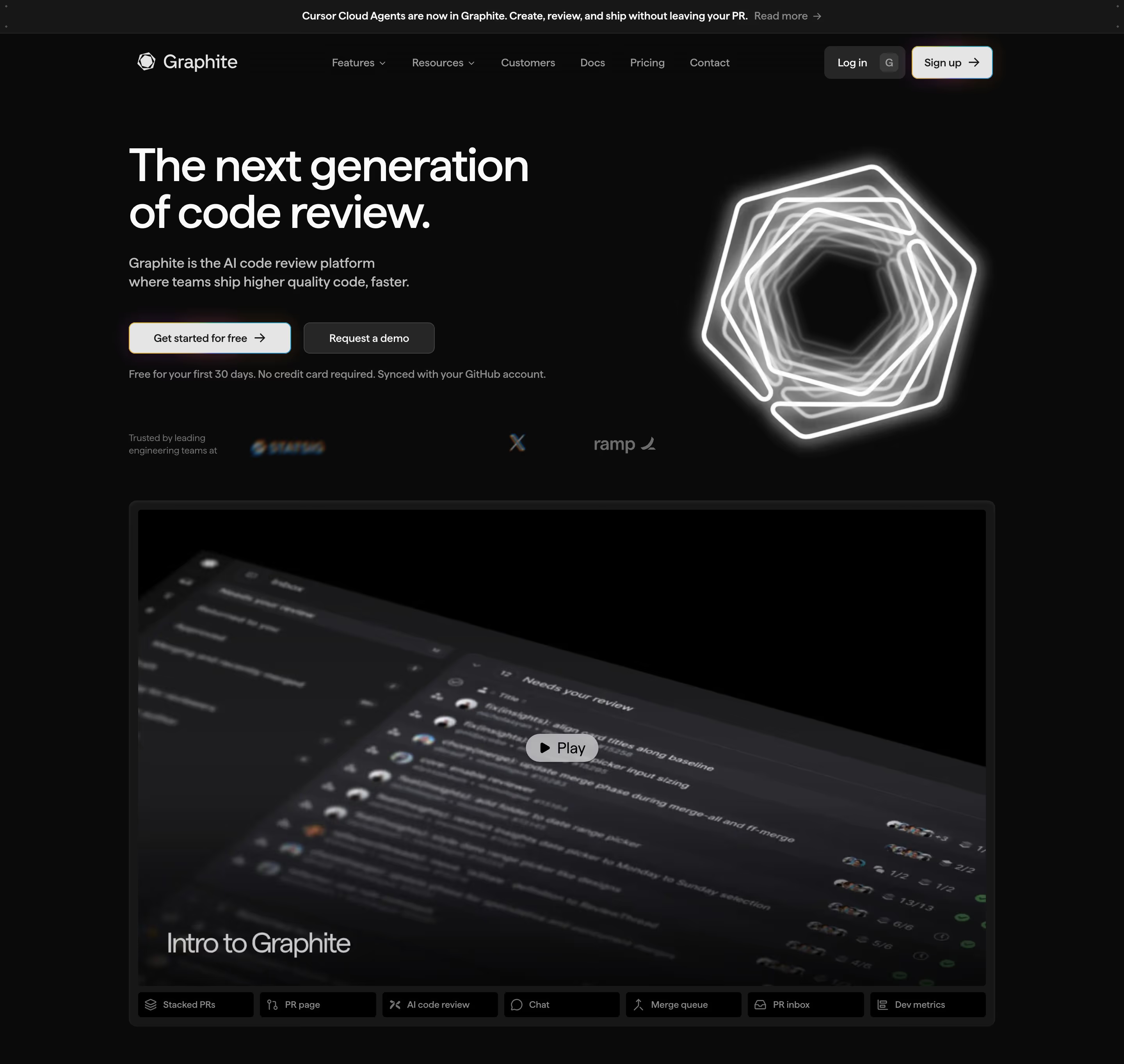
- Look for: bright outlines with a soft halo, black or near-black grounds, one or two vivid hues.
- Seen on: Graphite sets "The next generation of code review." beside a glowing nested hexagon, and our review notes that the page ends on a photograph of a neon "Graphite" sign. Trigger.dev uses neon green (#98e74d and #b4ff58 in our review) for buttons and accents on near-black.
- Prompt words: neon glow, glowing outline, light tube effect, black background, electric green or pink, soft halo.
- Best for / watch out: one focal object on a dark page. Neon text at small sizes blurs and fails contrast.
28. Halftone / Pop Art
Halftone uses dots of varying size to print tones. Pop Art (from the mid-1950s, think Roy Lichtenstein's Ben-Day dots) made those dots, bold outlines and flat colour into an art style.
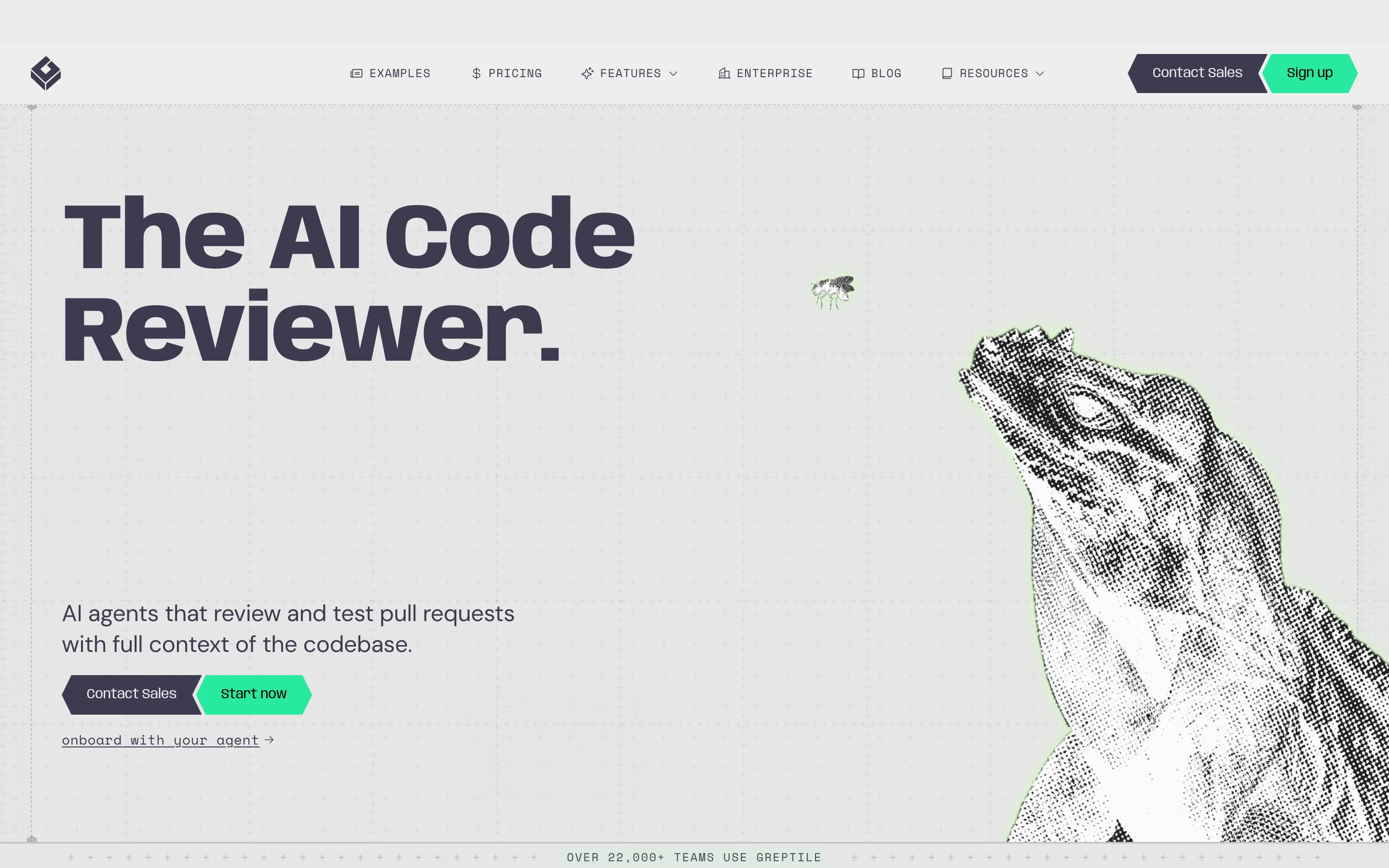
- Look for: visible dot patterns, high-contrast black shapes, flat bright colour, comic-book outlines.
- Seen on: Greptile faces "The AI Code Reviewer." with a large halftone lizard cropped at the right edge. Our reviews note halftone panels on Granola and halftone textures on Notra and Conduit.
- Prompt words: halftone illustration, Ben-Day dots, Pop Art, bold black outlines, flat primary colours, print texture.
- Best for / watch out: turning a mascot or photo into a graphic. Dots fight with small text, so keep the halftone away from copy.
29. Retro computing
Retro computing uses old hardware (beige PCs, CRT monitors, floppy disks) and its warm nostalgia as the visual subject.
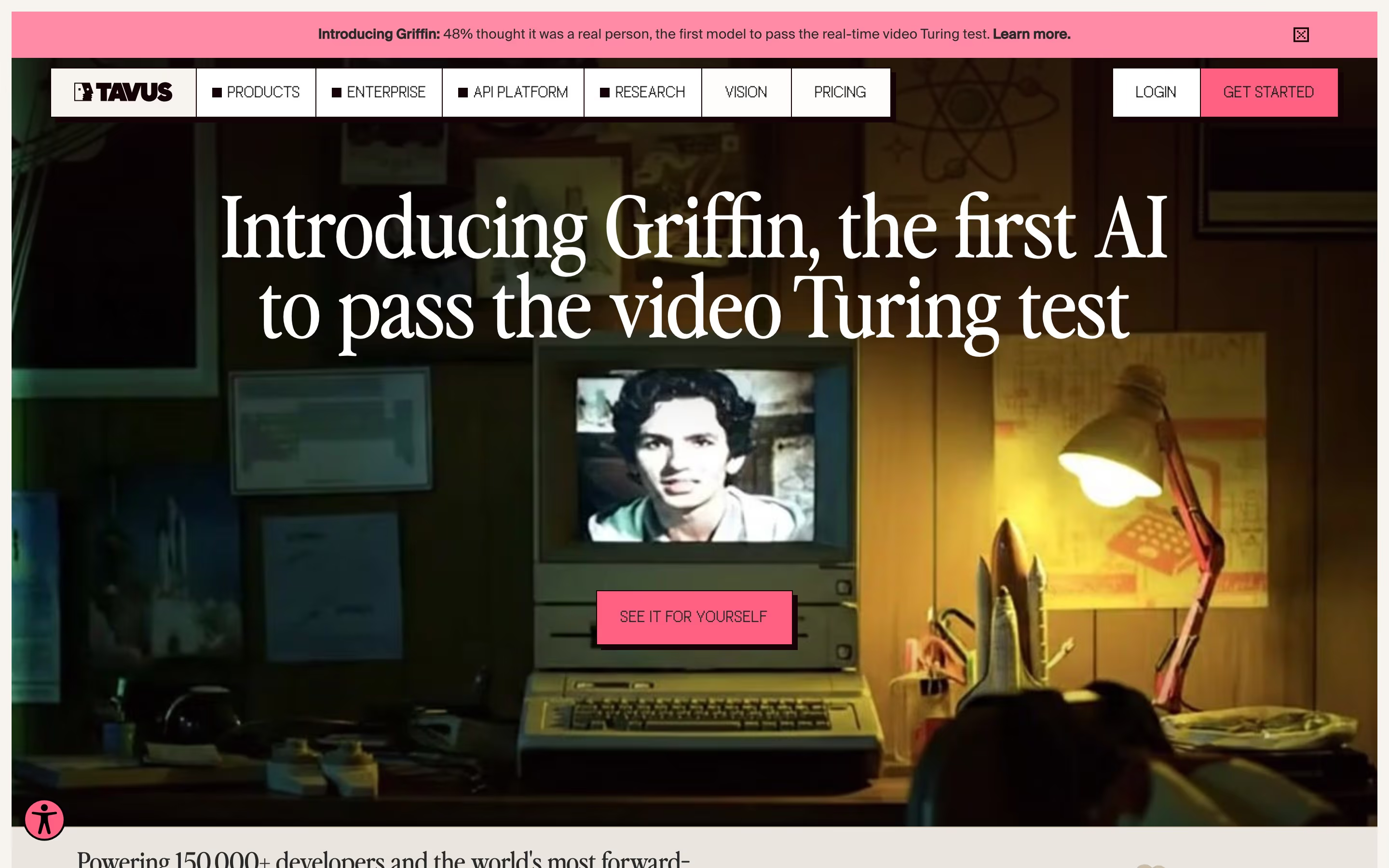
- Look for: CRT screens, beige plastic, 1980s–90s rooms, pixel or bitmap fonts, warm low light.
- Seen on: Tavus opens on a dark photograph of a retro computer showing a face on its screen, lit by a desk lamp, under a serif headline. Our review identifies the headline face as Perfectlynineties. Blacksmith takes the type route instead: a giant pixel-style wordmark on acid yellow.
- Prompt words: retro computer, CRT monitor, beige 1980s PC, warm lamp light, bitmap font, nostalgic tech.
- Best for / watch out: products that want to feel human about technology. Nostalgia doesn't explain what the product does.
30. Y2K
Y2K is the late-1990s to early-2000s look of chrome, gloss, iridescence and early-internet futurism.
- Look for: chrome and metallic type, iridescent gradients, glossy blobs, futuristic bubble fonts, translucent plastic.
- Seen on: no clear example in our catalog.
- Prompt words: Y2K aesthetic, chrome text, iridescent gradient, glossy plastic, early-2000s futurism, holographic.
- Best for / watch out: fashion, music and youth brands. It rarely suits B2B, where it reads as a costume.
31. Frutiger Aero
Frutiger Aero is a name given in hindsight to the glossy, optimistic UI look of the mid-2000s to early 2010s: aqua blues, bubbles, sky and grass, and translucent glass.
- Look for: glossy aqua buttons, water bubbles, bright skies, fresh greens, humanist sans-serifs like Frutiger.
- Seen on: no clear example in our catalog.
- Prompt words: Frutiger Aero, glossy aqua UI, water bubbles, bright sky and grass, translucent glass, 2000s optimism.
- Best for / watch out: nostalgia aimed at people who grew up with that era's operating systems. Gloss looks dated quickly unless it's deliberate.
32. Vaporwave
Vaporwave is an early-2010s internet art style: pastel pink and teal, classical statues, glitches, Japanese text and old software windows.
- Look for: pink and teal gradients, Greek busts, VHS glitches, Windows-95 style windows, palm trees.
- Seen on: no clear example in our catalog.
- Prompt words: vaporwave, pastel pink and teal, Greek bust, VHS glitch, retro OS windows, 1990s mall nostalgia.
- Best for / watch out: music, art and ironic campaigns. It carries a heavy cultural meaning, so it's hard to use straight.
Hand-made and expressive styles
These styles show the human hand: drawing, cutting, sticking, painting. They're the most common way product sites try to look friendly.
33. Hand-drawn line illustration
Hand-drawn illustration uses loose ink or pencil lines, so the page feels sketched rather than rendered.
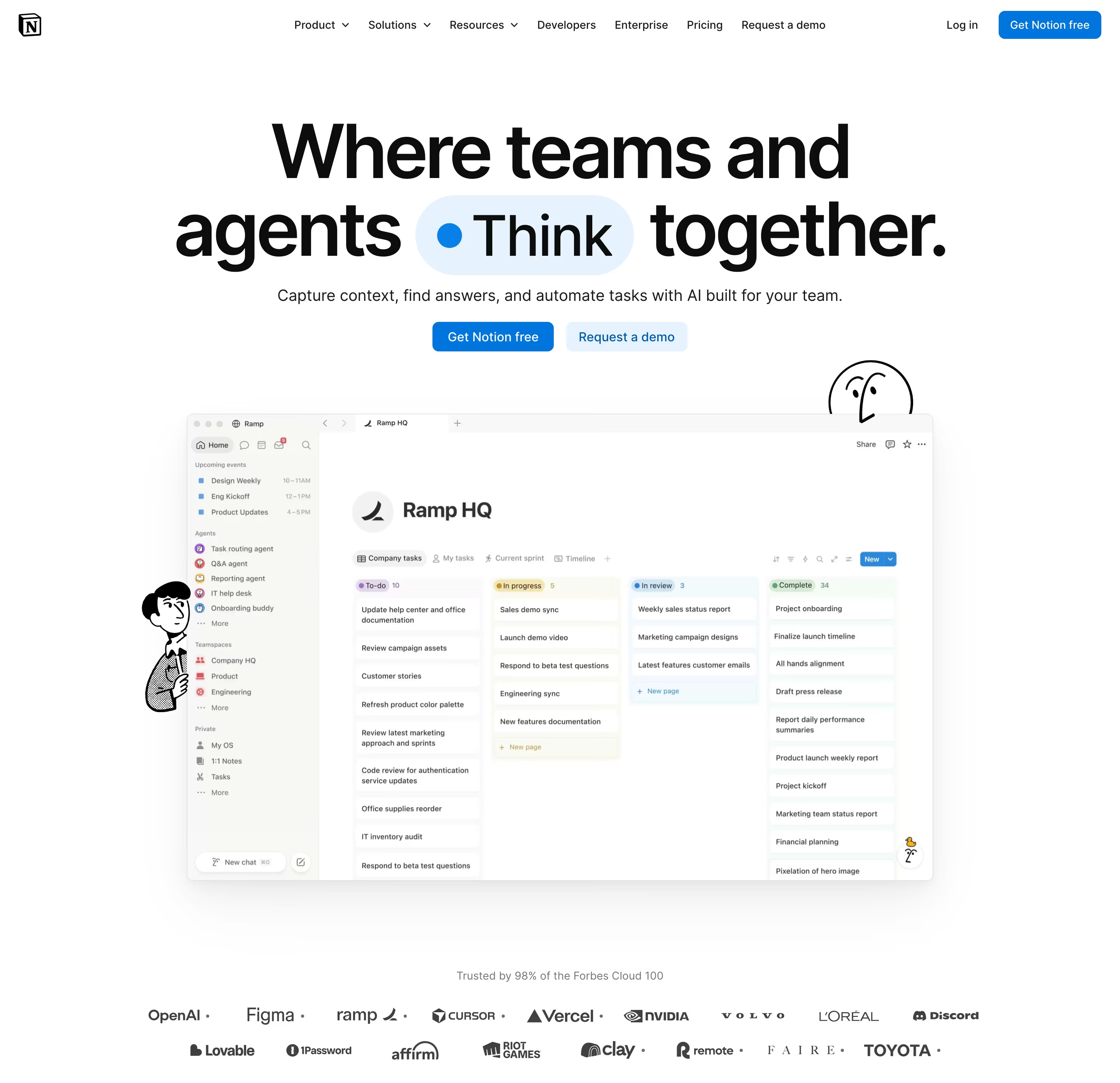
- Look for: uneven line weight, black ink characters, doodled arrows and underlines, little or no fill.
- Seen on: Notion places small hand-drawn black line characters beside its real product screenshot under "Where teams and agents Think together." Our reviews note hand-drawn arrows on Oyster and hand-drawn underlines in three colours on Ellipsus.
- Prompt words: hand-drawn line illustration, black ink, sketchy strokes, doodle arrows, minimal fill, alongside UI.
- Best for / watch out: adding warmth next to real UI. Sketches that replace the product entirely make it hard to see what you're buying.
34. Mascot / anthropomorphic
Anthropomorphic design gives human traits, such as faces, limbs and expressions, to objects, animals or the product itself, usually as a recurring mascot.
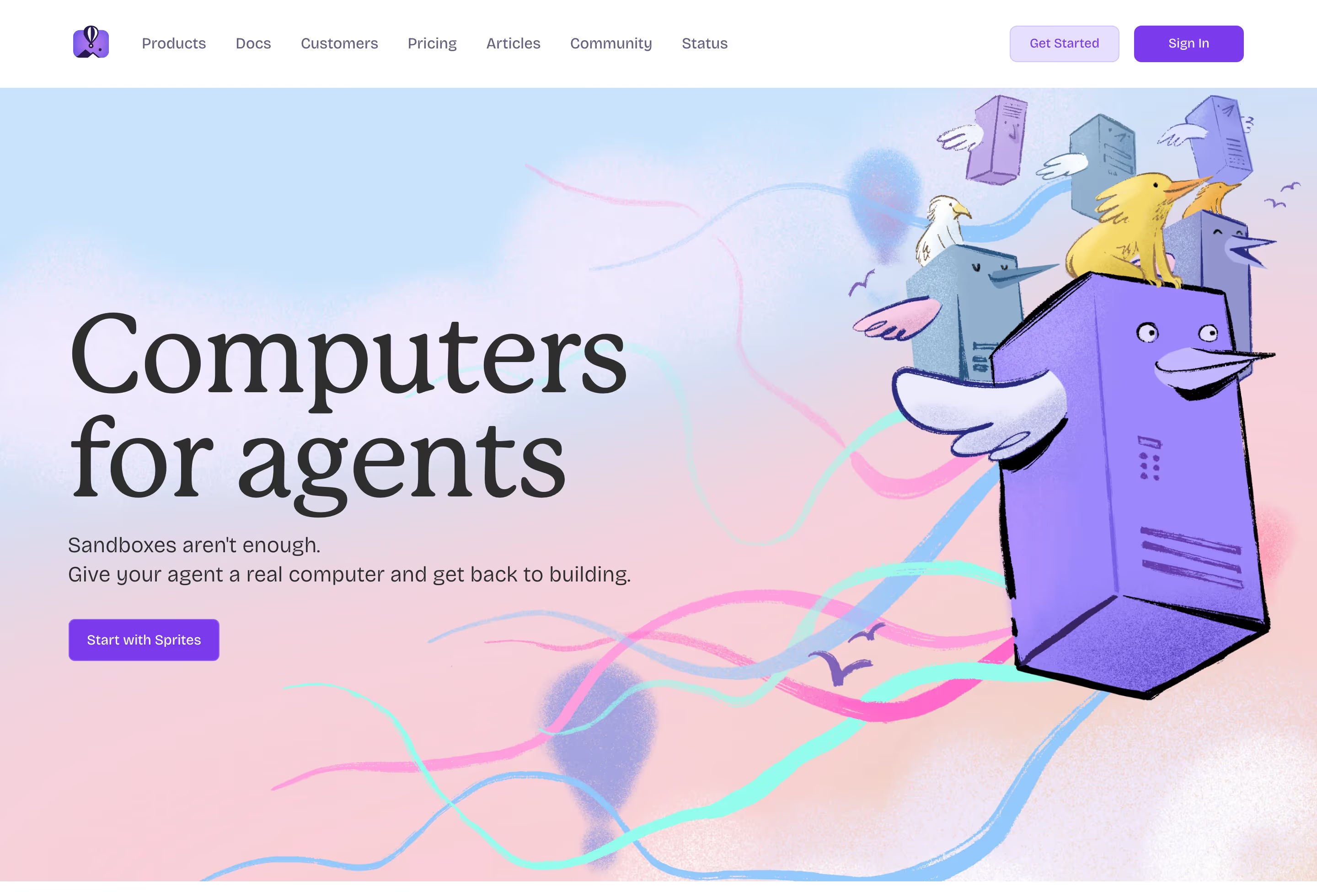
- Look for: one recurring character, expressive eyes, objects with personality, the same figure in the hero, footer and empty states.
- Seen on: Fly.io draws a purple server with a face and feathered wings, with birds perched on top, beside "Computers for agents". Our reviews note recurring mascots on Vanta (a llama), Qodo (an anteater on a skateboard) and Kiro (a ghost).
- Prompt words: anthropomorphic mascot, friendly character, expressive face, object with personality, consistent character design.
- Best for / watch out: making dry infrastructure memorable. A mascot only pays off if it recurs, so plan several poses.
35. Painterly
Painterly illustration shows visible brushwork, like oil or gouache, in place of vector art or photographs.
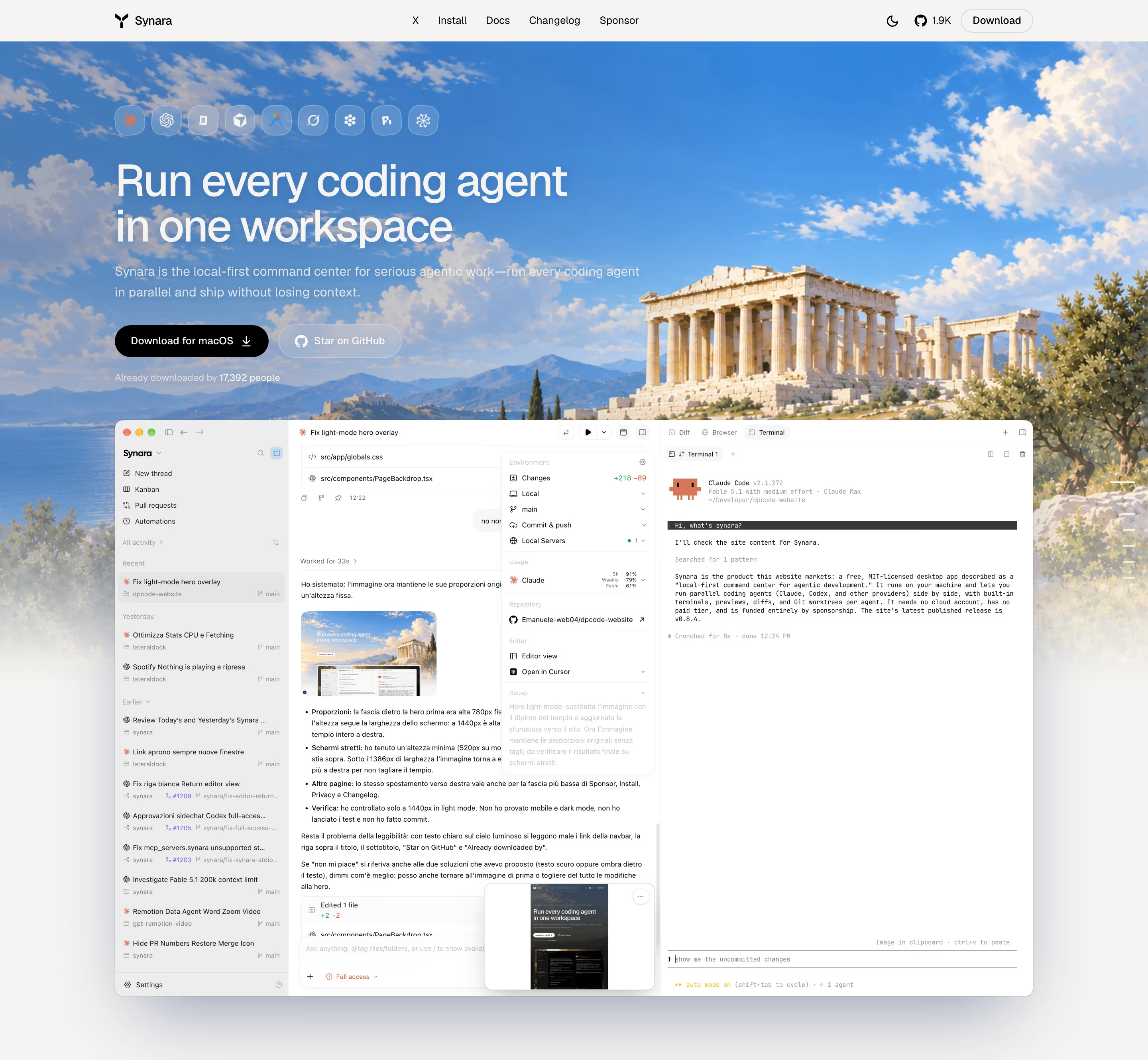
- Look for: brush texture, soft painted skies, landscapes, classical subjects, UI placed over the painting.
- Seen on: Synara's hero is a painted landscape with a Greek temple under a blue sky. Our review notes the same painting runs behind every screenshot on the page. Gooseworks and Sim also use painted scenes.
- Prompt words: painterly illustration, oil painting style, visible brushstrokes, classical landscape, soft painted sky.
- Best for / watch out: standing apart from gradient-heavy competitors. Commissioned paintings are expensive to extend to new pages.
36. Collage / mixed media
Collage combines photos, drawings, textures and UI fragments in one layered composition.
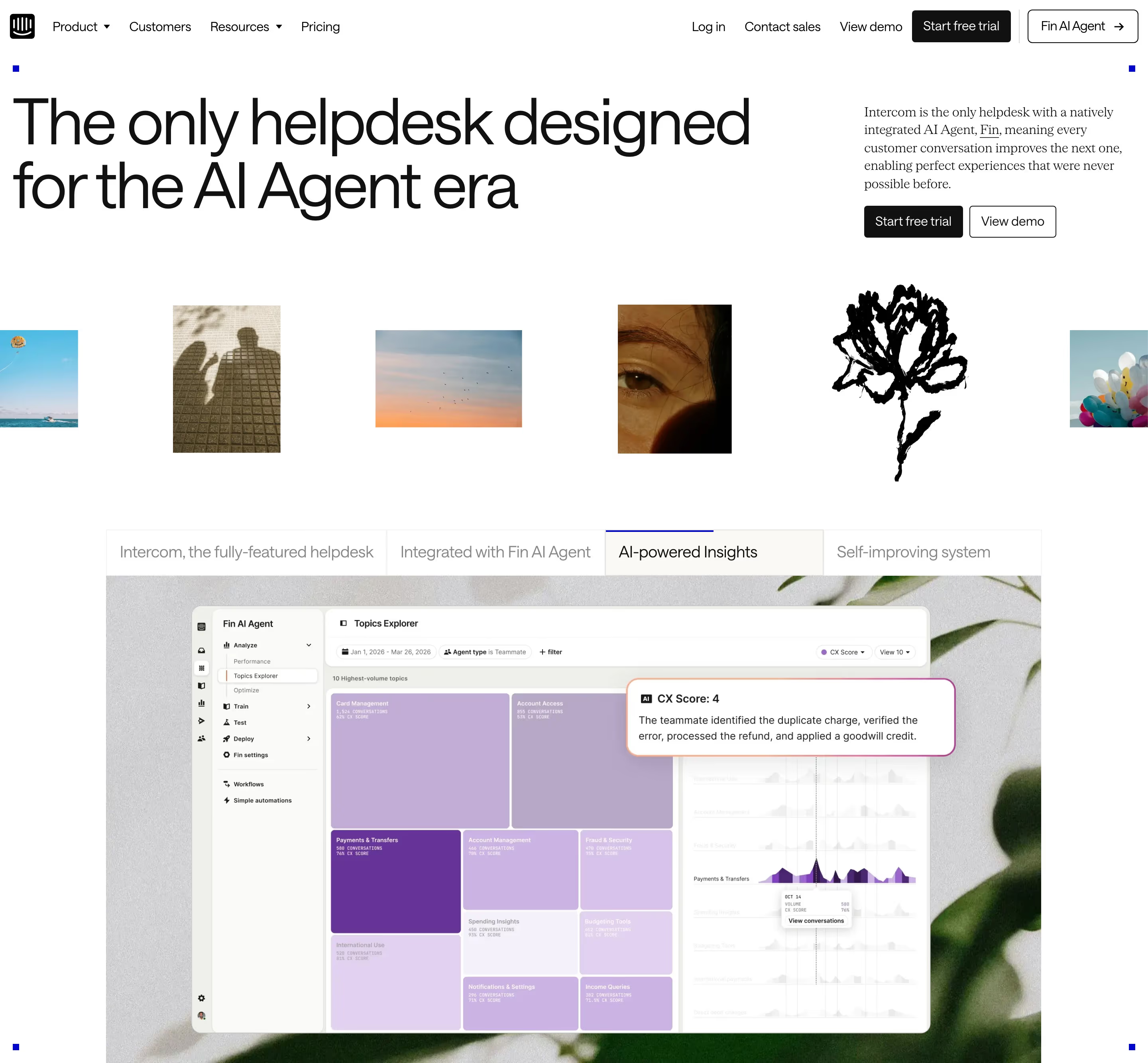
- Look for: different image types side by side, cut-out edges, layering, pinned or taped elements.
- Seen on: Intercom's hero lines up photo tiles and a black hand-drawn flower above a purple product window. Our review describes "hand-drawn art and pinned corner markers" that give it "an editorial, gallery-like feel".
- Prompt words: mixed media collage, photo cut-outs, hand-drawn elements, layered composition, gallery wall, paper texture.
- Best for / watch out: brands with a strong art direction. Without a tight palette, collage turns into clutter.
37. Expressive typography
Expressive typography makes type the image itself: mixed typefaces, extreme sizes and unusual setting instead of illustration.
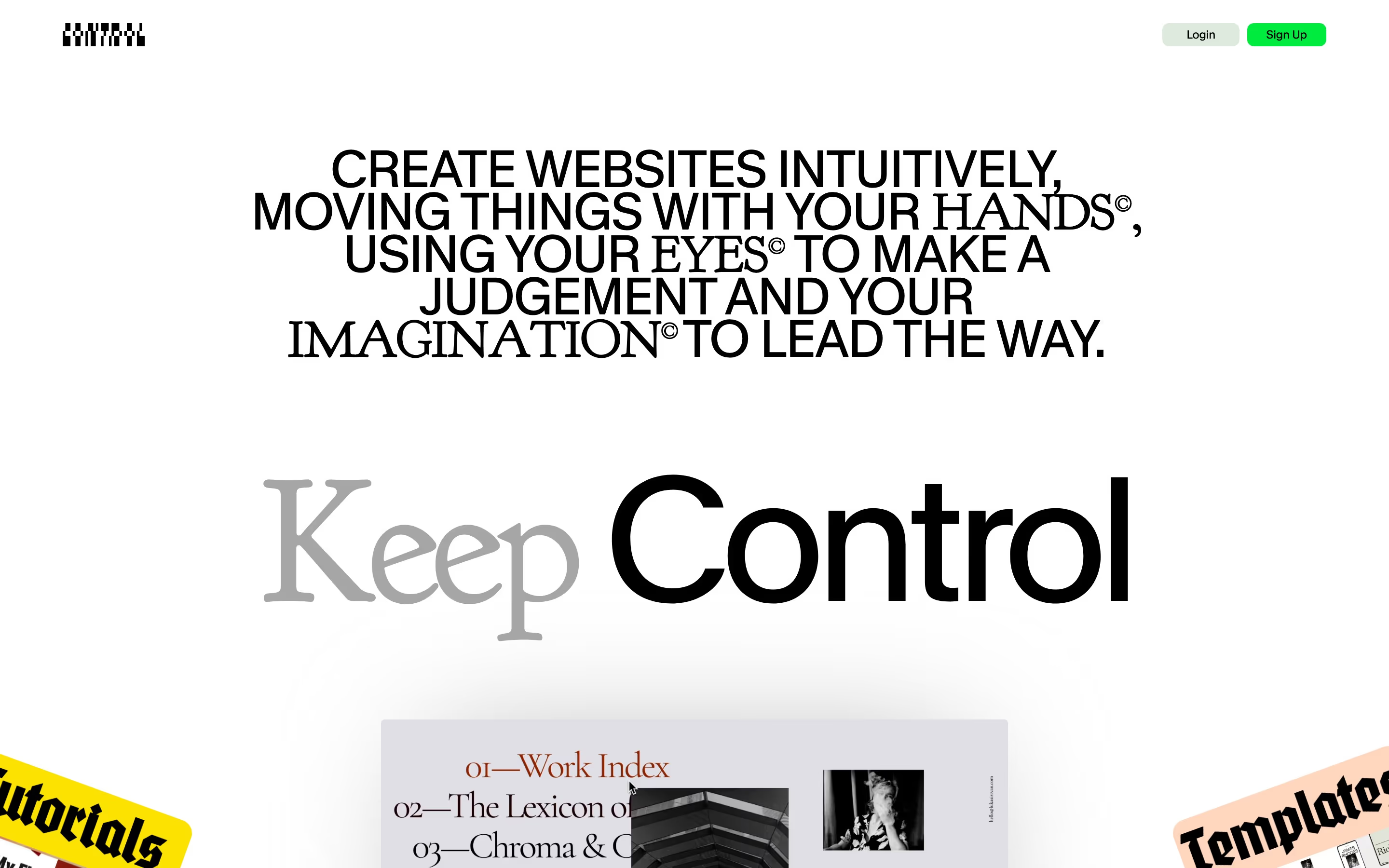
- Look for: serif and sans mixed in one line, huge words, unusual spacing, trademark or index symbols used decoratively.
- Seen on: Cntrl's hero is all type: an all-caps statement that switches between serif and sans-serif word by word, then "Keep Control" with "Keep" in grey serif and "Control" in black sans.
- Prompt words: expressive typography, mixed serif and sans-serif, oversized type, typographic hero, editorial type play, no imagery.
- Best for / watch out: design-literate audiences. Readability comes first, so keep the tricks to the headline.
38. Stickers / scrapbook
The scrapbook style looks stuck together by hand: tilted labels, tape, stamps and cut-outs layered over the page.
- Look for: rotated labels, sticker outlines, tape strips, overlapping cards, a handmade feel.
- Seen on: in the Cntrl screenshot above, tilted yellow "Tutorials" and peach "Templates" stickers sit at the page edges. Our reviews note a yellow "YES!" sticker repeated down a checklist on Basecamp and a rotated red "FAQs" sticker on Jasper.
- Prompt words: scrapbook style, tilted sticker labels, washi tape, cut-out paper, layered cards, handmade.
- Best for / watch out: adding play to a clean layout. A few stickers feel fun; dozens feel messy.
39. Neo-brutalism
Neo-brutalism takes brutalism's bluntness and makes it a system: thick black outlines, hard offset shadows, flat bright fills and heavy type.
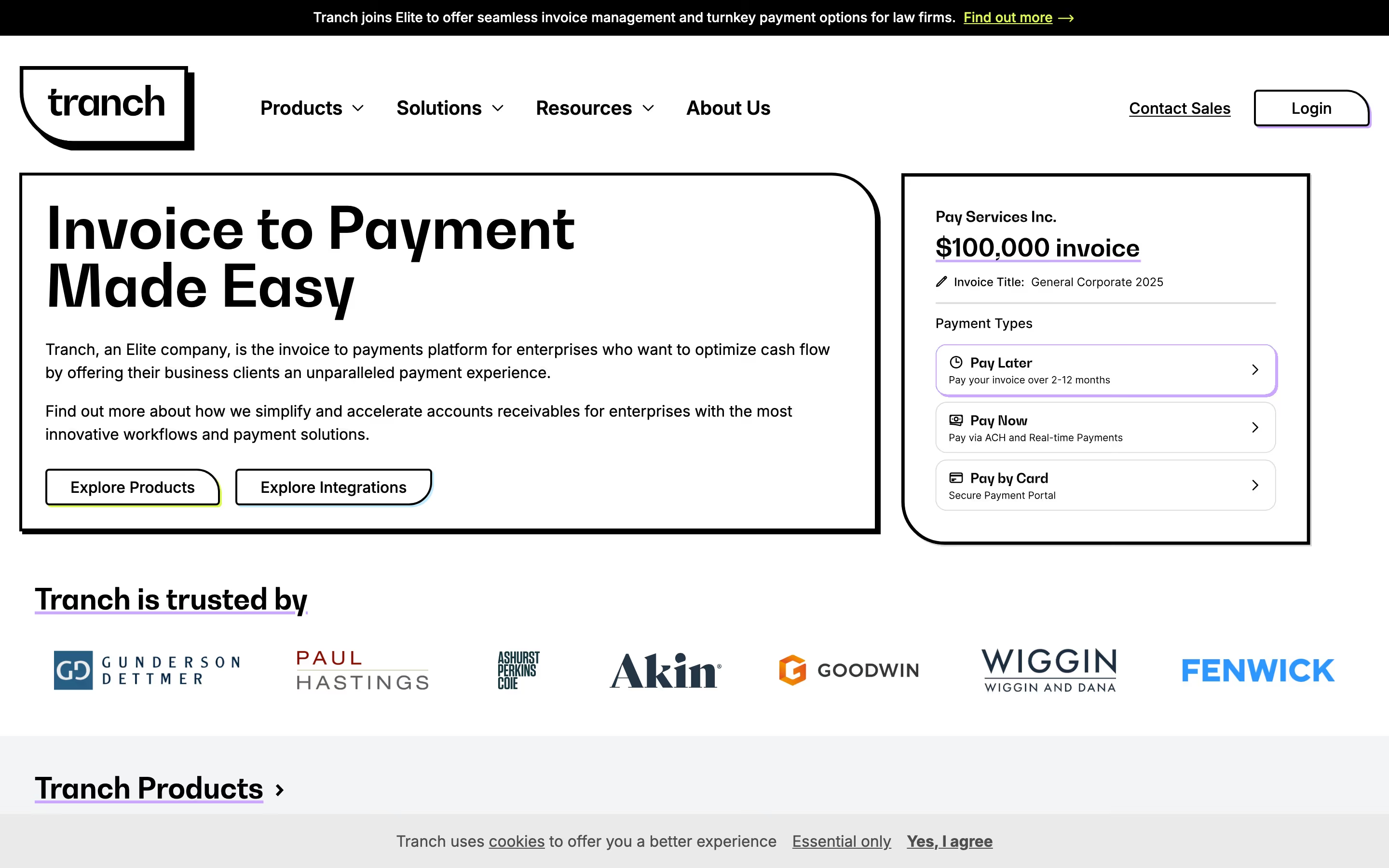
- Look for: 2–3px black borders on everything, solid offset shadows with no blur, flat saturated colour, chunky sans-serifs.
- Seen on: Tranch frames its hero, buttons and payment card in thick black outlines, and our review notes "hard-edged black boxes with offset shadows frame nearly every block". Juno and Gumroad use the same vocabulary.
- Prompt words: neo-brutalism, thick black outlines, hard offset shadow, flat bright colours, chunky sans-serif, no gradients.
- Best for / watch out: standing out in a category of soft gradients. The heavy outlines make long pages feel busy, so ease off in dense sections.
40. Web brutalism
Web brutalism deliberately looks unstyled: default-looking links, plain text and raw structure, rejecting polish on purpose.
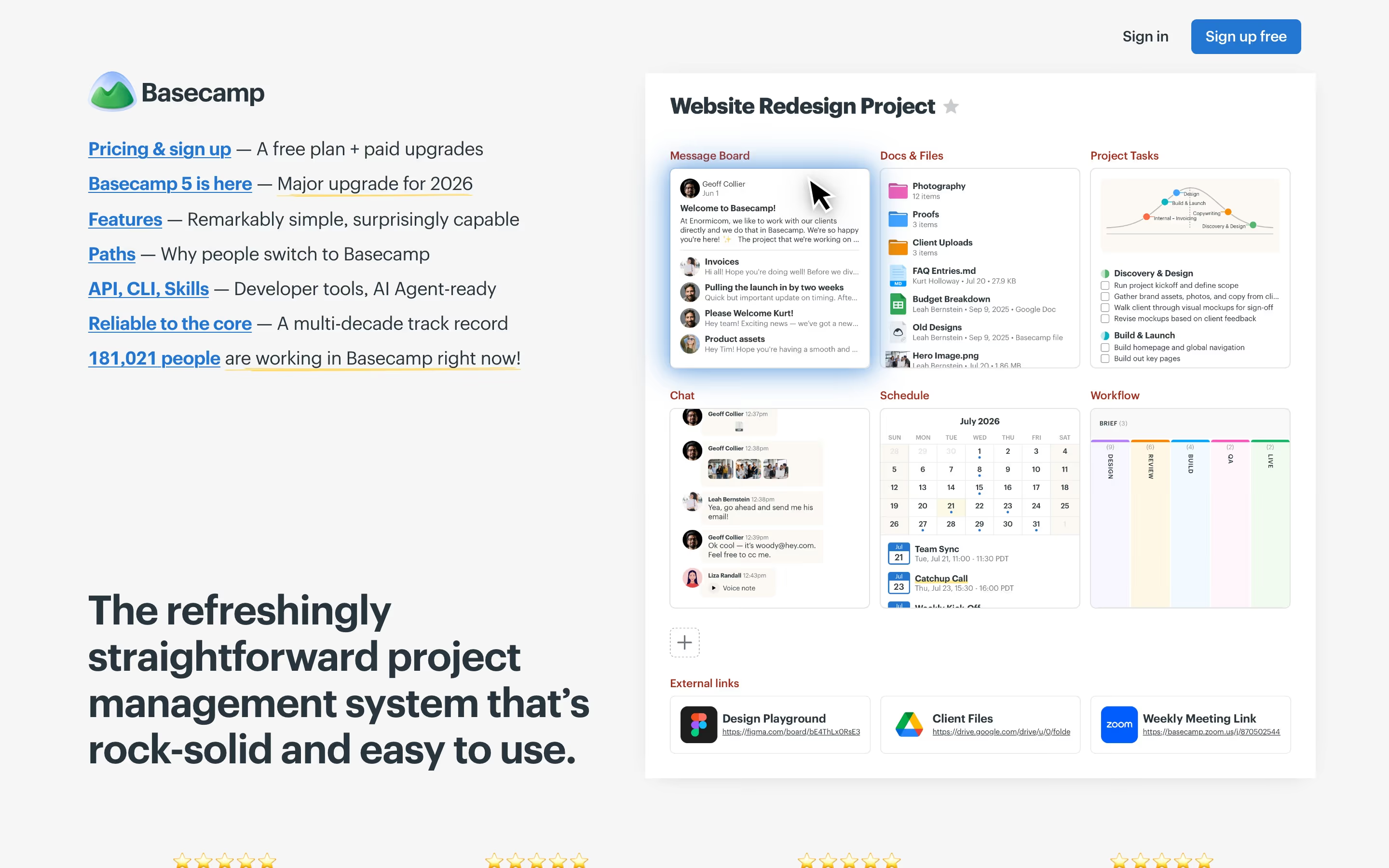
- Look for: underlined blue links, system fonts, visible structure, few or no decorative elements.
- Seen on: Basecamp is the closest example in our catalog. Its hero is a list of blue underlined links, each with a short dash-led note ("Pricing & sign up — A free plan + paid upgrades"), next to a plain product screenshot.
- Prompt words: web brutalism, raw HTML look, default blue links, system font, plain structure, no decoration.
- Best for / watch out: brands whose voice is "no nonsense". Done carelessly, it just looks unfinished.
41. Memphis
Memphis comes from the Memphis Group, formed in Milan in the early 1980s: clashing colours, squiggles, terrazzo patterns and playful geometric shapes.
- Look for: squiggle lines, confetti shapes, black-and-white patterns, bright primaries and pastels together.
- Seen on: no clear example in our catalog.
- Prompt words: Memphis design, 1980s, squiggles and confetti shapes, clashing bright colours, geometric patterns, terrazzo.
- Best for / watch out: events, education and youth brands. Too loud for most product pages.
42. Kawaii
Kawaii is the Japanese culture of cuteness: round characters with small faces, pastel colours and soft shapes.
- Look for: round shapes, tiny dot eyes, blush cheeks, pastel palettes, cute versions of everyday objects.
- Seen on: no clear example in our catalog, although the friendlier mascots under entry 34 lean towards it.
- Prompt words: kawaii, cute characters, pastel palette, round shapes, tiny faces, blush cheeks.
- Best for / watch out: consumer apps and stationery. It can make a serious product seem unserious.
Historical art and design movements
These are the graphic design and art movements many of the UI design styles above borrow from. None appears straight on a SaaS homepage in our catalog, but they are still the clearest words for a specific look in a brief or a prompt.
43. Neoclassical
Neoclassicism (from the mid-18th century) revived Greek and Roman forms: columns, symmetry, marble and restrained ornament.
- Look for: columns and pediments, symmetrical layouts, Roman-style serif capitals, marble and stone, muted palettes with gold.
- Seen on: no neoclassical layout in our catalog. The nearest is Synara's painted Greek temple (entry 35), used as a backdrop rather than a design system.
- Prompt words: neoclassical, Greek columns, symmetry, Roman serif capitals, marble texture, muted gold.
- Best for / watch out: heritage, law, academia and luxury. Easily feels stiff.
44. Art Nouveau
Art Nouveau (about 1890–1910) is built on flowing "whiplash" curves, plants and flowers, and decorative hand-lettering. Alphonse Mucha's posters are the best-known example.
- Look for: organic curves, floral frames, stylised female figures, hand-drawn lettering, muted earthy colours.
- Seen on: no clear example in our catalog.
- Prompt words: Art Nouveau, whiplash curves, floral ornament, Mucha-style poster, decorative lettering, earthy palette.
- Best for / watch out: natural, craft and beauty brands. The ornament is hard to scale down to small UI.
45. Art Deco
Art Deco takes its name from the 1925 Paris International Exhibition of Modern Decorative and Industrial Arts. It is geometric glamour: sunbursts, stepped forms, symmetry and gold.
- Look for: sunbursts and fans, stepped shapes, tall condensed geometric type, black with gold or jewel tones.
- Seen on: no clear example in our catalog.
- Prompt words: Art Deco, geometric ornament, sunburst, gold and black, symmetrical, 1920s glamour, condensed display type.
- Best for / watch out: hospitality, events and premium products. Gold on black loses contrast quickly in small text.
46. Bauhaus
The Bauhaus was a German school of art and design (1919–1933), founded by Walter Gropius. Its graphic style uses basic shapes, primary colours and sans-serif type in functional layouts.
- Look for: circles, squares and triangles; red, yellow and blue with black; sans-serif type; asymmetric balance.
- Seen on: no clear example in our catalog.
- Prompt words: Bauhaus, primary colours, basic geometric shapes, sans-serif, functional layout, asymmetric composition.
- Best for / watch out: clear, structured brands. Primary colours together can look childish without careful proportions.
47. Constructivism
Constructivism came out of Russia around the revolution (late 1910s to 1920s), with designers such as El Lissitzky and Alexander Rodchenko. It uses strong diagonals, red and black, and photomontage.
- Look for: dynamic diagonal layouts, red and black with off-white, bold sans-serif type, photomontage, arrows and wedges.
- Seen on: no clear example in our catalog.
- Prompt words: Constructivist poster, diagonal composition, red and black, photomontage, bold sans-serif, propaganda style.
- Best for / watch out: bold, urgent campaigns. Its political origins come along with it.
48. De Stijl
De Stijl was a Dutch movement founded in 1917, best known through Piet Mondrian. It reduces design to black lines at right angles and blocks of primary colour.
- Look for: thick black horizontal and vertical lines, red, yellow and blue rectangles, lots of white, no curves.
- Seen on: no clear example in our catalog.
- Prompt words: De Stijl, Mondrian-style grid, primary colour blocks, black right-angle lines, white space.
- Best for / watch out: grid-based layouts with a clear structure. Copying Mondrian too closely reads as a cliché.
49. Mid-century modern
Mid-century modern covers design from roughly the mid-1940s to the late 1960s: organic geometry, warm colours and optimistic, simple illustration.
- Look for: boomerang and atomic shapes, mustard, teal and orange, textured flat illustration, clean sans-serif or script.
- Seen on: no clear example in our catalog.
- Prompt words: mid-century modern, atomic age shapes, mustard teal orange palette, flat textured illustration, 1950s optimism.
- Best for / watch out: lifestyle, furniture and travel. Warm retro palettes can look muddy on screen.
50. Psychedelic
Psychedelic design comes from 1960s concert posters: hand-drawn lettering that melts into shapes, and complementary colours that seem to vibrate.
- Look for: warped, hard-to-read lettering, swirls, high-saturation clashing colours, dense ornament.
- Seen on: no clear example in our catalog.
- Prompt words: psychedelic poster, 1960s, melting hand-lettering, swirling shapes, vibrating complementary colours.
- Best for / watch out: music and festivals. The lettering is barely legible by design.
How to prompt with a style name
A style name narrows things down, but on its own it can be read more than one way. "Brutalism" means raw concrete in architecture and unstyled pages on the web, and "minimal" can mean Swiss or Japandi. The reliable fix is to name the style, then list the visible elements you mean. A template:
[subject], [style name] style, [2–3 elements from "Look for"], [palette], [type direction], no [what to avoid].
For example: "SaaS pricing page, neo-brutalist style, thick black outlines, hard offset shadows, flat yellow and white fills, heavy sans-serif headings, no gradients."
To mix styles, keep one in charge of structure and borrow only a texture or palette from the second: "editorial serif layout with halftone illustrations" holds together; "editorial serif plus vaporwave plus neon" usually doesn't. When the output is real UI rather than an image, also give it a real reference to inspect. Every example above links to a live site you can open.
How to choose a style for a product website
Start from what the buyer needs to believe, not from what is fashionable:
- "This is built for engineers like me": terminal, technical grid, ASCII, dithering or dark mode. In our catalog, the retro-technical styles show up on 36% of engineering and infrastructure sites against 15% of everything else; see Inngest, AgentMail, Cline and TesterArmy.
- "This is calm and premium": minimalism, editorial serif, monochrome or cinematic photography, like Vercel, Granola and Mercury.
- "This is friendly and easy": hand-drawn, mascots, clay or stickers, like Notion, Fly.io and Clay.
- "This is different from everyone else here": pick the style your direct competitors don't use, such as neo-brutalism, painterly or Swiss type, as on Tranch, Synara and Rig.
Then check the choice against real pages in the dark, light, colorful and minimal hubs before committing.
At a glance
Frequently asked
What are the different types of design styles?
A useful way to group them is by what does the visual work. Minimal and structural styles (minimalism, Swiss, bento, flat) rely on layout and type. Depth and surface styles (glassmorphism, clay, isometric, gradients, grain) rely on light and material. Retro-digital styles (pixel art, dithering, ASCII, Y2K, synthwave) borrow from older screens and print. Hand-made styles (hand-drawn, collage, mascots, neo-brutalism) rely on visible human marks. Historical movements (Art Nouveau, Art Deco, Bauhaus, De Stijl) are the art and design schools most of the others borrow from.
What is the difference between a design style and a design trend?
A style is a recognisable set of visual choices, such as palette, type, shape, texture and layout, that you can name and describe. A trend is a period when a style is popular. Glassmorphism is a style; its spread around 2020 was a trend. Styles outlast trends: Swiss style and Art Deco are still usable decades after their peak.
Is a design style the same as a design aesthetic or a visual style?
In practice, yes. Designers use "design style", "design aesthetic" and "visual style" interchangeably for a named, recognisable look. "Aesthetic" is more common in fashion and social media (Y2K, cottagecore), while "style" is more common in UI and graphic design (Swiss, flat, neo-brutalism).
What is the difference between brutalism and neo-brutalism in web design?
Web brutalism deliberately looks unstyled: default-looking links, plain text and few decorations, like Basecamp's list of blue underlined links. Neo-brutalism keeps the bluntness but adds a system: thick black outlines, hard offset shadows and flat bright fills, as on Tranch, Juno and Gumroad. One rejects polish; the other turns rawness into a consistent look.
How do I use a design style in an AI prompt?
Lead with the subject, then the style name, then two or three of the style's visible elements, a palette and a type direction, and finish with what to avoid. For example: "SaaS pricing page, neo-brutalist style, thick black outlines, hard offset shadows, flat yellow and white fills, heavy sans-serif headings, no gradients." The visible elements matter because a bare style name can be read in more than one way.
Which design style is best for a SaaS website?
There isn't a single best one. Pick the style whose signals match what the buyer needs to believe. Minimal and editorial styles read as calm and premium, technical styles (terminal, ASCII, grids) read as built for engineers, and hand-made styles read as friendly. Browse real examples by style in the dark, light, colorful and minimal hubs before choosing.
Can my coding agent find sites in a particular style?
Yes. With the free BestSaaSWebDesigns MCP server, an agent can filter the catalog by style (dark, light, colorful, minimal), section, stack, colour and font, and get back each site's link, palette and fonts. Setup: bestsaaswebdesigns.com/mcp.
Related reading
25 SaaS Contact Us Page Examples, Counted Field by Field
Dropbox's contact form asks for eleven things. Warp's asks for one. We counted the fields, the routes and the published email addresses on 25 real SaaS contact pages — and not one of them promises a response time.
24 SaaS About Us Page Examples, Module by Module
We read 24 real SaaS About Us pages against the same seven-module checklist — team photos, named people, stat tiles, timelines, investor walls, hiring CTAs, manifestos — and counted what's actually there. Only one page uses a timeline.
24 Product Landing Page Examples, Measured Fold to Footer
Twenty-four product landing pages read start to finish from our own screenshots — what's in the fold, where the logo strip actually sits, how the page closes, and how long each one really runs, in pixels.